PH
PHUpgrading to windows 10 Pro from Windows 10 Home Single Language. Upgrading Requires Internet Connection.
Change first yung product key mo, pumili lng ng isa dito(Kung hndi working yung una try mo yung second key):
N24DD-FGXK3-2RWYX-6D87B-HT672
FJT8C-2WNKT-DKPQG-JYHXD-YBFFC
Then Activate.
Then balik ulit and change mo product key mo for enterprise upgrade:
NPPR9-FWDCX-D2C8J-H872K-2YT43
Then activate or mag Initiate yan for Upgrade. Hintayin mo lng ksi magdodownload yan for Upgrade, mabilis lng nman kpag mabilis internet connection mo. After completed, mag Restart si PC natin. Hayaan mo lng magRestart.
Then punta Settings > Activation , tpos check mo if activation failed or windows is not activated, then change mo ulit product key to W269N-WFGWX-YVC9B-4J6C9-T83GX then activate mo ulit using that product key.
Hayaan mo na lng if nag Error ulit. tpos click mo troubleshoot kung lalabas then Detect problems, hintayin lng tpos kpag may sinabi na something "Windows 10 Home Single Language product is in your Digital License and you are using Windows 10 Pro activated. To use please install new Windows 10 Home Home Single Language." Basta parang ganyan, hndi ko ksi ma alala. Tpos close mo lng yan.
Proceed tayo sa activation. Open cmd dpat nka Run as Administrator.
Then Copy nyo muna to:
slmgr.vbs /ipk W269N-WFGWX-YVC9B-4J6C9-T83GX
then paste sa cmd. then hit enter
Tpos copy nyo nman ulit to:
slmgr.vbs /skms kms.lotro.cc
then paste sa cmd. then hit enter at hintayin na may magpop-up na message, then OK mo lng.
Tpos copy nyo nman ulit to:
slmgr.vbs /ato
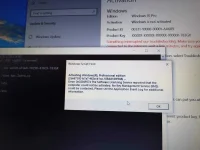
then paste sa cmd. then hit enter at Wait nyo hanggang may magpop-up na message ulit na ACTIVATED na ang Windows nyo.. Thats all..
Goodluck Guys. Share ko lang.
-Update-
Tested and Working ko pala to kaninang Umaga. My Laptop is Dell G7 15 7588, which Default OS is: Windows 10 Home Plus Single Language
Screenshots:
Take note the Date Installed On: 21/02/2019 andyan po sa Screenshot sa Dell Info sa pinakababa
Change first yung product key mo, pumili lng ng isa dito(Kung hndi working yung una try mo yung second key):
N24DD-FGXK3-2RWYX-6D87B-HT672
FJT8C-2WNKT-DKPQG-JYHXD-YBFFC
Then Activate.
Then balik ulit and change mo product key mo for enterprise upgrade:
NPPR9-FWDCX-D2C8J-H872K-2YT43
Then activate or mag Initiate yan for Upgrade. Hintayin mo lng ksi magdodownload yan for Upgrade, mabilis lng nman kpag mabilis internet connection mo. After completed, mag Restart si PC natin. Hayaan mo lng magRestart.
Then punta Settings > Activation , tpos check mo if activation failed or windows is not activated, then change mo ulit product key to W269N-WFGWX-YVC9B-4J6C9-T83GX then activate mo ulit using that product key.
Hayaan mo na lng if nag Error ulit. tpos click mo troubleshoot kung lalabas then Detect problems, hintayin lng tpos kpag may sinabi na something "Windows 10 Home Single Language product is in your Digital License and you are using Windows 10 Pro activated. To use please install new Windows 10 Home Home Single Language." Basta parang ganyan, hndi ko ksi ma alala. Tpos close mo lng yan.
Proceed tayo sa activation. Open cmd dpat nka Run as Administrator.
Then Copy nyo muna to:
slmgr.vbs /ipk W269N-WFGWX-YVC9B-4J6C9-T83GX
then paste sa cmd. then hit enter
Tpos copy nyo nman ulit to:
slmgr.vbs /skms kms.lotro.cc
then paste sa cmd. then hit enter at hintayin na may magpop-up na message, then OK mo lng.
Tpos copy nyo nman ulit to:
slmgr.vbs /ato
then paste sa cmd. then hit enter at Wait nyo hanggang may magpop-up na message ulit na ACTIVATED na ang Windows nyo.. Thats all..
Goodluck Guys. Share ko lang.
-Update-
Tested and Working ko pala to kaninang Umaga. My Laptop is Dell G7 15 7588, which Default OS is: Windows 10 Home Plus Single Language
Screenshots:
Take note the Date Installed On: 21/02/2019 andyan po sa Screenshot sa Dell Info sa pinakababa