 PH
PHThough the touchscreen keyboard on your Android smartphone or tablet is great for texting, wouldn't it be greater to attach a USB keyboard to your Android phones or tablets? After all, bigger is better when it comes to typing and dealing with a bunch of stuff. Also, some special apps may require an external mouse or mini keyboard for Android phone/tablet. Now, let's start to learn how to control Android using computer's keyboard and mouse.
Many Android devices support keyboard and mouse which are particularly helpful for people who use any office suite to create documents on their tablet. However, Android phones and tablets don’t have standard, full-size USB ports, so you can't plug a USB peripheral directly into it unless the peripheral device is wireless. To connect external keyboard and mouse for Android mobile phone and Android tablets, you need a USB On-the-Go cable.
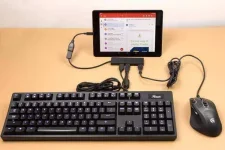
Now you have successfully connected a USB keyboard or mouse to your Android device. You can work on your Android far more easier and faster than ever before. Since USB OTG cable is such a magic tool, you can also use OTG to watch movies on USB disk, transfer photos from digital camera to Android directly and share files between Android devices without needing a computer. Just try the USB OTG and make your digital life easier.
Credit: FoneFaw
Many Android devices support keyboard and mouse which are particularly helpful for people who use any office suite to create documents on their tablet. However, Android phones and tablets don’t have standard, full-size USB ports, so you can't plug a USB peripheral directly into it unless the peripheral device is wireless. To connect external keyboard and mouse for Android mobile phone and Android tablets, you need a USB On-the-Go cable.
Now you have successfully connected a USB keyboard or mouse to your Android device. You can work on your Android far more easier and faster than ever before. Since USB OTG cable is such a magic tool, you can also use OTG to watch movies on USB disk, transfer photos from digital camera to Android directly and share files between Android devices without needing a computer. Just try the USB OTG and make your digital life easier.
Credit: FoneFaw