 PH
PHFreeNetNeed
Elite
Para sa phoenix os user jan hinde maka pag install ng applicaton like octopus na palaging application failed. Ito remedy natin jan

:Tools Needed:
APT
You do not have permission to view the full content of this post. Log in or register now.
Password: woltrex
HOW TO USE?
1 - Unpack operation
-Copy system.img or system.sfs into the \in folder. Later use unpack options in the toolbox.
2- Repack operation
-Unpacked files are into the \unpack folder. After finished your edit, use repack options in the toolbox.
3- How to create data.img with files?
-You must copy your game/app etc or personal data into the \data\media\0\ folder. Some games are using obb data. Copy .obb files into the media\obb folder.
4- How to create PhoenixOS live iso?
- Copy PhoenixOS .img and kernel files into the a folder > Use create live iso option in toolbox. > specify the file path of the files you have copied and start the process.
5- What is the Special Flash Tool option?
- I will share a lot of fixes later. This option will be useful in the future. You will use only shared .zip files. You can easily integrate your own solutions in this way.
6- How to create data/system .img with special size?
- Special size must be byte format - You can use this website for calculate > You do not have permission to view the full content of this post. Log in or register now.
7- How to edit fsconfig.txt?
-If you want to edit Android x86 system, you must edit fsconfig.txt with a text editor.
-For example: We add facebook app in system img.
After unpacked system.img (Android x86):
1- Create a facebook folder into the /unpack/system/app file path and copy facebook.apk in this folder.
2- Find fsconfig.txt into the /unpack folder and open with a text editor.
3- Add this codes in fsconfig.txt
Code:
system/app/facebook 0 0 755
system/app/facebook.apk 0 0 644
755 is "Folder" permission code - 644 is "File" permission code
4- Save fsconfig.txt and repack your system.img ( Press 4 and 2). Process completed
:Tuts:
Steps
1.Extract Apt .rar/.zip file password provided
-Locate system.img file of phoenix os mine is located at D:\PhoenixOS

-Copy system.img to apt in folder


2. Run Apt.exe


-Press Any Key

-Type 2
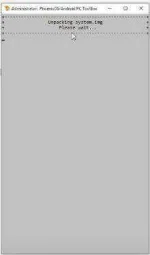
Wait for application to finish unpacking system.img
3. Go to Unpack Folder and locate your unpacked system image file
mine C:\Users\Jethro\Downloads\APT\unpack\system\app

-System Folder

-App Folder

-Inside app folder create a new folder name for application. Example Octopus

-After creating octopus folder copy your octopus.apk file you DL
4. Locate fs_config.txt open with notepad or notepad ++
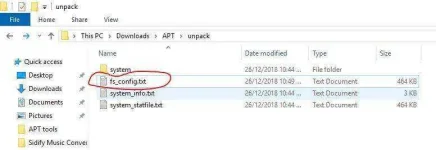
-Create new Command line for Example for octopus

5. Now for Repacking run APT.exe again
-Type Command Line 4

-Type Command Line 1

-Type 2 wait for Repacking to finish close apt.exe application
6. Locate the new system.img repacked file

-Moved system.img back to D:\PhoenixOS
Take note Make a backup of system.img before replacing a modified system.img
last step Run Phoenix Os

ayan naka installed na si octopus. Working ang method na ito sa ibang application na ayaw mag install kay phoenix os.
:Tools Needed:
APT
You do not have permission to view the full content of this post. Log in or register now.
Password: woltrex
HOW TO USE?
1 - Unpack operation
-Copy system.img or system.sfs into the \in folder. Later use unpack options in the toolbox.
2- Repack operation
-Unpacked files are into the \unpack folder. After finished your edit, use repack options in the toolbox.
3- How to create data.img with files?
-You must copy your game/app etc or personal data into the \data\media\0\ folder. Some games are using obb data. Copy .obb files into the media\obb folder.
4- How to create PhoenixOS live iso?
- Copy PhoenixOS .img and kernel files into the a folder > Use create live iso option in toolbox. > specify the file path of the files you have copied and start the process.
5- What is the Special Flash Tool option?
- I will share a lot of fixes later. This option will be useful in the future. You will use only shared .zip files. You can easily integrate your own solutions in this way.
6- How to create data/system .img with special size?
- Special size must be byte format - You can use this website for calculate > You do not have permission to view the full content of this post. Log in or register now.
7- How to edit fsconfig.txt?
-If you want to edit Android x86 system, you must edit fsconfig.txt with a text editor.
-For example: We add facebook app in system img.
After unpacked system.img (Android x86):
1- Create a facebook folder into the /unpack/system/app file path and copy facebook.apk in this folder.
2- Find fsconfig.txt into the /unpack folder and open with a text editor.
3- Add this codes in fsconfig.txt
Code:
system/app/facebook 0 0 755
system/app/facebook.apk 0 0 644
755 is "Folder" permission code - 644 is "File" permission code
4- Save fsconfig.txt and repack your system.img ( Press 4 and 2). Process completed
:Tuts:
Steps
1.Extract Apt .rar/.zip file password provided
-Locate system.img file of phoenix os mine is located at D:\PhoenixOS
-Copy system.img to apt in folder
2. Run Apt.exe
-Press Any Key
Code:
PhoenixOs/Android Pc ToolBox V2.6.7
command lines
1. Unpack system.sfs file
2. Unpack system.img file
3. Repack system.sfs file
4. Repack system.img file
5. Phoenix Special Tools
6. Create data.img file
7. Unpack/Rrepack data.img file
8. Backup/Create live iso
9. clear folders
0. Exit
-Type 2
Wait for application to finish unpacking system.img
3. Go to Unpack Folder and locate your unpacked system image file
mine C:\Users\Jethro\Downloads\APT\unpack\system\app
-System Folder
-App Folder
-Inside app folder create a new folder name for application. Example Octopus
-After creating octopus folder copy your octopus.apk file you DL
4. Locate fs_config.txt open with notepad or notepad ++
-Create new Command line for Example for octopus
Code:
system/app/Octopus 0 0 755
system/app/Octopus/Octopus.apk 0 0 644
755 is "Folder" permission code - 644 is "File" permission code
5. Now for Repacking run APT.exe again
-Type Command Line 4
-Type Command Line 1
-Type 2 wait for Repacking to finish close apt.exe application
6. Locate the new system.img repacked file
-Moved system.img back to D:\PhoenixOS
Take note Make a backup of system.img before replacing a modified system.img
last step Run Phoenix Os
ayan naka installed na si octopus. Working ang method na ito sa ibang application na ayaw mag install kay phoenix os.


