 PH
PHDarik's Boot and Nuke (DBAN) is free erasure software designed for consumer use. DBAN users should be aware of some product limitations, including:
To start, boot from a UBCD bootable CD. This may involve changing the BIOS options to make the computer boot from CD.
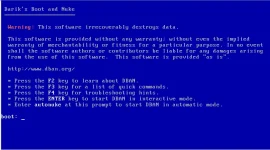
Use the menus to select Hard Disk Tools, then Wiping Tools, then Darik's Boot and Nuke. Once DBAN has booted, you will be presented with the following screen:
Autonuke
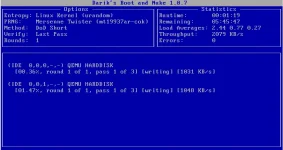
The easiest option is to type autonuke, then press ENTER. This will wipe any fitted hard drives, using the default options. The progress of each hard drive will be displayed in the main, lower part of the screen. The time taken, and an estimate of the time remaining, is displayed in the Statistics box. The screenshot below shows DBAN wiping two hard drives:
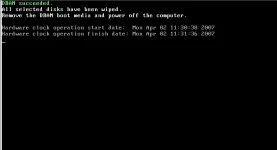
When DBAN is finished, it will display a message similar to the one below:
Interactive Mode
Interactive mode allows greater control. To start DBAN in interactive mode, just press ENTER at the DBAN start screen. When DBAN has started, you will be presented with the following screen:
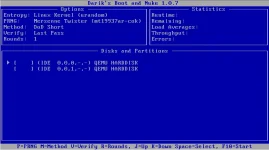
Use the up/down cursor and SPACE keys to select the hard drives and partitions to be wiped. If desired, you can select the pseudo-random number generator, wiping method, verification method and rounds. Each option has explanatory text when it is selected. When you are happy with the selected options, press F10 to start wiping.
As with autonuke mode, when DBAN has finished, it will display a message. The CD can be removed and the computer powered off.
You do not have permission to view the full content of this post. Log in or register now.
(Burn this file to a blank disc and boot the computer with it. Do not unzip this file.)
HOPE THIS THREAD HELPS YOU.
- No guarantee that data is removed
- Limited hardware support (e.g. no RAID dismantling)
- No customer support
To start, boot from a UBCD bootable CD. This may involve changing the BIOS options to make the computer boot from CD.
Use the menus to select Hard Disk Tools, then Wiping Tools, then Darik's Boot and Nuke. Once DBAN has booted, you will be presented with the following screen:
Autonuke
The easiest option is to type autonuke, then press ENTER. This will wipe any fitted hard drives, using the default options. The progress of each hard drive will be displayed in the main, lower part of the screen. The time taken, and an estimate of the time remaining, is displayed in the Statistics box. The screenshot below shows DBAN wiping two hard drives:
When DBAN is finished, it will display a message similar to the one below:
Interactive Mode
Interactive mode allows greater control. To start DBAN in interactive mode, just press ENTER at the DBAN start screen. When DBAN has started, you will be presented with the following screen:
Use the up/down cursor and SPACE keys to select the hard drives and partitions to be wiped. If desired, you can select the pseudo-random number generator, wiping method, verification method and rounds. Each option has explanatory text when it is selected. When you are happy with the selected options, press F10 to start wiping.
As with autonuke mode, when DBAN has finished, it will display a message. The CD can be removed and the computer powered off.
You do not have permission to view the full content of this post. Log in or register now.
(Burn this file to a blank disc and boot the computer with it. Do not unzip this file.)
HOPE THIS THREAD HELPS YOU.

