 PH
PHronnieverse
Fanatic
Download Asus ZenFone 6 A601CG stock ROM from here, flash it in your device and enjoy the native Android experience again. The download file contains the USB driver and the firmware file.

Download Asus ZenFone 6 A601CG Firmware
Stock ROM File Name: Asus_ZenFone_6_A601CG_4.3_OTA.zip
Stock ROM File Size: 633 MB
Android OS Version: 4.3
You do not have permission to view the full content of this post. Log in or register now.
How To Flash Stock ROM Firmware On Asus ZenFone 6 A601CG
Step 1: To get started, download You do not have permission to view the full content of this post. Log in or register now. and install it on your computer. Once done, download the firmware zip file from here and save it on your desktop.
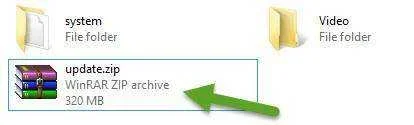
Step 2: Now rename the firmware zip file to “Update.zip“.
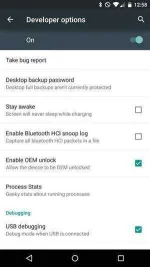
Step 3: Next, enable USB debugging mode in your device by following this path: Settings -> Developer Options -> USB Debugging. If developer option is not visible in your device, enable it by following this path: Settings -> About Phone -> Build Number (tap on it for 5-7 times to enable Developer Options).
Step 4: Now connect your Asus ZenFone 6 A601CG device to the computer using the original USB data cable and transfer the “Update.zip” file from Step 2 to the SD card of your device.
Step 5: Once the firmware file is successfully transferred to your device, unplug it from your computer.
Step 6: Now switch off your device and boot it into the recovery mode by pressing and holding the Volume Up and Power Buttons simultaneously. Once your device is in the recovery mode, select “wipe cache partition“.

Step 7: Next, select “update / recovery from SD Card” option.

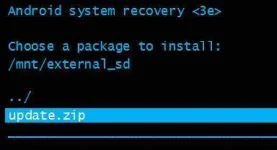
Step 8: Now click on “Update.zip” in your SD card to launch the firmware flashing process.
Step 9: It will take a minute or two for the flashing process to get completed and once it does, select “reboot system now” option.

That’s it. Now you have successfully flashed firmware on Asus ZenFone 6 A601CG device.

Download Asus ZenFone 6 A601CG Firmware
Stock ROM File Name: Asus_ZenFone_6_A601CG_4.3_OTA.zip
Stock ROM File Size: 633 MB
Android OS Version: 4.3
You do not have permission to view the full content of this post. Log in or register now.
How To Flash Stock ROM Firmware On Asus ZenFone 6 A601CG
Step 1: To get started, download You do not have permission to view the full content of this post. Log in or register now. and install it on your computer. Once done, download the firmware zip file from here and save it on your desktop.
Step 2: Now rename the firmware zip file to “Update.zip“.
Step 3: Next, enable USB debugging mode in your device by following this path: Settings -> Developer Options -> USB Debugging. If developer option is not visible in your device, enable it by following this path: Settings -> About Phone -> Build Number (tap on it for 5-7 times to enable Developer Options).
Step 4: Now connect your Asus ZenFone 6 A601CG device to the computer using the original USB data cable and transfer the “Update.zip” file from Step 2 to the SD card of your device.
Step 5: Once the firmware file is successfully transferred to your device, unplug it from your computer.
Step 6: Now switch off your device and boot it into the recovery mode by pressing and holding the Volume Up and Power Buttons simultaneously. Once your device is in the recovery mode, select “wipe cache partition“.
Step 7: Next, select “update / recovery from SD Card” option.
Step 8: Now click on “Update.zip” in your SD card to launch the firmware flashing process.
Step 9: It will take a minute or two for the flashing process to get completed and once it does, select “reboot system now” option.
That’s it. Now you have successfully flashed firmware on Asus ZenFone 6 A601CG device.