 PH
PHedj vincent
Forum Veteran
You do not have permission to view the full content of this post.
Log in or register now.
You do not have permission to view the full content of this post. Log in or register now.
Windows Update Blocker v1.1
You do not have permission to view the full content of this post. Log in or register now. | May 6, 2018 | You do not have permission to view the full content of this post. Log in or register now.

Windows 10 offers less UI control over the updating behavior of the operating system than previous versions of Windows , There is no option to turn off Windows Updates using the Control Panel or Settings app in Windows 10, it checks for updates automatically and install any updates they find, whether you like it or not. This new feature is actually pretty convenient for most users. If you want control over the update process you can disable the Windows Update service . This requires that you open the Services manager, locate the service and change its startup parameter and status. You would then have to enable the service again whenever you want the operating system to check for updates (It does not look so easy).
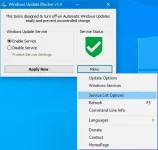
Windows Update Blocker is a freeware that helps you to completely disable or enable Automatic Updates on your Windows system , with just a click of the button . This utility is portable, which means that you are no longer required to go through the installation process and no leftovers will remain on the HDD after its removal. if you place the program file to an external data device, you make it possible to take Windows Update Blocker everywhere with you and use it on any computer you come in contact with, who has things configured just right, and doesn’t want to take the chance that an update might mess up their system. This utility is for that person.
How it works
After downloading, extract Windows Update Blocker to your desired location, then run it
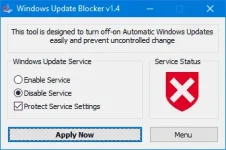
service status icon will show your windows Update service status , if you want to block Automatic Windows Updates Choose “Disable Service” And click “Apply Now” Button , Protect service setings can prevent Uncontrolled change (Recommended).
How to block any other service and protect the settings
Windows Update Blocker New version allow users to add any other service into Wub.ini file to block it , first please edit Wub.ini file and add your desired service name under the “dosvc=2,4” line , for example if you want to block “Windows Update medic Service” Please open services and find it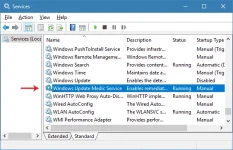
then click on it and copy the Service Name
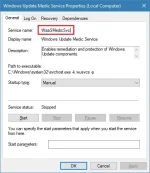
Write or paste the service name under the dosvc=2,4 line
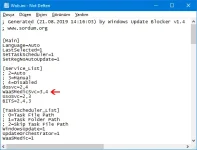
Finally open Windows Update Blocker and use “Apply now” button. If you want to delete recently added service after a while please follow these steps:
1. Open Windows Update Blocker and choose enable service option then use Apply now button.
2. Delete your desired service line from the Wub.ini file
3. Now you can choose disable service and Protect service settings options
NOTE: If you don’t follow these steps and just delete any service from the “Wub.ini” file the service status will remain protected.
Windows Update Blocker supports Command line options to automate Windows Update Blocker tasks :
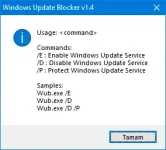
Supported operating systems: Windows 10, Windows 8.1 , Windows 8 , Windows 7 , Windos Vista ,Windows XP (32\64-bit).
Supported languages: English , Turkish , German , Hebrew , Slovenian , French , Russian , Portuguese , Italian , Polish , Spanish , Czech , Ukrainian , Dutch , Greek , Hungarian , Chinese Simplified , Chinese Traditional , Portuguese (brasil) , Thai , Arabic , Korean ,Vietnamese , Japanese
You do not have permission to view the full content of this post. Log in or register now.
Windows Update Blocker v1.1
You do not have permission to view the full content of this post. Log in or register now. | May 6, 2018 | You do not have permission to view the full content of this post. Log in or register now.
Windows 10 offers less UI control over the updating behavior of the operating system than previous versions of Windows , There is no option to turn off Windows Updates using the Control Panel or Settings app in Windows 10, it checks for updates automatically and install any updates they find, whether you like it or not. This new feature is actually pretty convenient for most users. If you want control over the update process you can disable the Windows Update service . This requires that you open the Services manager, locate the service and change its startup parameter and status. You would then have to enable the service again whenever you want the operating system to check for updates (It does not look so easy).
Windows Update Blocker is a freeware that helps you to completely disable or enable Automatic Updates on your Windows system , with just a click of the button . This utility is portable, which means that you are no longer required to go through the installation process and no leftovers will remain on the HDD after its removal. if you place the program file to an external data device, you make it possible to take Windows Update Blocker everywhere with you and use it on any computer you come in contact with, who has things configured just right, and doesn’t want to take the chance that an update might mess up their system. This utility is for that person.
How it works
After downloading, extract Windows Update Blocker to your desired location, then run it
service status icon will show your windows Update service status , if you want to block Automatic Windows Updates Choose “Disable Service” And click “Apply Now” Button , Protect service setings can prevent Uncontrolled change (Recommended).
How to block any other service and protect the settings
Windows Update Blocker New version allow users to add any other service into Wub.ini file to block it , first please edit Wub.ini file and add your desired service name under the “dosvc=2,4” line , for example if you want to block “Windows Update medic Service” Please open services and find it
then click on it and copy the Service Name
Write or paste the service name under the dosvc=2,4 line
Finally open Windows Update Blocker and use “Apply now” button. If you want to delete recently added service after a while please follow these steps:
1. Open Windows Update Blocker and choose enable service option then use Apply now button.
2. Delete your desired service line from the Wub.ini file
3. Now you can choose disable service and Protect service settings options
NOTE: If you don’t follow these steps and just delete any service from the “Wub.ini” file the service status will remain protected.
Windows Update Blocker supports Command line options to automate Windows Update Blocker tasks :
Supported operating systems: Windows 10, Windows 8.1 , Windows 8 , Windows 7 , Windos Vista ,Windows XP (32\64-bit).
Supported languages: English , Turkish , German , Hebrew , Slovenian , French , Russian , Portuguese , Italian , Polish , Spanish , Czech , Ukrainian , Dutch , Greek , Hungarian , Chinese Simplified , Chinese Traditional , Portuguese (brasil) , Thai , Arabic , Korean ,Vietnamese , Japanese