 PH
PHacervergel87
Elite
Ito nabasa ko sa net kaya lng hindi ko pa nasubukan, kasi windows user ako. ayaw ata gumana ng virtualbox sa os na Mac.OSX.Lion.10.7.2 kaya share ko nlng.
Using MUSHclient on a Mac or Linux PC
It looks like MUSHclient is a Windows app. Is there a version for Mac or Linux?
The state of computers today is that Windows has had market dominance for so long that a lot of very smart people have spent a lot of time making it so that Windows apps can be run on Mac (though only on Intel CPU Macs) and Linux operating systems. Two primary methods are explained below -- running through You do not have permission to view the full content of this post. Log in or register now. and running inside a You do not have permission to view the full content of this post. Log in or register now..
I (Fiendish) run the Aardwolf MUSHclient Package on both Linux and Mac OS (Intel). So yes, it is indeed possible to run this on all three major platforms. And it's pretty easy with a few small caveats that will be explained.
Running MUSHclient in Wine
What is Wine?
You do not have permission to view the full content of this post. Log in or register now. describes it in the following basic way: "Wine lets you run Windows software on other operating systems. With Wine, you can install and run these applications just like you would in Windows."
You can also see the You do not have permission to view the full content of this post. Log in or register now. to learn more.
One of the major benefits of using Wine is that you do not need to install Windows.
How do I install Wine in Linux?
Installing Wine in Linux is extremely straightforward with one minor caveat. If you are using an Intel graphics driver version between 2.12 and 2.15 (as of this writing) you'll probably need to use an old version of Wine (wine1.0 rather than wine), because of a bug in the Intel driver. It affects, for example, my Lenovo Thinkpad x201i running Ubuntu because it has an Intel graphics chip. If you have ATI or NVIDIA graphics, you should be fine with the latest version of Wine.
See here: You do not have permission to view the full content of this post. Log in or register now.
UPDATE: Intel has fixed the driver bug, but it may take time to reach some distributions. There is a PPA that can be applied to fix Ubuntu 11 here You do not have permission to view the full content of this post. Log in or register now.
Installing Wine in Linux is as simple and straightforward as installing anything else from the command line. Just open up a terminal and, for example...
In Ubuntu you could type:
How do I install Wine on a Mac?
Requirements:
If you're really adventurous, you can also try...
You do not have permission to view the full content of this post. Log in or register now.
Last Resort Option for Macs (very simple to set up, but old and buggy) If You Can't Figure Out PlayOnMac/Wineskin
2. Find the file you just downloaded. It should look like this:
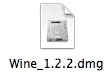
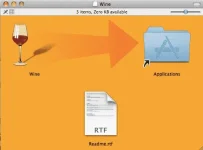
3. Double click on the file and you should see a disk icon mounted on your desktop that looks like this:

5.Drag the Wine icon onto the Applications folder as instructed by the arrow.
Once Wine is installed in this way, you can start MUSHclient by right-clicking on MUSHclient.exe and choosing Open With...->Wine.
It looks like MUSHclient is a Windows app. Is there a version for Mac or Linux?
The state of computers today is that Windows has had market dominance for so long that a lot of very smart people have spent a lot of time making it so that Windows apps can be run on Mac (though only on Intel CPU Macs) and Linux operating systems. Two primary methods are explained below -- running through You do not have permission to view the full content of this post. Log in or register now. and running inside a You do not have permission to view the full content of this post. Log in or register now..
I (Fiendish) run the Aardwolf MUSHclient Package on both Linux and Mac OS (Intel). So yes, it is indeed possible to run this on all three major platforms. And it's pretty easy with a few small caveats that will be explained.
Running MUSHclient in a virtual machine
What is a virtual machine?
Unlike Wine, where you do not need to actually install Windows to use Windows software, setting up a virtual machine means essentially creating a whole virtual computer running a second operating system that runs inside of your main operating system. Popular virtual machine software for the Mac includes You do not have permission to view the full content of this post. Log in or register now., You do not have permission to view the full content of this post. Log in or register now., and You do not have permission to view the full content of this post. Log in or register now.. Of those three, You do not have permission to view the full content of this post. Log in or register now. has the significant benefit that it doesn't cost anything because it is You do not have permission to view the full content of this post. Log in or register now..
How do I install a virtual machine on a Mac?
Requirements:
source: You do not have permission to view the full content of this post. Log in or register now.
Using MUSHclient on a Mac or Linux PC
It looks like MUSHclient is a Windows app. Is there a version for Mac or Linux?
The state of computers today is that Windows has had market dominance for so long that a lot of very smart people have spent a lot of time making it so that Windows apps can be run on Mac (though only on Intel CPU Macs) and Linux operating systems. Two primary methods are explained below -- running through You do not have permission to view the full content of this post. Log in or register now. and running inside a You do not have permission to view the full content of this post. Log in or register now..
I (Fiendish) run the Aardwolf MUSHclient Package on both Linux and Mac OS (Intel). So yes, it is indeed possible to run this on all three major platforms. And it's pretty easy with a few small caveats that will be explained.
Running MUSHclient in Wine
What is Wine?
You do not have permission to view the full content of this post. Log in or register now. describes it in the following basic way: "Wine lets you run Windows software on other operating systems. With Wine, you can install and run these applications just like you would in Windows."
You can also see the You do not have permission to view the full content of this post. Log in or register now. to learn more.
One of the major benefits of using Wine is that you do not need to install Windows.
How do I install Wine in Linux?
Installing Wine in Linux is extremely straightforward with one minor caveat. If you are using an Intel graphics driver version between 2.12 and 2.15 (as of this writing) you'll probably need to use an old version of Wine (wine1.0 rather than wine), because of a bug in the Intel driver. It affects, for example, my Lenovo Thinkpad x201i running Ubuntu because it has an Intel graphics chip. If you have ATI or NVIDIA graphics, you should be fine with the latest version of Wine.
See here: You do not have permission to view the full content of this post. Log in or register now.
UPDATE: Intel has fixed the driver bug, but it may take time to reach some distributions. There is a PPA that can be applied to fix Ubuntu 11 here You do not have permission to view the full content of this post. Log in or register now.
Installing Wine in Linux is as simple and straightforward as installing anything else from the command line. Just open up a terminal and, for example...
In Ubuntu you could type:
sudo apt-get install wine
In Fedora you could type:sudo yum install wine
In Gentoo you could type:sudo emerge wine
And so on...How do I install Wine on a Mac?
Requirements:
- A Mac with an Intel CPU (All new Macs use Intel CPUs). Older PPC or 68k Macs cannot use Wine. Sorry.
- (maybe) X11 (this is already installed by default on Snow Leopard and Leopard. If you are running Tiger, you can install X11 from your Tiger installation DVD using the "Optional Installs.mpkg" file. This may also be installed for you by other packages.)
If you're really adventurous, you can also try...
You do not have permission to view the full content of this post. Log in or register now.
Last Resort Option for Macs (very simple to set up, but old and buggy) If You Can't Figure Out PlayOnMac/Wineskin
Probably the simplest method to get Wine is as follows:
Code:
1. Download wine_1.2.2
http://aardwolfclientpackage.googlecode.com/files/Wine_1.2.2.dmg

OR

Wine_1.2.3 dmg from
http://www.mediafire.com/download/2tojees5mgk87fe/Wine+1.2.3.dmg
2. Find the file you just downloaded. It should look like this:
3. Double click on the file and you should see a disk icon mounted on your desktop that looks like this:
5.Drag the Wine icon onto the Applications folder as instructed by the arrow.
It looks like MUSHclient is a Windows app. Is there a version for Mac or Linux?
The state of computers today is that Windows has had market dominance for so long that a lot of very smart people have spent a lot of time making it so that Windows apps can be run on Mac (though only on Intel CPU Macs) and Linux operating systems. Two primary methods are explained below -- running through You do not have permission to view the full content of this post. Log in or register now. and running inside a You do not have permission to view the full content of this post. Log in or register now..
I (Fiendish) run the Aardwolf MUSHclient Package on both Linux and Mac OS (Intel). So yes, it is indeed possible to run this on all three major platforms. And it's pretty easy with a few small caveats that will be explained.
Running MUSHclient in a virtual machine
What is a virtual machine?
Unlike Wine, where you do not need to actually install Windows to use Windows software, setting up a virtual machine means essentially creating a whole virtual computer running a second operating system that runs inside of your main operating system. Popular virtual machine software for the Mac includes You do not have permission to view the full content of this post. Log in or register now., You do not have permission to view the full content of this post. Log in or register now., and You do not have permission to view the full content of this post. Log in or register now.. Of those three, You do not have permission to view the full content of this post. Log in or register now. has the significant benefit that it doesn't cost anything because it is You do not have permission to view the full content of this post. Log in or register now..
How do I install a virtual machine on a Mac?
Requirements:
- A Mac with an Intel CPU (All new Macs use Intel CPUs). Older PPC or 68k Macs cannot run modern virtual machine software. Sorry.
source: You do not have permission to view the full content of this post. Log in or register now.
