 PH
PHHi Guys,
If ever you need want to monitor your computer's activity or restrict access on internet. This software may help you. I personally liked the features of this application including the blocking websites (by keyword or category) , blocking programs, KEYSTROKED TYPED (this logs what ever the user typed on it's computer keyboard) and many more..
Like this post first then download the attached files. Don't forget to feedback.
Thanks!
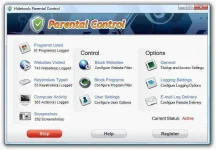
Main Features:
-----------------------
Websites Visited
Hidetools Parental Control tracks all visited website addresses (URLs) along with website titles and time/date of a visit. The program is compatible with all versions of the following browsers: Internet Explorer, Firefox, Opera, Netscape, America Online and more.
Keystrokes Typed
Hidetools Parental Control monitors every keystroke typed on your child's computer along with the application title and the time.
Programs Used
Hidetools Parental Control records all programs used on your child’s computer. The log contains also the time when the application was started/stopped and how long it was actually used.
Screenshot Capturing
Hidetools Parental Control captures screenshots of the computer screen at an interval defined by you. The screenshot capturing can be as often as once per minute.
Computer Activity
The program allows you to control the time children spend on the computer (shutdowns and user logons).
Remote Monitoring
Hidetools Parental Control automatically sends the log reports to your email. This allows you to see what your child are doing on the computer from any place where you could check your email. The option has fully customizable interface.
Block Websites
Hidetools Parental Control includes powerful Internet filter which guaranties Internet safety for your child. You can select website categories you want to disable. Also, Hidetools Parental Control allows you to block any website by URL. Just add a new website address or keyword and our Internet filter will block every website which you want to restrict access to. For example, entered 'myspace' will block 'You do not have permission to view the full content of this post. Log in or register now.' and any website which contains 'myspace' in its address.
Block Programs
Hidetools Parental Control can block any web browser, chat, instant messenger, block games and applications which you want to disable access. For example, you can block Internet Explorer, Firefox, Opera, Mirc, ICQ, MSN, Yahoo Messenger, Skype, etc.
Multiuser
Hidetools Parental Control can monitor and restrict every computer user, and it does not depend on user rights and what user installed the program. You can set individual monitoring and controlling functions for every windows account.
Program Invisibility
The program works secretly and nobody can detect it. Only you will know that out parental control is installed!
Password Protection
Access to Hidetools Parental Control can be password protected to prevent the program termination and options changes. Only the person who knows the special hotkey and the password can access the program.
Installation Guide:
1. Unpack
2. Install App
3. Copy Crack file in Install Directory where you installed the app
"C: Program Files/HPC".
4. Use Keygen (try and try until you get a working key)
5. Feedback ^_^
If ever you need want to monitor your computer's activity or restrict access on internet. This software may help you. I personally liked the features of this application including the blocking websites (by keyword or category) , blocking programs, KEYSTROKED TYPED (this logs what ever the user typed on it's computer keyboard) and many more..
Like this post first then download the attached files. Don't forget to feedback.
Thanks!
Main Features:
-----------------------
Websites Visited
Hidetools Parental Control tracks all visited website addresses (URLs) along with website titles and time/date of a visit. The program is compatible with all versions of the following browsers: Internet Explorer, Firefox, Opera, Netscape, America Online and more.
Keystrokes Typed
Hidetools Parental Control monitors every keystroke typed on your child's computer along with the application title and the time.
Programs Used
Hidetools Parental Control records all programs used on your child’s computer. The log contains also the time when the application was started/stopped and how long it was actually used.
Screenshot Capturing
Hidetools Parental Control captures screenshots of the computer screen at an interval defined by you. The screenshot capturing can be as often as once per minute.
Computer Activity
The program allows you to control the time children spend on the computer (shutdowns and user logons).
Remote Monitoring
Hidetools Parental Control automatically sends the log reports to your email. This allows you to see what your child are doing on the computer from any place where you could check your email. The option has fully customizable interface.
Block Websites
Hidetools Parental Control includes powerful Internet filter which guaranties Internet safety for your child. You can select website categories you want to disable. Also, Hidetools Parental Control allows you to block any website by URL. Just add a new website address or keyword and our Internet filter will block every website which you want to restrict access to. For example, entered 'myspace' will block 'You do not have permission to view the full content of this post. Log in or register now.' and any website which contains 'myspace' in its address.
Block Programs
Hidetools Parental Control can block any web browser, chat, instant messenger, block games and applications which you want to disable access. For example, you can block Internet Explorer, Firefox, Opera, Mirc, ICQ, MSN, Yahoo Messenger, Skype, etc.
Multiuser
Hidetools Parental Control can monitor and restrict every computer user, and it does not depend on user rights and what user installed the program. You can set individual monitoring and controlling functions for every windows account.
Program Invisibility
The program works secretly and nobody can detect it. Only you will know that out parental control is installed!
Password Protection
Access to Hidetools Parental Control can be password protected to prevent the program termination and options changes. Only the person who knows the special hotkey and the password can access the program.
Installation Guide:
1. Unpack
2. Install App
3. Copy Crack file in Install Directory where you installed the app
"C: Program Files/HPC".
4. Use Keygen (try and try until you get a working key)
5. Feedback ^_^