🔒 Closed Datepicker range to query db content

Status
Not open for further replies.

daredavil07

Journeyman
Hello po, sinusubukan ko pong kumuha ng content sa db ko na pasok sa date range na napili ko sa datepicker(s) at display sa table. Ano po kaya yung mali sa query ko?

Code:
<html lang="en">
<head>
<title>List</title>
<script src="jquery-3.3.1.min.js"></script>
<script src="jquery.min.js"></script>
<script src="jquery-ui.js"></script>
<link href="jquery-ui.css" rel="stylesheet"/>
<link rel="stylesheet" href="jquery-ui.css">
</head>
<body>
<h1 align="center">List</h1>
      <center><form><p class="search_input">
       <input type="text" placeholder="From Date" id="from" name="from" /> 
       <input type="text" placeholder="To Date" id="to" name="to" />
       <input type="submit" name="go" value="Search" />
       </p></form></center>

<table align="center" cellspacing="0" cellpadding="0">
  <thead class="fixedthead">
  <th width="120px" style="text-align: center; color: navy">Name</th>
  <th width="120px" style="text-align: center; color: navy">Description</th>
  <th width="120px" style="text-align: center; color: navy">Date</th>
  <th width="120px" style="text-align: center; color: navy">Open</th>
  </thead>

  <?php
  error_reporting(0);
  $from = $_POST['from'];
  $to = $_POST['to'];

  $conn = mysqli_connect("localhost", "root", "", "order");
  $result = mysqli_query($conn, "SELECT * FROM item WHERE date between '$from' AND '$to' ", MYSQLI_USE_RESULT) or die(mysqli_error($conn));
  while($row = mysqli_fetch_array( $result )) {
  ?>
  
    <tbody>   
    <tr>     
       <td width="120px" style="text-align: center"><?php echo $row['name']; ?></td>
    <td width="120px" style="text-align: center"><?php echo $row['description']; ?></td>
    <td width="120px" style="text-align: center"><?php echo $row['date']; ?></td>
    <td width="120px"><a href = "download.php?id=<?php echo $row['id']; ?>" ><button>Open</button></a></td>
   </tr>
  </tbody>
</table>
<?php
}
?>
</body>
</html>     

<script type="text/javascript">
var dateToday = new Date();
var dates = $("#from, #to").datepicker({
    defaultDate: "+1w",
    changeMonth: true,
    numberOfMonths: 2,
     onSelect: function(selectedDate) {
        var option = this.id == "from" ? "minDate" : "maxDate",
            instance = $(this).data("datepicker"),
            date = $.datepicker.parseDate(instance.settings.dateFormat || $.datepicker._defaults.dateFormat, selectedDate, instance.settings);
        dates.not(this).datepicker("option", option, date);
    }
});
</script>

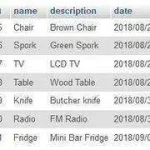
Ito po yung db ko:
Capture2.webp

Salamat po!
 
tanong lang po... bakit po nakaenclosed ang <tbody> tag sa loob ng while loop? dapat po sa ang while loop ang nakaenclosed sa tbody tag then ang <tr> is nakaenclosed sa while loop para isang tbody tag lang po ang lalabas sa browser then multiple tr's sa loob ng tbody.

Eg.

HTML:
<tbody>
  <php
while ($row = mysqli_fetch_array( $result )) {
?>
  <tr>
     <td>Record ID</td>
  </tr>
<php } ?>

</tbody>


kapag nagquery ka po ba may lumalabas na error? ano po ang datatype ng db field mo, datetime or date lang? :)
 
tanong lang po... bakit po nakaenclosed ang <tbody> tag sa loob ng while loop? dapat po sa ang while loop ang nakaenclosed sa tbody tag then ang <tr> is nakaenclosed sa while loop para isang tbody tag lang po ang lalabas sa browser then multiple tr's sa loob ng tbody.

Eg.

HTML:
<tbody>
  <php
while ($row = mysqli_fetch_array( $result )) {
?>
  <tr>
     <td>Record ID</td>
  </tr>
<php } ?>

</tbody>


kapag nagquery ka po ba may lumalabas na error? ano po ang datatype ng db field mo, datetime or date lang? :)

Wala pong may lumalabas na error, wala din pong may lumalabas na content from db :) datetime pa po now, pero papalitan ko po ng date lang eventually.
 
Mga bossing, pa tulong po. :):)
pacheck po ako boss ng Form tag natin:

HTML:
<form method="POST" action="">
                 <p class="search_input">
                       <input type="text" placeholder="From Date" id="from" name="from" />
                       <input type="text" placeholder="To Date" id="to" name="to" />
                       <input type="submit" name="go" value="Search" />
                </p>
           </form>

:):)
 
pacheck po ako boss ng Form tag natin:

HTML:
<form method="POST" action="">
                 <p class="search_input">
                       <input type="text" placeholder="From Date" id="from" name="from" />
                       <input type="text" placeholder="To Date" id="to" name="to" />
                       <input type="submit" name="go" value="Search" />
                </p>
           </form>

:):)

Hi po sir, nagupdate po ako ng kaunti, pero medyo may di parin tama.

Code:
<html lang="en">
<head>
<title>List</title>
<script src="jquery-3.3.1.min.js"></script>
<script src="jquery.min.js"></script>
<script src="bootstrap.min.js"></script>
<script src="jquery-latest.min.js" type="text/javascript"></script>
<script src="jquery-ui.js"></script>
<link href="jquery-ui.css" rel="stylesheet"/>
<link rel="stylesheet" href="jquery-ui.css">
</head>
<body>
<h1 align="center">List</h1>
      <center><form action="" method="post"><p class="search_input">
       <input type="text" placeholder="From Date" id="from" name="from" /> 
       <input type="text" placeholder="To Date" id="to" name="to" />
       <input type="submit" name="go" value="Search" class="btn-info" />
       </p></center>

<table align="center" cellspacing="0" cellpadding="0">
  <thead>
  <th width="120px" style="text-align: center; color: navy">Name</th>
  <th width="120px" style="text-align: center; color: navy">Description</th>
  <th width="120px" style="text-align: center; color: navy">Date</th>
  <th width="120px" style="text-align: center; color: navy">Open</th>
  </thead>
 
    <tbody>   
    <tr>     
       <td width="120px" style="text-align: center"><?php echo $row['name']; ?></td>
    <td width="120px" style="text-align: center"><?php echo $row['description']; ?></td>
    <td width="120px" style="text-align: center"><?php echo $row['date']; ?></td>
    <td width="120px"><a href = "download.php?id=<?php echo $row['id']; ?>" ><button>Open</button></a></td>
   </tr>
  </tbody>
</table>
</form>
</body>
</html>     

<?php
error_reporting(0);
include("connection.php");

if (isset($_POST['submit']))
{
  $from = mysqli_real_escape_string($conn, $_POST['from']);
  $to = mysqli_real_escape_string($conn, $_POST['to']);

  $conn = mysqli_connect("localhost", "root", "", "order");
  $result = mysqli_query($conn, "SELECT * FROM item WHERE date between '$from' AND '$to' ", MYSQLI_USE_RESULT)
  or die(mysqli_error($conn));
}
  ?>
 

  <script type="text/javascript">
var dateToday = new Date();
var dates = $("#from, #to").datepicker({
    defaultDate: "+1w",
    changeMonth: true,
    numberOfMonths: 2,
     onSelect: function(selectedDate) {
        var option = this.id == "from" ? "minDate" : "maxDate",
            instance = $(this).data("datepicker"),
            date = $.datepicker.parseDate(instance.settings.dateFormat || $.datepicker._defaults.dateFormat, selectedDate, instance.settings);
        dates.not(this).datepicker("option", option, date);
    }
});
</script>
 
Status
Not open for further replies.

About this Thread

  • 7
    Replies
  • 806
    Views
  • 3
    Participants
Last reply from:
daredavil07

Online now

Members online
370
Guests online
1,302
Total visitors
1,672

Forum statistics

Threads
2,275,514
Posts
28,963,793
Members
1,232,827
Latest member
Nash3790
Back
Top