PH
PHRequirements:
Windows XP / Vista / Windows 7 / Windows 8 / Windows 10
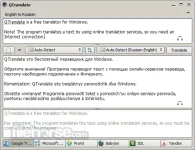
QTranslate is a free translator for Windows. With this small utility, you simply select the text you want to translate and then press the hot key (Ctrl+Q to show translation in the popup window or Double Ctrl click to show the translation in the main window). QTranslatealso has the ability to speak text Ctrl+E and perform a dictionary search Ctrl+Shift+Q. Also, you can open the main window and type text manually.
The following translation services are supported:
Download link:
You do not have permission to view the full content of this post. Log in or register now.
Windows XP / Vista / Windows 7 / Windows 8 / Windows 10
QTranslate is a free translator for Windows. With this small utility, you simply select the text you want to translate and then press the hot key (Ctrl+Q to show translation in the popup window or Double Ctrl click to show the translation in the main window). QTranslatealso has the ability to speak text Ctrl+E and perform a dictionary search Ctrl+Shift+Q. Also, you can open the main window and type text manually.
The following translation services are supported:
- Google Translate
- Bing Translator
- Promt
- Babylon
- SDL FreeTranslation.com
- Yandex.Translate
- youdao
- Baidu
- Naver
- Text translation in any application that supports text selection
- Speech recognition
- Image text recognition (OCR API provided by OCR.SPACE)
- Text to speech synthesis
- Search in online dictionaries
- Search in offline XDXF dictionaries
- Spell checking
- Word suggestion/autocomplete
- History of translations
- Virtual keyboard
Download link:
You do not have permission to view the full content of this post. Log in or register now.