 PH
PHBefore you install 3rd party desktop msstyle themes, you need ρá†ch Your System.
This post is instruction of how to ρá†ch Windows 7 System by Universal Theme Patcher
1. Download Universal Theme Patcher
2. Unzip it and Choose the corresponding patcher based on you Windows:
3. Require administrator rights. Right-click the exe file, select Run as Administrator.
4. Path uxtheme.dll, themeui.dll, themeservice.dll
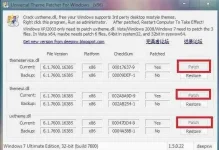
5. After ρá†ch, Restart computer to take effect.
6. You can run program with argument “-silent” to ρá†ch in silent mode.
Repost ?
This post is instruction of how to ρá†ch Windows 7 System by Universal Theme Patcher
1. Download Universal Theme Patcher
2. Unzip it and Choose the corresponding patcher based on you Windows:
For 32bit(x86): UniversalThemePatcher-x86.exe
For 64bit(amd64): UniversalThemePatcher-x64.exe
3. Require administrator rights. Right-click the exe file, select Run as Administrator.
4. Path uxtheme.dll, themeui.dll, themeservice.dll
5. After ρá†ch, Restart computer to take effect.
6. You can run program with argument “-silent” to ρá†ch in silent mode.
Repost ?
