PH
PHFreeNetNeed
Elite
orig source: You do not have permission to view the full content of this post.
Log in or register now.
Tutorial Explanation not mine ok. Share ko lang 100% working na spoofing method para sa metered mode ng windows 10 using regedit editing. Both working sa PC at Netbook, Laptop no more Windows Update
Important: Before you make any changes, make sure to understand that you'll be modifying the Windows registry, which could be a dangerous game that can cause irreversible damage to your computer when changes are not done properly. It's recommended that you do a You do not have permission to view the full content of this post. Log in or register now.. You've been warned!

4. On the Security tab, click the Advanced button.

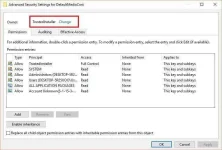
5. Next to TrustedInstaller, click the Change link.
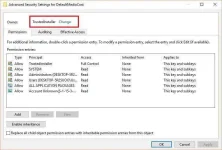
6.Type Administrators, and click the Check Names button to make sure you're typing the correct object

7. Click OK.
8. On the Advanced Security Settings for DefaultMediaCost, check the "Replace owner on subcontainers and objects"

9. Click Apply.
10. Click OK.
11. On Permissions for DefaultMediaCost, select the Administrators group, and then make sure to check the allow Full Control box.

12. Click Apply.
13. Click OK.
14. On the DefaultMediaCost key, you'll find different entries, including for 3G, 4G, Default, Ethernet, and WiFi with their default data values: 1 or 2. The data value 1 means that the connection type is non-metered, and the data value of 2 means that the connection type is metered. Double-click the Ethernet DWORD (32-bit) Value key, and change the value to 2.

15. Click OK.
16. Close the registry and restart your computer to complete the process.
Once you set a metered connection, the operating system will stop using the internet in many ways. For example:
Tutorial Explanation not mine ok. Share ko lang 100% working na spoofing method para sa metered mode ng windows 10 using regedit editing. Both working sa PC at Netbook, Laptop no more Windows Update
Important: Before you make any changes, make sure to understand that you'll be modifying the Windows registry, which could be a dangerous game that can cause irreversible damage to your computer when changes are not done properly. It's recommended that you do a You do not have permission to view the full content of this post. Log in or register now.. You've been warned!
- Use the Windows key + R to open the Run command, type regedit, and click OK to open the Windows registry.
- Browse the following path:
HKEY_LOCAL_MACHINE\SOFTWARE\Microsoft\Windows NT\CurrentVersion\NetworkList\DefaultMediaCost
- Right-click the DefaultMediaCost key and select Permissions.
4. On the Security tab, click the Advanced button.
5. Next to TrustedInstaller, click the Change link.
6.Type Administrators, and click the Check Names button to make sure you're typing the correct object
7. Click OK.
8. On the Advanced Security Settings for DefaultMediaCost, check the "Replace owner on subcontainers and objects"
9. Click Apply.
10. Click OK.
11. On Permissions for DefaultMediaCost, select the Administrators group, and then make sure to check the allow Full Control box.
12. Click Apply.
13. Click OK.
14. On the DefaultMediaCost key, you'll find different entries, including for 3G, 4G, Default, Ethernet, and WiFi with their default data values: 1 or 2. The data value 1 means that the connection type is non-metered, and the data value of 2 means that the connection type is metered. Double-click the Ethernet DWORD (32-bit) Value key, and change the value to 2.
15. Click OK.
16. Close the registry and restart your computer to complete the process.
Once you set a metered connection, the operating system will stop using the internet in many ways. For example:
- Windows updates will no longer download automatically. However, priority updates will continue to download when available.
- Apps will no longer update automatically.
- Live Tiles on the Start menu may stop downloading updates.
- Offline content may not sync with other devices.