 PH
PHConquerorXXX
Forum Guru
HOW TO MAKE WEBSITE your SSH PANEL
Requirements:
1. VPS with SSH Panel Installed
2. Chrome or Mozilla Firefox Browser
3. WinSCP
4. NotePad++
STEP 1
### Note : The files are Sample Files and Open source template , pwedi mong e edit gamit ang notepad++ palitan mo lang lahat kung ano ang gusto mong ipalit ..
STEP 2
Note: Pwedi kang mag research sa You do not have permission to view the full content of this post. Log in or register now. tungkol sa mga html coding..
Example
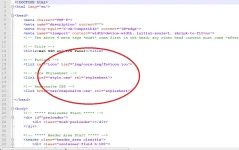
<link rel="icon" href="img/core-img/favicon.ico">
• Dito mo makikita kung saan naka link sa ang img, css, at sa ibaba naman ang js
• Pag aralan mo lang kung paano gumagana ang mga codes
OPTIONAL:
· Open CSS folder and Edit the files inside,, for the colors of your themes
·
STEP 3
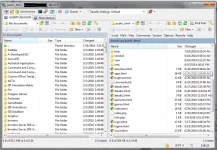
NOTE: Dapat hindi naka folder or naka zip
Look like this:
STEP 4 (Optional) in case if hindi mo makikita ang web mo or nasa previous UI ka parin
STEP 5:
STEP 6
Requirements:
1. VPS with SSH Panel Installed
2. Chrome or Mozilla Firefox Browser
3. WinSCP
4. NotePad++
STEP 1
- Download the Files ( You do not have permission to view the full content of this post. Log in or register now. )
- Extract the Files
- Open the HTML file for the Preview
### Note : The files are Sample Files and Open source template , pwedi mong e edit gamit ang notepad++ palitan mo lang lahat kung ano ang gusto mong ipalit ..
STEP 2
- Right Click the HTML files
- Open it with Notepad++
- And Edit the code
Note: Pwedi kang mag research sa You do not have permission to view the full content of this post. Log in or register now. tungkol sa mga html coding..
Example
<link rel="icon" href="img/core-img/favicon.ico">
• Dito mo makikita kung saan naka link sa ang img, css, at sa ibaba naman ang js
• Pag aralan mo lang kung paano gumagana ang mga codes
OPTIONAL:
· Open CSS folder and Edit the files inside,, for the colors of your themes
·
STEP 3
- After mung ma edit lahat
- Open WinSCP program
- Login to your VPS with SSH Panel Installed
- Open Public_Html folder and
- Paste your files
NOTE: Dapat hindi naka folder or naka zip
Look like this:
STEP 4 (Optional) in case if hindi mo makikita ang web mo or nasa previous UI ka parin
- Right in Winscp then Refresh
- Or delete the temp folder
- Or Clear cache of your browser
STEP 5:
- PM me if you stuck !
STEP 6
- Video tutorials is coming soon
