 PH
PH-
Welcome to PHCorner Forums! Sign up for free to unlock full access and exclusive privileges, including:
- Asking questions about computer and mobile issues
- Discovering internet tips for your mobile network and computer
You are using an out of date browser. It may not display this or other websites correctly.
You should upgrade or use an alternative browser.
You should upgrade or use an alternative browser.
🔒 Closed How to change password of hotspot in laptop
- Thread starter amirkrr
- Start date
- Status
- Not open for further replies.

KinjiBloodFallen
Enthusiast
anong operating System mo? Windows 10 ba? if windows 10 try mo ito
Change mobile hotspot name and password
Here is how to change your mobile hotspot name (SSID) and password in Windows 10.
NOTE: The ability to create mobile hotspot from Settings app was introduced with Anniversary Update (version 1607) for Windows 10. So make sure that you are running Windows 10 version 1607 by typing Winever.exe and then pressing Enter key.
Step 1: You do not have permission to view the full content of this post. Log in or register now.. Navigate to Network & Internet > Mobile hotspot.
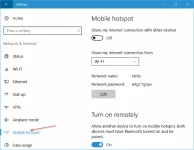
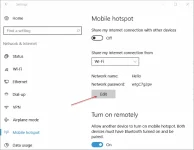
Step 2: Under Mobile hotspot section, you can see the current SSID (name of the Wi-Fi hotspot name) and password. To change mobile hotspot name or password or both, click the Edit button.
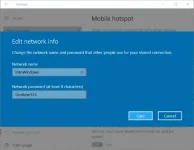
Step 3: Enter a new network name and then enter a new password for the network. Click Save button. Note that the password must be of at least 8 characters.
Change mobile hotspot name and password
Here is how to change your mobile hotspot name (SSID) and password in Windows 10.
NOTE: The ability to create mobile hotspot from Settings app was introduced with Anniversary Update (version 1607) for Windows 10. So make sure that you are running Windows 10 version 1607 by typing Winever.exe and then pressing Enter key.
Step 1: You do not have permission to view the full content of this post. Log in or register now.. Navigate to Network & Internet > Mobile hotspot.
Step 2: Under Mobile hotspot section, you can see the current SSID (name of the Wi-Fi hotspot name) and password. To change mobile hotspot name or password or both, click the Edit button.
Step 3: Enter a new network name and then enter a new password for the network. Click Save button. Note that the password must be of at least 8 characters.
- Status
- Not open for further replies.
About this Thread
-
2Replies
-
80Views
-
2Participants
Last reply from:
amirkrr
amirkrr
New Topics
-
REQ PC GAMES #3 | DIRECT LINK | NO ADS
- Started by AuraGod
- Replies: 0
- ⚙️ PC Apps, Themes, Tools
-
FB Tools Extension auto unfriend delete chat unfollow etc.
- Started by RARasputin
- Replies: 16
- ⚙️ PC Apps, Themes, Tools
-
MediaHuman YouTube Downloader 3.9.24 (2010)
- Started by Carlos2026
- Replies: 1
- ⚙️ PC Apps, Themes, Tools
-
Abelssoft Ssd Fresh Plus 2027 16.02.76570
- Started by webrtc
- Replies: 0
- ⚙️ PC Apps, Themes, Tools
-
Maxon Cinema 4d 2027.0
- Started by webrtc
- Replies: 1
- ⚙️ PC Apps, Themes, Tools
-
Perfecttableplan Professional 7.3.1
- Started by webrtc
- Replies: 0
- ⚙️ PC Apps, Themes, Tools
-
Serato DJ Pro Suite 5.0.0
- Started by crakyman
- Replies: 0
- ⚙️ PC Apps, Themes, Tools
-
Queueexplorer Professional 5.1.1
- Started by webrtc
- Replies: 0
- ⚙️ PC Apps, Themes, Tools
-
Sublime Merge 2 Build 2134 Dev
- Started by webrtc
- Replies: 0
- ⚙️ PC Apps, Themes, Tools
-
Boris FX VEGAS Pro 2027.0.0.31 (x64) Multilingual
- Started by crakyman
- Replies: 2
- ⚙️ PC Apps, Themes, Tools
Trending Topics
Online now
- Members online
- 1,196
- Guests online
- 8,990
- Total visitors
- 10,186