 PH
PHDONT FORGET TO FOLLOW ME! and LIKE MY POST!
Files
TunesKit Spotify Music Converter 1.2.7.140 [CrackzSoft]
Files
TunesKit Spotify Music Converter 1.2.7.140 [CrackzSoft]
- Premium KEY & How to use.txt (0.2 KB)
- Download Link: You do not have permission to view the full content of this post. Log in or register now.
- SpotifyConverter.exe (1.9 MB)

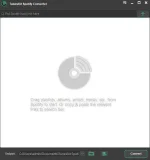
TunesKit Spotify Music Converter
A brilliant Spotify DRM removal app designed to download and convert Spotify music songs, playlists, albums, and artists to MP3, AAC, WAV, FLAC, M4A, M4B losslessly, offering you a great experience to enjoy Spotify music offline on any player and device.
Download any music track, album, artist and playlist from Spotify within free subscription
Spotify is the biggest streaming music service in the market that only allows subscribers to stream to listen to music without downloading if you sign up as a free membership. Now with TunesKit Spotify Music Converter for Windows, downloading all kinds of music from Spotify can't be easier even if you are not subscribing the premium plan. You just need to drag the Spotify track, album, artist or playlist to the software screen and the music will be download in seconds within one click only.
Download Link: You do not have permission to view the full content of this post. Log in or register now.
TUTORIAL
Drag Spotify Songs to TunesKit Music Converter for Spotify
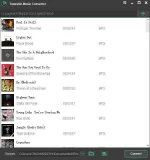
After launching TunesKit Spotify DRM Music Converter on your computer, it will load Spotify software automatically. Then find any track or album or playlist from the Spotify app and drag the songs to TunesKit interface. Or you can simply paste the links of the Spotify music to the search box of TunesKit main screen.
Note: Even if you are a free Spotify subscriber, you can drag and drop any Spotify track without downloading the songs in advance.
Step 2
Set Output Format and Music Preferences
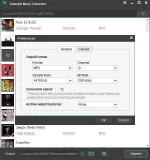
When the Spotify songs are loaded successfully into TunesKit Music Converter for Spotify, you can simply click the menu bar and select Preferences. Then you'll be asked to selet the output format for the Spotify music. Currently it supports MP3, AAC, M4A, M4B, WAV and FLAC. Besides, you can adjust the audio channel, bit rate, sample rate, etc. to make the music more personalized.
Note: If you want to convert the Spotify music in stable mode in order to avoid any unexpected conversion error, please remember to set the conversion speed as 1X. You can also make the converted Spotify songs organized by setting the output tracks by albums or artists there.
Step 3
Start to Remove DRM and Convert Spotify Songs to MP3
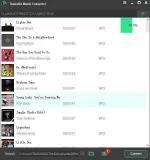
Once the settings are customized according to your own needs, you can begin to convert the Spotify songs to MP3 or other formats by clicking the "Convert" button at the bottom right. When the conversion completes, you should click the history folder to locate the converted DRM-free Spotify songs and transfer them to any other media playing device for offline listening.
VIDEO TUTORIAL
https://phc.onl/#forbidden#/0Pt931_ps48


