PH
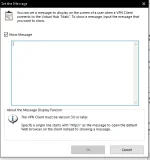
PHHello Server softether server owners~ ever wondered if you can edit this message prompt when you connect to the server?
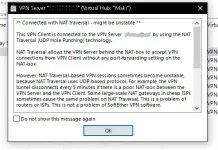
well pwde sya maedit may konting ayusin ka lang sa server manager mo~
_____________________________________________________________________________
1. Connect to your Server Manager
2. Go to your Virtual Hub Properties
3. Click "Set the Message"

4.Click Show Message
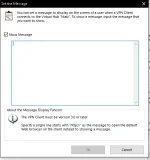
now if you read from the bottom it says Specify a single line starts with " http:// "
technically pag naglagay ka ng website link, at nagconnect ka automatically magbubukas yung link na yun sa browser mo, but what if di mo gusto yun, you just need a message box that show your desired information.

and Clicked OK then connect to your server... well lalabas sya pero nasa baba, ayaw natin ng ganun.

Now lets go back to the Virtual Hub Properties....
5. Make sure that your first line consist of " http:// " weird right? but it is needed for it to work. just use your creativity add something like " https://phcorner.org/ or something
now be careful not just hit enter for the next line, use spacebar to manually go to the next line

6. then Enter your desired message, now in the end of the line/message type " % " it should look like this:
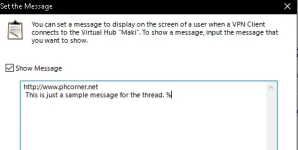
then click OK. it should now look like this... when your connected

you can also put the % in the start of the message

and Thats it!~ lol
now it looks weird huh, well just use your creativity to enter a nice message box XD

~~Thanks
well pwde sya maedit may konting ayusin ka lang sa server manager mo~
_____________________________________________________________________________
1. Connect to your Server Manager
2. Go to your Virtual Hub Properties
3. Click "Set the Message"
4.Click Show Message
now if you read from the bottom it says Specify a single line starts with " http:// "
technically pag naglagay ka ng website link, at nagconnect ka automatically magbubukas yung link na yun sa browser mo, but what if di mo gusto yun, you just need a message box that show your desired information.
Lets continue.. what if naglagay ka lang ng any message like this..Note: This is the only method that I tried and found on my own, There might be a different methods that others know you are free to post them
and Clicked OK then connect to your server... well lalabas sya pero nasa baba, ayaw natin ng ganun.
Now lets go back to the Virtual Hub Properties....
5. Make sure that your first line consist of " http:// " weird right? but it is needed for it to work. just use your creativity add something like " https://phcorner.org/ or something
now be careful not just hit enter for the next line, use spacebar to manually go to the next line
6. then Enter your desired message, now in the end of the line/message type " % " it should look like this:
then click OK. it should now look like this... when your connected
you can also put the % in the start of the message
and Thats it!~ lol
now it looks weird huh, well just use your creativity to enter a nice message box XD
~~Thanks