 PH
PH-
Welcome to PHCorner Forums! Sign up for free to unlock full access and exclusive privileges, including:
- Asking questions about computer and mobile issues
- Discovering internet tips for your mobile network and computer
You are using an out of date browser. It may not display this or other websites correctly.
You should upgrade or use an alternative browser.
You should upgrade or use an alternative browser.
🔒 Closed Solved
- Thread starter Leocode
- Start date
- Status
- Not open for further replies.
Tingin ka You do not have permission to view the full content of this post.
Log in or register now.
May mga tut din sa ibang website, hanap hanap din minsan, inilalabas din ng ibang taga Xda
May mga tut din sa ibang website, hanap hanap din minsan, inilalabas din ng ibang taga Xda
Baka mali yung TWRP file mo, paki check, dapat ang status sa Odin ay Passtama naman pagflash ko ng twrp sa ap tapos nagreboot na cp ko agad pero ng nag custom recovery original padin e SAMSUNG J7 PRIME 7.0 NOUGAT 2017 SM-G610F yan
B U L I L Y A S O
Forum Guru
successful ba ang pag flush boss?
symbiocomph
Established
FRP stands for factory reset protection
Factory Reset Protection (FRP) is a security method that was designed to make sure someone can't just wipe and factory reset your phone if you've lost it or it was stolen. Starting with Android Lollipop, FRP is "standard" in vanilla Android, and most companies making our phones have implemented it in their own models.
A locked or unlocked bootloader is what gives you access to “root.” “Root” is another big word in the Android community. If you “root” a device, it means you have “super user” access or “administrator” access to the operating system that runs on your phone.
Factory Reset Protection (FRP) is a security method that was designed to make sure someone can't just wipe and factory reset your phone if you've lost it or it was stolen. Starting with Android Lollipop, FRP is "standard" in vanilla Android, and most companies making our phones have implemented it in their own models.
A locked or unlocked bootloader is what gives you access to “root.” “Root” is another big word in the Android community. If you “root” a device, it means you have “super user” access or “administrator” access to the operating system that runs on your phone.
symbiocomph
Established
Have you tried king root app and kingo root app.. internet connection is a requirement though..
yon, naka off yung FRP kailangan ko pa bang i on for para makapagflash sa twrp or off lang ok na.FRP stands for factory reset protection
Factory Reset Protection (FRP) is a security method that was designed to make sure someone can't just wipe and factory reset your phone if you've lost it or it was stolen. Starting with Android Lollipop, FRP is "standard" in vanilla Android, and most companies making our phones have implemented it in their own models.
A locked or unlocked bootloader is what gives you access to “root.” “Root” is another big word in the Android community. If you “root” a device, it means you have “super user” access or “administrator” access to the operating system that runs on your phone.
tapos yung samsung recovery may nakalagay na reboot to bootloader, which is ON? or should i off that? para twrp and how?
oo not working sakin yan 5.0 pababa lang yan eHave you tried king root app and kingo root app.. internet connection is a requirement though..
Installation
-Enable USB debugging and OEM unlocking in the settings
- Put your phone in download mode (turn off phone, then hold VolDown+Home+Power to boot - if it asks you to press a button to continue
-Flash the CF-Auto-Root package as AP in ODIN(Comes within the zip file), and your device should reboot into a modified recovery (signified by a large red Android logo) and it will install SuperSU for you and restore the stock recovery, and reboot back into Android.
You do not have permission to view the full content of this post. Log in or register now.
-Enable USB debugging and OEM unlocking in the settings
- Put your phone in download mode (turn off phone, then hold VolDown+Home+Power to boot - if it asks you to press a button to continue
-Flash the CF-Auto-Root package as AP in ODIN(Comes within the zip file), and your device should reboot into a modified recovery (signified by a large red Android logo) and it will install SuperSU for you and restore the stock recovery, and reboot back into Android.
You do not have permission to view the full content of this post. Log in or register now.
saan dito idownload ko?Installation
-Enable USB debugging and OEM unlocking in the settings
- Put your phone in download mode (turn off phone, then hold VolDown+Home+Power to boot - if it asks you to press a button to continue
-Flash the CF-Auto-Root package as AP in ODIN(Comes within the zip file), and your device should reboot into a modified recovery (signified by a large red Android logo) and it will install SuperSU for you and restore the stock recovery, and reboot back into Android.
You do not have permission to view the full content of this post. Log in or register now.
Attachments

Anong TWRP version ginamit mo?View attachment 402599 eto sya master tama ba?
CF-Root Auto posaan dito idownload ko?
hindi ko naintindihan to masyado tatry ko na magflash eCF-Root Auto po
should reboot into a modified recovery (signified by a large red Android logo) and it will install SuperSU for you and restore the stock recovery, and reboot back into Android.
twrp 3.1.1 sm-g610f
symbiocomph
Established
Sir got this from youtube..
Hope that helps. Its a video tut how to root your device specifically j7 prime 2017 nougat.
You do not have permission to view the full content of this post. Log in or register now.
Hope that helps. Its a video tut how to root your device specifically j7 prime 2017 nougat.
You do not have permission to view the full content of this post. Log in or register now.
Ano exact device variant, (ex. SM-J710F/G/M )
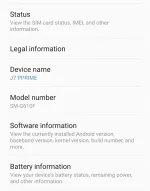
tama yan ba?
tagal na magflash ng cf auto root master
hindi kaya mabootloop to
hindi gumagana yung link kaya mo embed sirSir got this from yôutubê..
Hope that helps. Its a video tut how to root your device specifically j7 prime 2017 nougat.
You do not have permission to view the full content of this post. Log in or register now.
symbiocomph
Established
You do not have permission to view the full content of this post.
Log in or register now.
Try mu sir copy paste sa browser mu
Try mu sir copy paste sa browser mu
symbiocomph
Established
Eto nalang search mu sir sa youtube Root Galaxy J7 Prime SM-G610F | SM-G610M | Autoroot
- Status
- Not open for further replies.
Similar threads
-
-
Bilang ng suspek sa Mima Alicia case, umakyat sa 6; kaso ng pagpatay, itinuturing nang solved ng PNP
- Started by flex012
- Replies: 0
-
Python Basics: A Beginners Course And Solved Exercises
- Started by jomla5
- Replies: 1
-
🏷️ For Sale Solvely ai Math Solver & Homework Pro unlimited GPT-5,GEMINI And Claude Opus 5
- Started by -PHCmark
- Replies: 8
-
👨🏫 Tutorial Machine Learning Algorithms Solved Numerical Examples
- Started by WSODownload
- Replies: 1
About this Thread
-
37Replies
-
2KViews
-
9Participants
Last reply from:
maykelcruz08
maykelcruz08
New Topics
-
Samsung A03s Bypass need help
- Started by aking143
- Replies: 1
- 📖 Android Guides, Recoveries, ROMs
-
Help Bypass Realme c71/73
- Started by XsanX
- Replies: 0
- 📖 Android Guides, Recoveries, ROMs
-
Zte f50 5g B10 version
- Started by Reyjrtagaro
- Replies: 0
- 📖 Android Guides, Recoveries, ROMs
-
ZTE F50 5G restore 5G capability
- Started by Reyjrtagaro
- Replies: 0
- 📖 Android Guides, Recoveries, ROMs
-
[updated 23/10/26] - UNLOCKTOOL 2026.10.15.0 + L0ader
- Started by vivek1
- Replies: 25
- 📖 Android Guides, Recoveries, ROMs
-
[11/10/26] - A.N.TOOL v4.6 [Life time Free]
- Started by vivek1
- Replies: 3
- 📖 Android Guides, Recoveries, ROMs
-
[12/10/26] - KG Killer Tool V3.8.0 Cr@cked
- Started by vivek1
- Replies: 3
- 📖 Android Guides, Recoveries, ROMs
-
[11/10/26] - TSM-Tool PRO Edition Cr@cked
- Started by vivek1
- Replies: 16
- 📖 Android Guides, Recoveries, ROMs
Trending Topics
Online now
- Members online
- 1,035
- Guests online
- 13,421
- Total visitors
- 14,456