PH
PHSoftether VPN 10 PHP maintaning Load / No GS / No Cap

Requirements:
1. Globe / TM sim
2. No GSwitch Data
3. Maintaining balance 10 pesos load
4. Text SURFALERT ON to 8080
5. Modem / Pocket Wifi
6. Windows PC
7. Softether VPN client, download You do not have permission to view the full content of this post. Log in or register now.
8. Established (Bawala muna sa bulag hehe)
"Tried and tested!"
Softether Account:
-------------------------------------------
Location: Singapore 8
Server IP: 52.221.172.114
Virtual Hub: EdmarVPN
Port: 443
Password: not4sale
Account Expiration: 2018/06/18 00:01:00
Config Template: You do not have permission to view the full content of this post. Log in or register now.
-------------------------------------------
Location: Singapore DO1
Server IP: 206.189.151.243
Virtual Hub: EdmarVPN
Port: 443
Password: not4sale
Account Expiration: 2018/06/18 00:01:00
Config Template: You do not have permission to view the full content of this post. Log in or register now.
-------------------------------------------
For Mobile [Root Needed]:
Download @ Playstore: You do not have permission to view the full content of this post. Log in or register now.
If not working try the old version of the app: You do not have permission to view the full content of this post. Log in or register now.
Note: No torrent please ...
Tools:
Softether VPN Client
You do not have permission to view the full content of this post. Log in or register now.
FAQS:
How to use S.E. VPN Client mgr
1. Download vpn client You do not have permission to view the full content of this post. Log in or register now.
2. Install and run
3. Add VPN Connection (Input account details above) or Import SE VPN config above
4. Connect
5. Enjoy
Mababawasan ba yung load ko?
* Technically no, di mababawasan yan gawa ng SURFALERT ON
Hanggang kelan expiration ng 10 pesos load ko?
* Check mo balance mo andun expiration, alam mo na siguro paano i extend expiration nyan. xoxo
No cap ba?
* Oyeah
How to fix error code 1 / error code 2
Open cmd then input the ff:
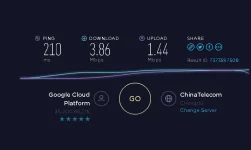
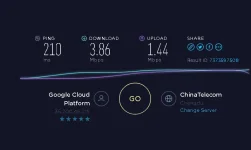
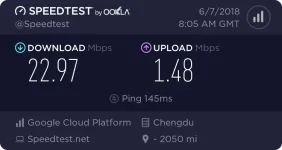
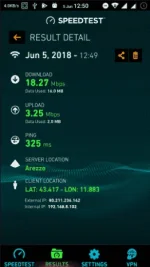
Screenshots
PC:
Mobile:
Credits:
- Lincoln Lee
Like lang sapat na hehe
Requirements:
1. Globe / TM sim
2. No GSwitch Data
3. Maintaining balance 10 pesos load
4. Text SURFALERT ON to 8080
5. Modem / Pocket Wifi
6. Windows PC
7. Softether VPN client, download You do not have permission to view the full content of this post. Log in or register now.
8. Established (Bawala muna sa bulag hehe)
"Tried and tested!"
Softether Account:
-------------------------------------------
Location: Singapore 8
Server IP: 52.221.172.114
Virtual Hub: EdmarVPN
Port: 443
Spoiler contents are visible only to Established Members.
Account Expiration: 2018/06/18 00:01:00
Config Template: You do not have permission to view the full content of this post. Log in or register now.
-------------------------------------------
Location: Singapore DO1
Server IP: 206.189.151.243
Virtual Hub: EdmarVPN
Port: 443
Spoiler contents are visible only to Established Members.
Password: not4sale
Account Expiration: 2018/06/18 00:01:00
Config Template: You do not have permission to view the full content of this post. Log in or register now.
-------------------------------------------
For Mobile [Root Needed]:
Download @ Playstore: You do not have permission to view the full content of this post. Log in or register now.
If not working try the old version of the app: You do not have permission to view the full content of this post. Log in or register now.
Note: No torrent please ...
Tools:
Softether VPN Client
You do not have permission to view the full content of this post. Log in or register now.
FAQS:
How to use S.E. VPN Client mgr
1. Download vpn client You do not have permission to view the full content of this post. Log in or register now.
2. Install and run
3. Add VPN Connection (Input account details above) or Import SE VPN config above
4. Connect
5. Enjoy
Mababawasan ba yung load ko?
* Technically no, di mababawasan yan gawa ng SURFALERT ON
Hanggang kelan expiration ng 10 pesos load ko?
* Check mo balance mo andun expiration, alam mo na siguro paano i extend expiration nyan. xoxo
No cap ba?
* Oyeah
How to fix error code 1 / error code 2
Open cmd then input the ff:
Code:
1. Before connecting type on cmd: ipconfig /release
2. On connecting type on cmd: ipconfig /renew && ipconfig /flushdns
Screenshots
PC:
Mobile:
Credits:
- Lincoln Lee
Like lang sapat na hehe