 PH
PHCyberReckon
Honorary Poster
Hello guys, maybe some of you here have been banned already for excessive use of cheats/häçks or mods. But today I will show you how to login your banned account. This is a tutorial for Google bound account, if your account has not been bound using Google, well... you can also try these steps.
Notes:
This tutorial is not actually a recovery of your banned account.
Your RANK will stay as it is, your RANK WILL NOT BE RESET so don't worry!
Your items such as clothing, weapon skins, face, and other items will be lost.
Your friends list will be empty too.
But your friends can see you and can add you to a game, just make sure to add them back again.
Requirements:
• Android/IOS Phone with the Latest and updated RoS installed.
• For Android: Install the latest Google Play (Not Google Playstore)
• For IOS: No google play so you need to login your google account inside ROS.
• Of course, an mobile phone with working Camera.
Tutorial:
Im sure you will get the same message when logging in your banned account.
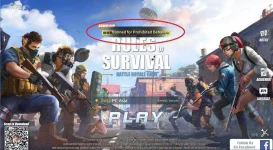
All you need to do is to login your banned account in your mobile by tapping on ACCOUNTS.

When you have an account already logged in your RoS Mobile then Tap Switch account - but if you are logging in RoS Mobile for the first time then tap on Bind account.
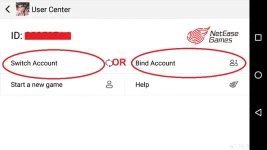
Then select GOOGLE PLAY
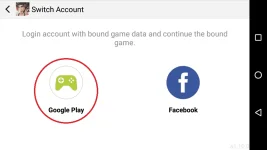
Then its time to login your BANNED ACCOUNT - and wait until it is completely bound.
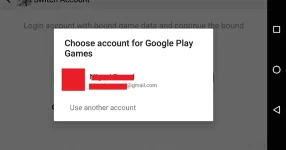
NOW - OPEN YOUR ROS in PC and Select SWITCH ACCOUNT
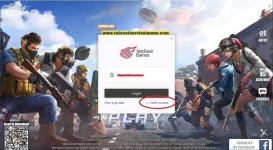
THE QR Code will SHow up.
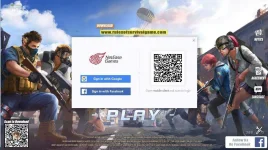
OPEN your RoS Mobile again and Select PC LOGIN

[OPTIONAL] When this message shows up, just tap on CANCEL.
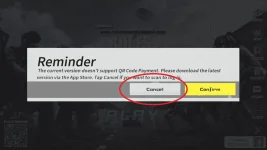
NOW Scan the QR Code on your PC
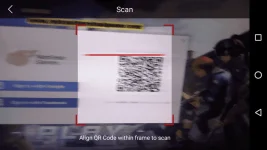
This will show up on your PC
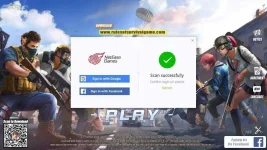
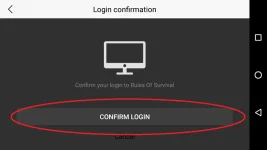
And this will Show up on your MOBILE - just tap on CONFIRM LOGIN.
AFTER THAT - CLICK PLAY!
Notice that the account has been logged in but you are asked to ENTER Your Name like it's your first time!
Don't worry! Just enter the name of your banned account or you can re enter another name for free.

If you want your old name to be applied, you can add a blank space in Character Map.
Copy that blank space character and paste it at the end of your Name so that it will be saved even though the name is already taken.
CONGRATULATIONS! You have successfully logged in your banned account! Remember that this is your last chance to play your banned account - if your account have been banned again then there's nothing you can do to log it on again.
Notice that your Rank has not been reset.
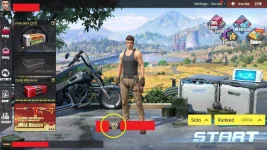
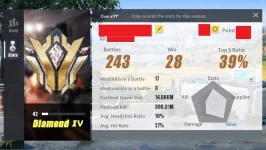
But your FRIENDS and ITEMS ARE GONE. Don't worry, your friends can still see you and invite you to a game.
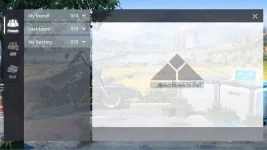
IMPORTANT NOTE:
To login your account in PC - use the SCAN QR Again using your RoS Mobile!
You cannot directly login your account without QR Scan anymore!
Credits: QuestMajor & Nagato
Notes:
This tutorial is not actually a recovery of your banned account.
Your RANK will stay as it is, your RANK WILL NOT BE RESET so don't worry!
Your items such as clothing, weapon skins, face, and other items will be lost.
Your friends list will be empty too.
But your friends can see you and can add you to a game, just make sure to add them back again.
Requirements:
• Android/IOS Phone with the Latest and updated RoS installed.
• For Android: Install the latest Google Play (Not Google Playstore)
• For IOS: No google play so you need to login your google account inside ROS.
• Of course, an mobile phone with working Camera.
Tutorial:
Im sure you will get the same message when logging in your banned account.
All you need to do is to login your banned account in your mobile by tapping on ACCOUNTS.
When you have an account already logged in your RoS Mobile then Tap Switch account - but if you are logging in RoS Mobile for the first time then tap on Bind account.
Then select GOOGLE PLAY
Then its time to login your BANNED ACCOUNT - and wait until it is completely bound.
NOW - OPEN YOUR ROS in PC and Select SWITCH ACCOUNT
THE QR Code will SHow up.
OPEN your RoS Mobile again and Select PC LOGIN
[OPTIONAL] When this message shows up, just tap on CANCEL.
NOW Scan the QR Code on your PC
This will show up on your PC
And this will Show up on your MOBILE - just tap on CONFIRM LOGIN.
AFTER THAT - CLICK PLAY!
Notice that the account has been logged in but you are asked to ENTER Your Name like it's your first time!
Don't worry! Just enter the name of your banned account or you can re enter another name for free.
If you want your old name to be applied, you can add a blank space in Character Map.
Copy that blank space character and paste it at the end of your Name so that it will be saved even though the name is already taken.
CONGRATULATIONS! You have successfully logged in your banned account! Remember that this is your last chance to play your banned account - if your account have been banned again then there's nothing you can do to log it on again.
Notice that your Rank has not been reset.
But your FRIENDS and ITEMS ARE GONE. Don't worry, your friends can still see you and invite you to a game.
IMPORTANT NOTE:
To login your account in PC - use the SCAN QR Again using your RoS Mobile!
You cannot directly login your account without QR Scan anymore!
Credits: QuestMajor & Nagato

