PH
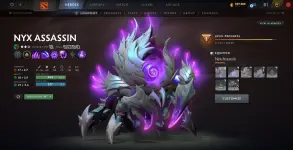
PHDOTA 2 MODS SKIN [10/11/2026] WORKING! (INSIDE THE TROVE OF TREASURE UPDATE) + LOW POLY MAP




HOW TO USE:
1. Select what pack you want to use and download it.
2. After downloading open your steam then go to Library -> Home -> Look for Dota 2 -> Right Click -> Manage -> Browse Local Files
3. The folder will open and paste here the downloaded zip/rar file.
4. Extract the file and select extract here and a pop-up will appear select YES to ALL.
5. Run InstallModsDota (windows batch file) as admin.
6. IMPORTANT, this step is whenever you open the game always run this before opening Dota 2 or starting from steam.
Run FixMatchMaking (windows batch file) as admin.
7. BOOM! enjoy the mod.
DISCLAIMER:
Ikaw lang makakakita nung mod. Kailangan mong iremove yung nakaequip mong items sa hero mo pati mga weather, skin, music, announcer, etc para makita mo yung effects ng MOD.
Pampagana lang maglaro kasi full set at maganda effect ng skills! Hahaha enjoy po!
Nakakaban ba? Hindi po! 4 years ko na gamit di pa naman ako na-ban =)
HOW TO USE:
1. Select what pack you want to use and download it.
2. After downloading open your steam then go to Library -> Home -> Look for Dota 2 -> Right Click -> Manage -> Browse Local Files
3. The folder will open and paste here the downloaded zip/rar file.
4. Extract the file and select extract here and a pop-up will appear select YES to ALL.
5. Run InstallModsDota (windows batch file) as admin.
6. IMPORTANT, this step is whenever you open the game always run this before opening Dota 2 or starting from steam.
Run FixMatchMaking (windows batch file) as admin.
7. BOOM! enjoy the mod.
DISCLAIMER:
Ikaw lang makakakita nung mod. Kailangan mong iremove yung nakaequip mong items sa hero mo pati mga weather, skin, music, announcer, etc para makita mo yung effects ng MOD.
Pampagana lang maglaro kasi full set at maganda effect ng skills! Hahaha enjoy po!
Nakakaban ba? Hindi po! 4 years ko na gamit di pa naman ako na-ban =)
You do not have permission to view the full content of this post. Log in or register now.