Basahin mo po eto
If you use Wi-Fi to access the Internet
Interestingly, there is a simple option in Wi-Fi settings, which if enabled, stops your Windows 10 computer from downloading automatic updates. To do that, search for
Change Wi-Fi settings in Start Menu or
You do not have permission to view the full content of this post.
Log in or register now.. Click
Advanced Options, and enable the toggle below
Set as metered connection.
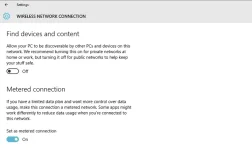
Once done,
You do not have permission to view the full content of this post.
Log in or register now. will stop pushing updates to your Windows 10 computer, as it realises that you're on a limited plan (works even if you aren't).
The problem is that if you have a broadband connection and you use an Ethernet cable to connect to the Internet, this trick won't work. There was another method that used to work in the preview builds, but doesn't anymore, so just in case you are still on a preview Windows 10 build, you can try it by following the steps mentioned after we tell you another trick.
Disabling select updates
Microsoft has also released a tool that can be used to hide or disable Windows 10 updates selectively. All you need to do it, download it from company's
You do not have permission to view the full content of this post.
Log in or register now., and install it on your computer. Follow the instructions on the website to disable the problematic update.
Using Group Policy Editor
In Windows 10, the option to disable automatic updates is invisible by default. You can tweak a setting in Group Policy Editor to make this option show up and prevent your Windows 10 computer from downloading automatic updates. To open Group Policy Editor, go to Start Menu or Cortana and search for
gpedit.msc and press enter. Then follow these steps:
(Note: This option is available in the preview builds of Windows 10)
1) Click on
Computer Configuration, and select
Administrative Templates on the following page.
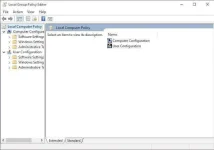
2) Now select
All Settings and scroll down the list to find the entry that says
Configure Automatic Updates.
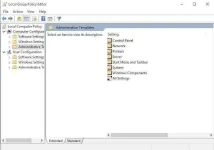
3) Double click on it and select
Enabled radio button from the left upper side.
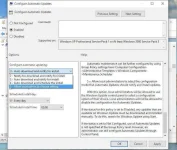
4) Once you have done that, you should be able to edit the
Options pane at the bottom. Click the drop bar and select the fifth option that says
Allow local admin to choose setting.
Now that the option to disable automatic downloads is available again, you need to go and select it.
1) Go to
Control Panel (desktop app), and select
System and Security.
2) Under that, click on
Windows Update, and select
Change settings on the following page. You will now see the option that says
Check for updates but let me choose whether to download and install them. Select it and now your computer will check for updates, but never download or install them without your permission.
If you want your Windows 10 computer to not even check for updates, there's a way for that as well, though we don't recommend you do this. With that being said, this is the way:
1) Go back to Group Policy Editor as mentioned above.
2) Now select
All Settings and scroll down the list to find the entry that says
Configure Automatic Updates.
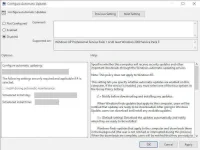
3) Double click on it and select
Disabled.
That's it, now your computer will not even check to see what Windows 10 updates are available.
 PH
PH