 PH
PHnathansnow
Established
Introduction
This utility, which has the most comprehensive knowledge of auto-starting locations of any startup monitor, shows you what programs are configured to run during system bootup or login, and when you start various built-in Windows applications like Internet Explorer, Explorer and media players. These programs and drivers include ones in your startup folder, Run, RunOnce, and other Registry keys. Autoruns reports Explorer shell extensions, toolbars, browser helper objects, Winlogon notifications, auto-start services, and much more. Autoruns goes way beyond other autostart utilities.
Autoruns' Hide Signed Microsoft Entries option helps you to zoom in on third-party auto-starting images that have been added to your system and it has support for looking at the auto-starting images configured for other accounts configured on a system. Also included in the download package is a command-line equivalent that can output in CSV format, Autorunsc.
You'll probably be surprised at how many executables are launched automatically!
Link: You do not have permission to view the full content of this post. Log in or register now.
//program and tutorial are inside
Para po ito sa mga hindi pa nakakaalam. Kung kagaya ko kayong hindi naman kataasan ang memory ng ginagamit na pc (I'm using 4gb ram) at feeling nyo bumagal na yong process speed ng pc nyo dahil sa napakadami ng files at installed programs, pwede nyo subukan itong autoruns. Ang pinakagamit nya is pagkastart mo ng pc yong mga nakacheck lang sa autoruns application ang istartup nya. Iba po ito sa pagpili lang ng programs sa startup through Task Manager, kasi pati mga background process is pwede mo pakialaman kung di mo gusto magrun ito sa pc pagka On. Yong mga background process na yan (Applications ng windows, manufacturers, installed programs na hindi mo naman talaga ginagamit) kahit maliliit lang yan pero pag pinagsama sama mo is magconsume parin ng malaking space ng memory mo. Payo ko sayo pag gagamitin mo na sya, uncheck mo lahat sa autoruns na makita mong nagruruns sa background process na alam mo namang hindi mo nagagamit at alam mong tatakbo pa rin ng maayos ang pc mo kahit wala sya. Iwan mo lang yong mga processes kagaya ng drivers,etc.
Other tips:
-Delete mo lahat ng programs and apps na alam mo namang hindi mo kelangan at hindi mo nagagamit.
(Ex. of this is yong mga pre installed programs ng manufacturer na hindi mo naman nagagamit or never mo pa nagamit.
-use/install cleaner tools like CCleaner
- try troubleshooting
-try Disk Cleanup and Defrag
- atleast clean reboot your pc once a week
-kung wala talaga, baka panahon na para sa pagbabago, magdagdag ka na ram mo!
Ito lang po mailalagay ko kasi ito lang mga ginawa ko na. Kung may nais po kayo idagdag malaya kayong magbahagi. Salamat po sa bagbabasa kahit mahaba! Naway may naitulong ako sa inyo!
Ito sample ng sa akin.
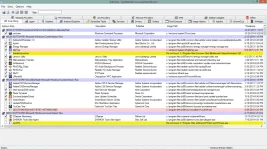
This utility, which has the most comprehensive knowledge of auto-starting locations of any startup monitor, shows you what programs are configured to run during system bootup or login, and when you start various built-in Windows applications like Internet Explorer, Explorer and media players. These programs and drivers include ones in your startup folder, Run, RunOnce, and other Registry keys. Autoruns reports Explorer shell extensions, toolbars, browser helper objects, Winlogon notifications, auto-start services, and much more. Autoruns goes way beyond other autostart utilities.
Autoruns' Hide Signed Microsoft Entries option helps you to zoom in on third-party auto-starting images that have been added to your system and it has support for looking at the auto-starting images configured for other accounts configured on a system. Also included in the download package is a command-line equivalent that can output in CSV format, Autorunsc.
You'll probably be surprised at how many executables are launched automatically!
Link: You do not have permission to view the full content of this post. Log in or register now.
//program and tutorial are inside
Para po ito sa mga hindi pa nakakaalam. Kung kagaya ko kayong hindi naman kataasan ang memory ng ginagamit na pc (I'm using 4gb ram) at feeling nyo bumagal na yong process speed ng pc nyo dahil sa napakadami ng files at installed programs, pwede nyo subukan itong autoruns. Ang pinakagamit nya is pagkastart mo ng pc yong mga nakacheck lang sa autoruns application ang istartup nya. Iba po ito sa pagpili lang ng programs sa startup through Task Manager, kasi pati mga background process is pwede mo pakialaman kung di mo gusto magrun ito sa pc pagka On. Yong mga background process na yan (Applications ng windows, manufacturers, installed programs na hindi mo naman talaga ginagamit) kahit maliliit lang yan pero pag pinagsama sama mo is magconsume parin ng malaking space ng memory mo. Payo ko sayo pag gagamitin mo na sya, uncheck mo lahat sa autoruns na makita mong nagruruns sa background process na alam mo namang hindi mo nagagamit at alam mong tatakbo pa rin ng maayos ang pc mo kahit wala sya. Iwan mo lang yong mga processes kagaya ng drivers,etc.
Other tips:
-Delete mo lahat ng programs and apps na alam mo namang hindi mo kelangan at hindi mo nagagamit.
(Ex. of this is yong mga pre installed programs ng manufacturer na hindi mo naman nagagamit or never mo pa nagamit.
-use/install cleaner tools like CCleaner
- try troubleshooting
-try Disk Cleanup and Defrag
- atleast clean reboot your pc once a week
-kung wala talaga, baka panahon na para sa pagbabago, magdagdag ka na ram mo!
Ito lang po mailalagay ko kasi ito lang mga ginawa ko na. Kung may nais po kayo idagdag malaya kayong magbahagi. Salamat po sa bagbabasa kahit mahaba! Naway may naitulong ako sa inyo!
Ito sample ng sa akin.