 PH
PHMethod 1st:- Virtual Ram Concept For Windows XP, 7 And 8,10
lets boost your system memory with a usb flash memory stick,follow below steps.
Step:1) First of all Just plug the drive in the USB port of computer or laptops (make sure with 1GB at least in the USB port, better to prefer 4GB).
Step:2) Now Wait for 2-3 second for detecting your Pendrive by your computer or laptops.
Step:3) When your computer detect Pen-drive, there is a real and smart thing to do.
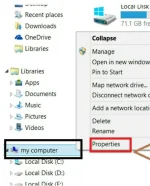
Step:4) Right click on "My Computer" and select "Properties"
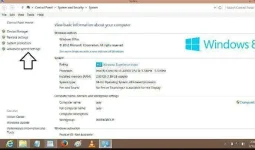
Step:5) Now when you click on Properties a new window will appear, now here you need to press the "Advanced system settings" button which is located at the left side.
Step:6) Here in this window simply click on "Advanced" Tab after that click on "Settings" Button appear in "performance box".
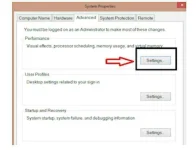
Step:7) Again new window will appear then click on "Advanced" Tab.
In Advanced Tab there is an option of "Virtual Memory box", Then click on "Change" Button.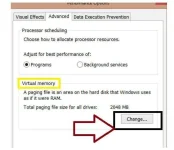
Step:8) After click Change Button "Virtual settings" will appear.
Now unchecked the box of "Automatically Manage Page size for all drives",and select your pendrive from here.
Step:9) Then select "Custom size" and Add Your Pen Drive current same in below format.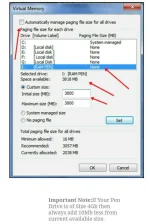
Step:10) Now Add same "Value" in both boxes and click on "ok" button.
Step:11) Restart Your PC or Laptop and Now pen drive work as "Virtual Ram".
Method 2nd:- Steps Of Ready Boost Concept Only For Windows 7, 8,10 Very Easy Method To Expend Your RAM.
If you face problem in above method then can also follow this method which is easy to perform and work on Window 7, 8,10,xp (tested)
Step:1) first of all you need to *********** "Pen Drive" in to your PC or laptop then make Right click on your pen drive and select "properties".
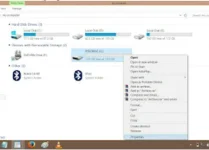
Step:2) In Properties select "ReadyBoost" Tab.
Step:3) Then switch to "Use this device" and reduce your current memory space. If your current device place is 4094 MB then reduce it with approx 300-400MB.
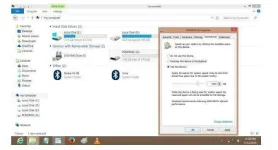
Step:4) After that simply click on Apply button.
How To Change Your Pendrive As Normal:
In case if you want to change back your pen drive to normal then follow above step 1&2 and switch to "Do not use this device" in readyBoost tab.
Thank you iPixx
lets boost your system memory with a usb flash memory stick,follow below steps.
Step:1) First of all Just plug the drive in the USB port of computer or laptops (make sure with 1GB at least in the USB port, better to prefer 4GB).
Step:2) Now Wait for 2-3 second for detecting your Pendrive by your computer or laptops.
Step:3) When your computer detect Pen-drive, there is a real and smart thing to do.
Step:4) Right click on "My Computer" and select "Properties"
Step:5) Now when you click on Properties a new window will appear, now here you need to press the "Advanced system settings" button which is located at the left side.
Step:6) Here in this window simply click on "Advanced" Tab after that click on "Settings" Button appear in "performance box".
Step:7) Again new window will appear then click on "Advanced" Tab.
In Advanced Tab there is an option of "Virtual Memory box", Then click on "Change" Button.
Step:8) After click Change Button "Virtual settings" will appear.
Now unchecked the box of "Automatically Manage Page size for all drives",and select your pendrive from here.
Step:9) Then select "Custom size" and Add Your Pen Drive current same in below format.
Step:10) Now Add same "Value" in both boxes and click on "ok" button.
Step:11) Restart Your PC or Laptop and Now pen drive work as "Virtual Ram".
Method 2nd:- Steps Of Ready Boost Concept Only For Windows 7, 8,10 Very Easy Method To Expend Your RAM.
If you face problem in above method then can also follow this method which is easy to perform and work on Window 7, 8,10,xp (tested)
Step:1) first of all you need to *********** "Pen Drive" in to your PC or laptop then make Right click on your pen drive and select "properties".
Step:2) In Properties select "ReadyBoost" Tab.
Step:3) Then switch to "Use this device" and reduce your current memory space. If your current device place is 4094 MB then reduce it with approx 300-400MB.
Step:4) After that simply click on Apply button.
How To Change Your Pendrive As Normal:
In case if you want to change back your pen drive to normal then follow above step 1&2 and switch to "Do not use this device" in readyBoost tab.
Thank you iPixx
