 PH
PHSo you are reading instructions on some article that tells you to reboot into Safe mode. You ask how you do that, and are told to use the F8 key when the computer boots up. But you just can’t seem to get the F8 key to work… so how do you boot into Safe mode?
There’s an option in the well-known System Configuration utility that will let you force Windows to always boot into Safe mode… until you turn the option off.
Note: While this method is nothing new, I have to give credit to reader Larry for mentioning it in a comment and prompting this article. Thanks, Larry!
Force Windows to Boot into Safe Mode
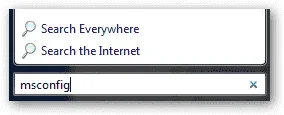
Open up the start menu search or run box, and type in msconfig and hit the enter key.
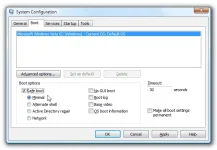
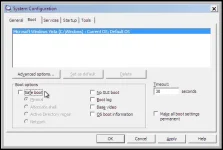
Select the Boot tab, and then check the box for “Safe boot” and make sure the radio button below is set to “Minimal”.
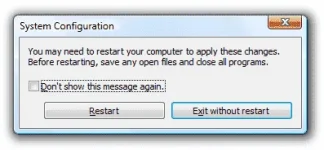
Once you hit the OK button you’ll be asked if you want to Restart now or wait until later. Either way, the next boot will take you into safe mode.
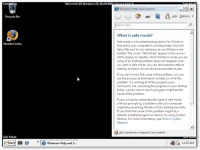
Once you restart, you’ll realize that you are in Safe Mode because it not only places that text in the four corners of the screen, but it even opens up the safe mode page from the help file in Windows 7 or Vista.
Now you can work on getting rid of that spyware…
Turn Safe Mode Back Off
Once you are done fixing whatever you were working on, you’ll probably want to turn safe mode off and go back to normal mode. Just open up msconfig the same way as above, and then on the Boot tab you’ll uncheck the “Safe boot” checkbox.
There’s an option in the well-known System Configuration utility that will let you force Windows to always boot into Safe mode… until you turn the option off.
Note: While this method is nothing new, I have to give credit to reader Larry for mentioning it in a comment and prompting this article. Thanks, Larry!
Force Windows to Boot into Safe Mode
Open up the start menu search or run box, and type in msconfig and hit the enter key.
Select the Boot tab, and then check the box for “Safe boot” and make sure the radio button below is set to “Minimal”.
Once you hit the OK button you’ll be asked if you want to Restart now or wait until later. Either way, the next boot will take you into safe mode.
Once you restart, you’ll realize that you are in Safe Mode because it not only places that text in the four corners of the screen, but it even opens up the safe mode page from the help file in Windows 7 or Vista.
Now you can work on getting rid of that spyware…
Turn Safe Mode Back Off
Once you are done fixing whatever you were working on, you’ll probably want to turn safe mode off and go back to normal mode. Just open up msconfig the same way as above, and then on the Boot tab you’ll uncheck the “Safe boot” checkbox.

