🔒 Closed Help os

Status
Not open for further replies.

Yameteee

Eternal Poster
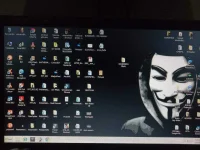
Guys bat yung computer namin naging itsurang windows xp ehh windows 7 ultimate nakainstall. Ginamit ko pa kagabi okay naman tapos ngayon naging ganun. pano po kaya maayos?
 

Attachments

  • 1520818795647213519593.webp
    1520818795647213519593.webp
    145.9 KB · Views: 23
  1. Go to Control Panel.
  2. Press Alt + D para mapunta sa address bar, tapos copy niyo po ito ► Control Panel\System and Security\System
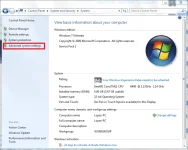
  3. May lalabas na window, click niyo po sa kaliwa yung "Advance System Settings".
    this.webp
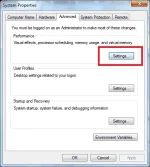
  4. Sa "Advanced" tab, click mo yung "Settings" button under "Performance".
    Settings.webp
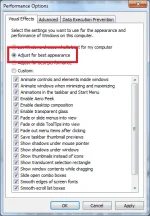
  5. May lalabas ulit na window. Sa "Visual Effects" tab, piliin niyo po yung "Adjust for best appearance".
    vve.webp
  6. Click "Apply", then press "Ok".
 
  1. Go to Control Panel.
  2. Press Alt + D para mapunta sa address bar, tapos copy niyo po ito ► Control Panel\System and Security\System
  3. May lalabas na window, click niyo po sa kaliwa yung "Advance System Settings".
    View attachment 339344
  4. Sa "Advanced" tab, click mo yung "Settings" button under "Performance".
    View attachment 339345
  5. May lalabas ulit na window. Sa "Visual Effects" tab, piliin niyo po yung "Adjust for best appearance".
    View attachment 339348
  6. Click "Apply", then press "Ok".
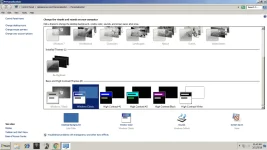
ayaw parin po. kasi kagabi may nagpop up sa antivirus ko tapos may idedelete daw napindot ko po yung delete tapos ayaw na mastop. Bale parang nadelete po yung aero theme po ba yun kpag pupunta sa personalization. Eto po upload ko picture. ayaw na po maapply yung theme ng windows 7. nagtry din po ako magdownload ng theme ayaw din po maapply. Thank you po sa pagsagot
 

Attachments

  • Untitled.webp
    Untitled.webp
    65.5 KB · Views: 15
  1. Go to Control Panel.
  2. Press Alt + D para mapunta sa address bar, tapos copy niyo po ito ► Control Panel\System and Security\System
  3. May lalabas na window, click niyo po sa kaliwa yung "Advance System Settings".
    View attachment 339344
  4. Sa "Advanced" tab, click mo yung "Settings" button under "Performance".
    View attachment 339345
  5. May lalabas ulit na window. Sa "Visual Effects" tab, piliin niyo po yung "Adjust for best appearance".
    View attachment 339348
  6. Click "Apply", then press "Ok".
okay na po pala naayos ko na nagystem restore nalang po ako tas naayos na. thank you po.
 
Status
Not open for further replies.

Similar threads

About this Thread

  • 3
    Replies
  • 207
    Views
  • 2
    Participants
Last reply from:
Yameteee

Trending Topics

Online now

Members online
445
Guests online
945
Total visitors
1,390

Forum statistics

Threads
2,275,076
Posts
28,960,477
Members
1,233,572
Latest member
linaresgmarc
Back
Top