 PH
PHManage your file and folder in your Android phone
Using ES file Explorer:
Step 1. First of all download and install this cool android file explorer that is You do not have permission to view the full content of this post. Log in or register now..

Using ES file Explorer
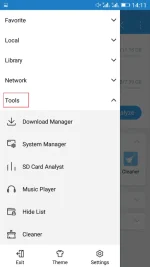
Step 2. Now open the app and swipe from left to right in the app and there select the option Tools.
Using ES file Explorer
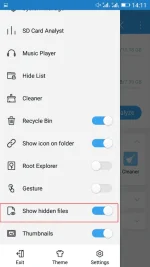
Step 3. Now there scroll down and enable the option Show hidden files.
Using ES file Explorer
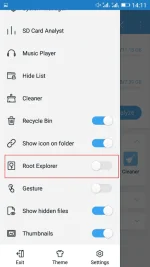
Step 4. Also, you can explore out system files and folders by navigating to root folder and there you will see lots of hidden files.
Using ES file Explorer
That’s it! you are done, now you can easily manage all the files and folders better in your android device.
Using ES file Explorer:
Step 1. First of all download and install this cool android file explorer that is You do not have permission to view the full content of this post. Log in or register now..
Using ES file Explorer
Step 2. Now open the app and swipe from left to right in the app and there select the option Tools.
Using ES file Explorer
Step 3. Now there scroll down and enable the option Show hidden files.
Using ES file Explorer
Step 4. Also, you can explore out system files and folders by navigating to root folder and there you will see lots of hidden files.
Using ES file Explorer
That’s it! you are done, now you can easily manage all the files and folders better in your android device.