PH
PHCheck internet speed using cmd pings to default gateway
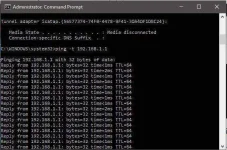
You can check your internet connection speed by sending ping packets to your default gateway.
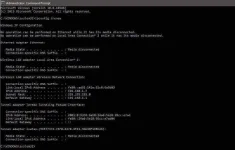
To know your default gateway, you can use ipconfig /all command. Once you get the IP address of your default gateway, start running a continuous ping by typing ping -t <your default gateway address>. The time field value will show you the time taken to get an acknowledgment from the gateway.
Lower time value is an indication that your network is faster. However, running a lot of pings consume network bandwidth as well as your default gateway resources. Though the data packets for ping are very negligible in size and you might not observe any change in internet speed but it does consume bandwidth.
IP release and renew
Well, If you are using a WiFi connection, in the case of IP release and renew, you may experience a temporary speed boost, depending on the strength of the WiFi signal. However, in the case of LAN, it won’t affect speed.
Flushdns to Speed up internet using cmd
Our computer maintains a list of the websites and their corresponding IP addresses that we access the most in the DNS resolver cache. Sometimes, these data become obsolete after months or weeks. So when we flush our DNS resolver cache, we actually flush out the obsolete data and make new entries in the DNS resolver cache table.
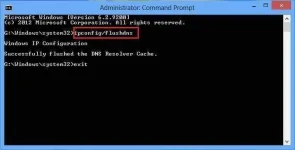
Using this command, you might initially experience a slower connection because of the requirement of the new DNS lookups for every resource. However, you will soon experience faster loading of the websites in your browser.
Speed up internet using cmd ‘Netsh int tcp’ command:
Type this command in your command prompt window and observe carefully:
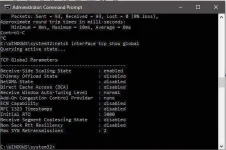
If you do not see Receive Window Autotuning level as ‘Normal’ as shown above then run the following command:
After this command, let’s check for another parameter of Windows in terms of the slow internet connection called ‘Windows scaling heuristics’. To check for this parameter, type
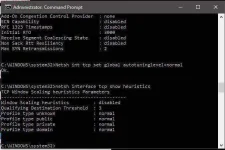
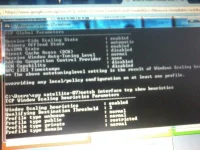
Well, in my case, it’s disabled. However, in some case, you might it enable. That means Microsoft in some ways, is trying to limit your internet connection. So avoid it and to get faster internet, type the below command and press enter:
Once you are done with the above steps, you can follow step one again to measure the time value in getting a ping acknowledgment from the default gateway, just to check if your internet speed has gone up or not.
For the people who already posted this credit to him or her.. Thank you
[/iPixx]
You can check your internet connection speed by sending ping packets to your default gateway.
To know your default gateway, you can use ipconfig /all command. Once you get the IP address of your default gateway, start running a continuous ping by typing ping -t <your default gateway address>. The time field value will show you the time taken to get an acknowledgment from the gateway.
Lower time value is an indication that your network is faster. However, running a lot of pings consume network bandwidth as well as your default gateway resources. Though the data packets for ping are very negligible in size and you might not observe any change in internet speed but it does consume bandwidth.
IP release and renew
Well, If you are using a WiFi connection, in the case of IP release and renew, you may experience a temporary speed boost, depending on the strength of the WiFi signal. However, in the case of LAN, it won’t affect speed.
Flushdns to Speed up internet using cmd
Our computer maintains a list of the websites and their corresponding IP addresses that we access the most in the DNS resolver cache. Sometimes, these data become obsolete after months or weeks. So when we flush our DNS resolver cache, we actually flush out the obsolete data and make new entries in the DNS resolver cache table.
Using this command, you might initially experience a slower connection because of the requirement of the new DNS lookups for every resource. However, you will soon experience faster loading of the websites in your browser.
Speed up internet using cmd ‘Netsh int tcp’ command:
Type this command in your command prompt window and observe carefully:
If you do not see Receive Window Autotuning level as ‘Normal’ as shown above then run the following command:
- netsh int tcp set global autotuninglevel=normal
After this command, let’s check for another parameter of Windows in terms of the slow internet connection called ‘Windows scaling heuristics’. To check for this parameter, type
- netsh interface tcp show heuristics
Well, in my case, it’s disabled. However, in some case, you might it enable. That means Microsoft in some ways, is trying to limit your internet connection. So avoid it and to get faster internet, type the below command and press enter:
- netsh interface tcp set heuristics disabled
Once you are done with the above steps, you can follow step one again to measure the time value in getting a ping acknowledgment from the default gateway, just to check if your internet speed has gone up or not.
For the people who already posted this credit to him or her.. Thank you
[/iPixx]