 PH
PHBlock Website
Want to block a website on your computer, then you just follow the simple step which is shown below. In this article you have to learn how to block any website with-out any software.
Follow the steps:
Step-1:
At first Open “Run” from the start menu or press WinKey + R. Just copy paste the following path and press ENTER.
notepad %windir%\system32\drivers\etc\hosts
or
Go to C:\Windows\System32\Drivers\Etc and find the file “hosts”. Then open with notepad file.
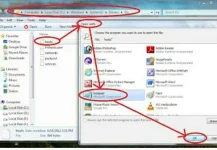
Opening hosts file
Step-2:
When this hosts file is opened in Notepad, at the end of the file you will see something like “127.0.0.1 localhost”.
Step-3:
Under “127.0.0.1 localhost” just add another website URL that you want to block.
For Example:-
127.0.0.1 localhost
127.0.0.2 You do not have permission to view the full content of this post. Log in or register now.
127.0.0.3 You do not have permission to view the full content of this post. Log in or register now.
Step-4:
Make sure every time you add another website, the last digit of the address 127.0.0.x should not be the same.
Step-5:
Save the file and exit.
So, here you go. Restart your browser if it is opened and changes will take place immediately.
The good thing is that no message, no pop ups nothing will be displayed when someone tries to open a blocked website. Your browser will just fail to open those websites without any error messages.
Sa mga nagpost na nito credit na lang.. Thank you
[/iPixx]
Want to block a website on your computer, then you just follow the simple step which is shown below. In this article you have to learn how to block any website with-out any software.
Follow the steps:
Step-1:
At first Open “Run” from the start menu or press WinKey + R. Just copy paste the following path and press ENTER.
notepad %windir%\system32\drivers\etc\hosts
or
Go to C:\Windows\System32\Drivers\Etc and find the file “hosts”. Then open with notepad file.
Opening hosts file
Step-2:
When this hosts file is opened in Notepad, at the end of the file you will see something like “127.0.0.1 localhost”.
Step-3:
Under “127.0.0.1 localhost” just add another website URL that you want to block.
For Example:-
127.0.0.1 localhost
127.0.0.2 You do not have permission to view the full content of this post. Log in or register now.
127.0.0.3 You do not have permission to view the full content of this post. Log in or register now.
Step-4:
Make sure every time you add another website, the last digit of the address 127.0.0.x should not be the same.
Step-5:
Save the file and exit.
So, here you go. Restart your browser if it is opened and changes will take place immediately.
The good thing is that no message, no pop ups nothing will be displayed when someone tries to open a blocked website. Your browser will just fail to open those websites without any error messages.
Sa mga nagpost na nito credit na lang.. Thank you
[/iPixx]
