 PH
PHacervergel87
Forum Guru
Lara croft modifications with 3 tpf files.
TPF mod Contents
1. wet shirt w/ b**bies
2. trouser, tan
3. Clean face and wounds was removed.
I do not own this modification.
credit to "Mick Budarrap" the original modder of this awesome tpf files.
I've tried this modification on windows7 32/64 bit OS.
We will use texmod tool to run this mod.
download texmod tool and tpf mod files ----> You do not have permission to view the full content of this post. Log in or register now.
extract the files.
Instructions:
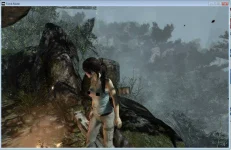
*Para sure at makita na gumana ang mod na ito, play it first and reach up to the 1st camp of the game, after that save and close the game.
1st camp figure
*Dahil ito ay texmod skins, you'll need to use the DX9 h@ck:Launch the Registry Editor
(open the Start Screen/Start Menu, type regedit, hit Enter).
Navigate to HKEY_CURRENT_USER\Software\Crystal Dynamics\Tomb Raider\GraphicsModify on the right panel find RenderAPI right click and hit modify change value 0 to 9 and ok.
*copy texmod and the 3 tpf files paste it to tombraider's destination folder.
*right click texmod hit properties, click on compatibility, under compatibility mode
check the box "run this program in compatibilty mode for: windows xp servicepack3"
check the box " Run this programs as an administrator" click apply and close the window.
*then rename tombraider to tombraider2, Tapos e rename mo naman ang texmod to Tombraider.
run or double click now Tombraider (which is the texmod that you'd renamed)
*click on "target application"
click browse and find Tombraider and rename it backto texmod, rename also tombraider2 back to it's orignal name Tombraider.
*You can select Tombraider now click open.
*click the small yellow folder in the middle. select the 3 tpf file mods and click open
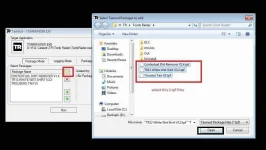
*click run and the game will start , load your saved game (the mod will work after some texture adjustments)
* to change texture hit esc on your keyboard click graphic settings go to advance
set texture quality to High and set texture filter to Bilinear or trilinear apply and close
*voala the mod should work.
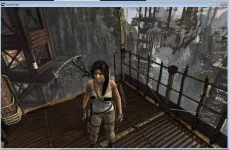
Lara croft on endurance ship
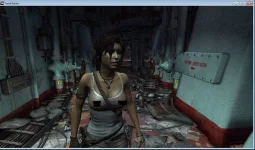
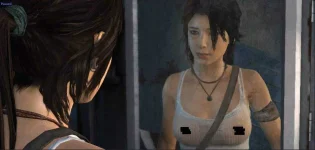
*that's it good luck.
Hit thumbs up if you like it. ^_^
TPF mod Contents
1. wet shirt w/ b**bies
2. trouser, tan
3. Clean face and wounds was removed.
I do not own this modification.
credit to "Mick Budarrap" the original modder of this awesome tpf files.
I've tried this modification on windows7 32/64 bit OS.
We will use texmod tool to run this mod.
download texmod tool and tpf mod files ----> You do not have permission to view the full content of this post. Log in or register now.
extract the files.
Spoiler contents are visible only to Established Members.
Instructions:
*Para sure at makita na gumana ang mod na ito, play it first and reach up to the 1st camp of the game, after that save and close the game.
1st camp figure
*Dahil ito ay texmod skins, you'll need to use the DX9 h@ck:Launch the Registry Editor
(open the Start Screen/Start Menu, type regedit, hit Enter).
Navigate to HKEY_CURRENT_USER\Software\Crystal Dynamics\Tomb Raider\GraphicsModify on the right panel find RenderAPI right click and hit modify change value 0 to 9 and ok.
*copy texmod and the 3 tpf files paste it to tombraider's destination folder.
*right click texmod hit properties, click on compatibility, under compatibility mode
check the box "run this program in compatibilty mode for: windows xp servicepack3"
check the box " Run this programs as an administrator" click apply and close the window.
*then rename tombraider to tombraider2, Tapos e rename mo naman ang texmod to Tombraider.
run or double click now Tombraider (which is the texmod that you'd renamed)
*click on "target application"
click browse and find Tombraider and rename it backto texmod, rename also tombraider2 back to it's orignal name Tombraider.
*You can select Tombraider now click open.
*click the small yellow folder in the middle. select the 3 tpf file mods and click open
*click run and the game will start , load your saved game (the mod will work after some texture adjustments)
* to change texture hit esc on your keyboard click graphic settings go to advance
set texture quality to High and set texture filter to Bilinear or trilinear apply and close
*voala the mod should work.
Lara croft on endurance ship
*that's it good luck.
Hit thumbs up if you like it. ^_^