PH
PHYou have to do this following steps.
1.Click on the START botton then
2.Go to RUN
3.type Regedit and hit ENTER
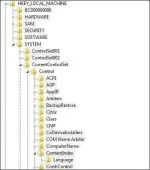
4.this will open Registery Editor
5.Now look for the below key
HKEY_LOACAL_MACHINE-SYSTEM-CurrentControlSet-Control
ContentIndex
6.Now there find the key Called
"Startup Delay" Double Click on it.
7.Now where its base Click Decimal.
8.Now its Default Value is
4800000(75300:hexadecimal)
9.Change the Value to 40000 and click on OK
10.Now close the Registery Editor.
11.Now you have done it and restart your pc and check the speed
1.Click on the START botton then
2.Go to RUN
3.type Regedit and hit ENTER
4.this will open Registery Editor
5.Now look for the below key
HKEY_LOACAL_MACHINE-SYSTEM-CurrentControlSet-Control
ContentIndex
6.Now there find the key Called
"Startup Delay" Double Click on it.
7.Now where its base Click Decimal.
8.Now its Default Value is
4800000(75300:hexadecimal)
9.Change the Value to 40000 and click on OK
10.Now close the Registery Editor.
11.Now you have done it and restart your pc and check the speed