PH
PHbastimanWOLF
Eternal Poster
Links
You do not have permission to view the full content of this post. Log in or register now.
You do not have permission to view the full content of this post. Log in or register now.
File Size: 893.74 MB
Proof

Guitar Pro 7 Features
If you’re unfamiliar with Guitar Pro, it’s a guitar tablature/notation program that allows you to create or download transcriptions of music then play them back to jam along with. That’s the simple explanation, but there’s a lot more Guitar Pro can do.
Guitar Pro 7 boasts a lot of features so rather than repeat them here, You do not have permission to view the full content of this post. Log in or register now..
The way I recommend thinking about Guitar Pro is that it’s a program that allows you to do three main tasks:
Ease of use
Screen layout
The biggest change from Guitar Pro 6 to Guitar Pro 7 is the complete design overhaul. While GP6 doesn’t look dated like GP5 does today, GP7 is a step up in many ways. It took me quite some time to get used to the changes from GP5 to GP6 as everything completely changed so I had to relearn the layout from scratch. With GP7 it didn’t take long to get a feel for GP7’s layout and features. Within an hour I had a good grasp of where to find most features.
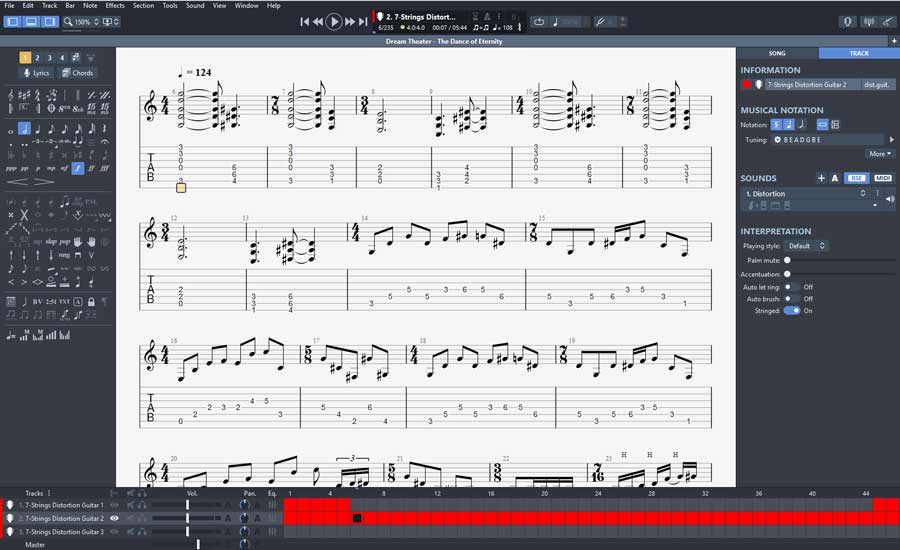
In Guitar Pro 7, there are three main panels to edit and control your score:
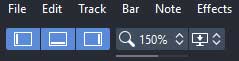
It’s such a simple feature, but makes it easy to change your screen depending on what you’re doing (eg: writing music vs jamming). Having those three buttons always available makes it really quick and easy to access the right tools needed. While GP5 & GP6 often felt cluttered, GP7 does feel a bit more streamlined and organized.
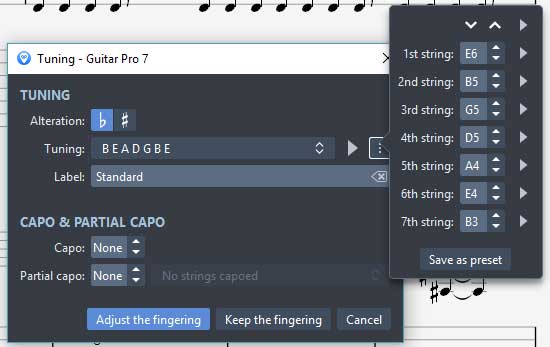
While many features were much easier to access, some of the changes were a big step backwards. For example, to change the tuning on a track, here are the steps you need to go through in GP7:
For comparison, here is how it was done back in GP6:
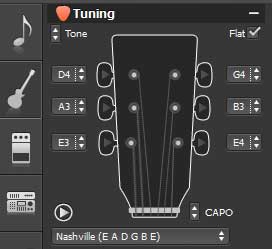
It might not seem like much, but it is a big step backwards. It took me longer than I’d like to admit to try and find how to change individual string tuning in GP7 to the point where I was worried it wasn’t available. Instead of displaying it on the screen like in GP6, it was hidden in a button with three dots.
While we’re talking about tunings, it was surprising to see that the limit on how many strings an instrument can have is 8. GP7 has missed a big opportunity by not raising that limit. It would have been nice to support writing for 9 or 10 string guitars or other instruments like the Chapman Stick which can have 12 or more strings. A lot of musicians are experimenting with instruments with more than 8 strings, so it’s disappointing that in 2017 we’re still stuck with the same limitation as it was in 2010.
The reason I mention this tuning issue is because you may like some of the changes and dislike other changes. For the most part I really liked the changes from GP6 to GP7, but little changes like editing tuning left me scratching my head wondering what the designers were thinking. Sometimes it feels like GP7 is a big step forward, while other times it feels like things were moved around for no good reason.
Notation Options
One aspect I found frustrating in GP6 was the way other non-guitar instruments were handled. Try to write for a piano or drum kit in GP6 and by default you couldn’t enter the notes using TAB format or view TAB at all. Whether you like TAB or not isn’t the issue here. The issue is that GP6 didn’t give you a choice – you were forced to use only one method. I was extremely glad to see that in GP7 you have complete freedom to write, edit and view any instruments any way you want. You’re not forced to use a method you don’t like – you have all choices available.
Simple click on ‘Track’ on the right panel, and select the type of notation you want from TAB, Standard Notation and Slash Notation. This means if you want to view everything in Standard Notation, you can. If you prefer Guitar TAB, you can view everything in TAB format. If you’re a GP5 user and write your drum tracks on TAB (eg: 42 for hi-hat, 49 for crash cymbal, etc.), you can continue to write drums that way.
File Formats
GP6 annoyed a lot of people as it introduced a new file format: .gpx. If you had GP5 and didn’t want to make the change to GP6, you started to see gpx files on sites like ultimate-guitar.com. Well unfortunately GP7 introduces another new format: .gp. While it’s possible to export in the now older .gpx format, you can’t export to the older .gp5 format – so you can’t share anything with other guitarists who still use GP5.
Of course GP7 can import all older formats as well as MIDI, PowerTab and other common formats. But for some guitarists it’s frustrating news to see yet another new format appear.
Sound
I personally never really cared about sound quality when using Guitar Pro. MIDI was fine and allowed me to write my music and get a rough idea how it sounds before I record real instruments. I never used RSE (Realistic Sound Engine) on GP6 because I felt it was distracting compared to MIDI. To me, Guitar Pro is mainly a writing tool, so RSE wasn’t important. But if you mainly use Guitar Pro to jam along or learn songs, the RSE and built-in effects are worth taking a look at.
RSE
The RSE has a really nice range of instruments available along with heaps of presets. This is a great way to quickly get close to the style of tone you’re after. While you shouldn’t expect the instruments to sound like real instruments, they’re good enough for songwriting or jamming purposes.
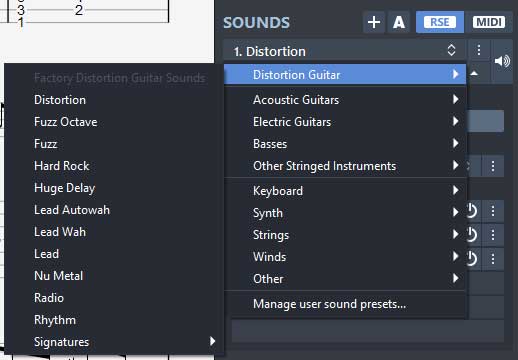
Notice the ‘RSE’ and ‘MIDI’ buttons on the top right? These are available on every track so you can easily switch between the different modes on individual tracks as you like.
Effects
Click on the icon next to any effect and you’ll bring up a nice graphic of the pedal/amp:
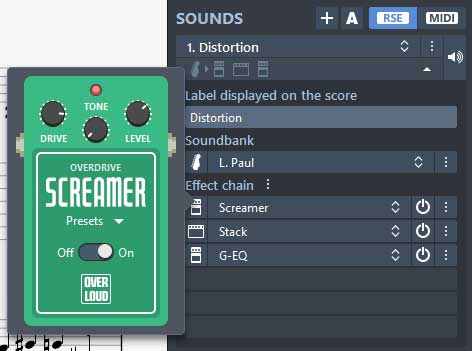
This is a great way to learn about different effects as well as try out different effects on any parts you’re writing. A new feature in GP7 is that you can connect your guitar to your computer and run your guitar through the effects. Don’t expect anywhere near the same quality a program like You do not have permission to view the full content of this post. Log in or register now. offers, but it’s good enough to quickly try out different effects while songwriting.
Reliability/Quality
Speed
GP6 was horribly sluggish on my laptop when it first came out, but performance gradually improved as GP6 was updated. I was glad to see that GP7 loaded much faster and didn’t feel as slow on the same aging laptop. I’m sure it would run lightning fast on a decent computer, but I’m happy with the performance so far.
Bugs
I was really surprised when I saw GP7 was suddenly available. There was no press release or big announcement on the day – it just became available on the website. My emails to the marketing team were ignored which made me worried that the release was rushed and that GP7 may not really be ready for release.
Unfortunately my worry was confirmed with crash after crash and reading countless comments on their Facebook page with similar experiences. I remember GP6 started out as a buggy mess and it does seem like Arobas rushed the launch of GP7.
Fortunately a lot of issues have already been fixed, but it’s disappointing to see that Arobas haven’t learned from the launch of GP6. As an example of an error that might impact you if you bought GP7 after launch, if you’re on Windows you may find that the updater doesn’t work at all. It will download the update, but not install it. If you’re having this issue, You do not have permission to view the full content of this post. Log in or register now..
Overall impression of Guitar Pro 7
I really like GP7, but was really disappointed with how Arobas released it. They released GP6 when it wasn’t ready and released GP7 full of bugs. A lot of bugs have already been fixed as of version 7.0.4. Now that I’m not constantly annoyed with crashes and bugs, GP7 is growing on me. It’s far better than GP6 in most ways and should continue to improve as they keep updating it.
There are a lot of guitarists who still use GP5 today as they felt GP6 was a big step backwards. I feel that GP7 is finally a big step forward and might be enough to convince people still using GP5 to upgrade. If you’re still on the fence, just download the free trial and see whether you like the changes or not.
Guitar Pro 7 Pros
Guitar Pro is the type of program that every guitarist could find useful. Whether you want to write songs or just learn other people’s songs, Guitar Pro is one of the best tools available. The real question isn’t whether Guitar Pro is for you or not, but which version is right for you.
You do not have permission to view the full content of this post. Log in or register now.
You do not have permission to view the full content of this post. Log in or register now.
File Size: 893.74 MB
Proof
Guitar Pro 7 Features
If you’re unfamiliar with Guitar Pro, it’s a guitar tablature/notation program that allows you to create or download transcriptions of music then play them back to jam along with. That’s the simple explanation, but there’s a lot more Guitar Pro can do.
Guitar Pro 7 boasts a lot of features so rather than repeat them here, You do not have permission to view the full content of this post. Log in or register now..
The way I recommend thinking about Guitar Pro is that it’s a program that allows you to do three main tasks:
- Write music for guitar as well as any other instrument
- Jam along with transcriptions
- Learn songs and parts with tools such as the speed trainer and looper
Ease of use
Screen layout
The biggest change from Guitar Pro 6 to Guitar Pro 7 is the complete design overhaul. While GP6 doesn’t look dated like GP5 does today, GP7 is a step up in many ways. It took me quite some time to get used to the changes from GP5 to GP6 as everything completely changed so I had to relearn the layout from scratch. With GP7 it didn’t take long to get a feel for GP7’s layout and features. Within an hour I had a good grasp of where to find most features.
In Guitar Pro 7, there are three main panels to edit and control your score:
- The left panel contains all the different score editing tools and symbols
- The bottom panel lists instrument tracks, mixing console and allows you to jump to different parts of the song
- The right panel gives you track and song information as well as tuning, effects and TAB/notation options
It’s such a simple feature, but makes it easy to change your screen depending on what you’re doing (eg: writing music vs jamming). Having those three buttons always available makes it really quick and easy to access the right tools needed. While GP5 & GP6 often felt cluttered, GP7 does feel a bit more streamlined and organized.
While many features were much easier to access, some of the changes were a big step backwards. For example, to change the tuning on a track, here are the steps you need to go through in GP7:
- Click on ‘Track’ on the right panel
- Click on the Tuning section to open the tuning window
- Click on the Tuning dropdown and select the preset tuning
- If you want to manually edit individual strings, click the button with three dots to bring up each string (as shown below)
For comparison, here is how it was done back in GP6:
- Click the guitar icon on the left
- Select the preset tuning on the dropdown or change each string on the same screen (as shown below)
It might not seem like much, but it is a big step backwards. It took me longer than I’d like to admit to try and find how to change individual string tuning in GP7 to the point where I was worried it wasn’t available. Instead of displaying it on the screen like in GP6, it was hidden in a button with three dots.
While we’re talking about tunings, it was surprising to see that the limit on how many strings an instrument can have is 8. GP7 has missed a big opportunity by not raising that limit. It would have been nice to support writing for 9 or 10 string guitars or other instruments like the Chapman Stick which can have 12 or more strings. A lot of musicians are experimenting with instruments with more than 8 strings, so it’s disappointing that in 2017 we’re still stuck with the same limitation as it was in 2010.
The reason I mention this tuning issue is because you may like some of the changes and dislike other changes. For the most part I really liked the changes from GP6 to GP7, but little changes like editing tuning left me scratching my head wondering what the designers were thinking. Sometimes it feels like GP7 is a big step forward, while other times it feels like things were moved around for no good reason.
Notation Options
One aspect I found frustrating in GP6 was the way other non-guitar instruments were handled. Try to write for a piano or drum kit in GP6 and by default you couldn’t enter the notes using TAB format or view TAB at all. Whether you like TAB or not isn’t the issue here. The issue is that GP6 didn’t give you a choice – you were forced to use only one method. I was extremely glad to see that in GP7 you have complete freedom to write, edit and view any instruments any way you want. You’re not forced to use a method you don’t like – you have all choices available.
Simple click on ‘Track’ on the right panel, and select the type of notation you want from TAB, Standard Notation and Slash Notation. This means if you want to view everything in Standard Notation, you can. If you prefer Guitar TAB, you can view everything in TAB format. If you’re a GP5 user and write your drum tracks on TAB (eg: 42 for hi-hat, 49 for crash cymbal, etc.), you can continue to write drums that way.
File Formats
GP6 annoyed a lot of people as it introduced a new file format: .gpx. If you had GP5 and didn’t want to make the change to GP6, you started to see gpx files on sites like ultimate-guitar.com. Well unfortunately GP7 introduces another new format: .gp. While it’s possible to export in the now older .gpx format, you can’t export to the older .gp5 format – so you can’t share anything with other guitarists who still use GP5.
Of course GP7 can import all older formats as well as MIDI, PowerTab and other common formats. But for some guitarists it’s frustrating news to see yet another new format appear.
Sound
I personally never really cared about sound quality when using Guitar Pro. MIDI was fine and allowed me to write my music and get a rough idea how it sounds before I record real instruments. I never used RSE (Realistic Sound Engine) on GP6 because I felt it was distracting compared to MIDI. To me, Guitar Pro is mainly a writing tool, so RSE wasn’t important. But if you mainly use Guitar Pro to jam along or learn songs, the RSE and built-in effects are worth taking a look at.
RSE
The RSE has a really nice range of instruments available along with heaps of presets. This is a great way to quickly get close to the style of tone you’re after. While you shouldn’t expect the instruments to sound like real instruments, they’re good enough for songwriting or jamming purposes.
Notice the ‘RSE’ and ‘MIDI’ buttons on the top right? These are available on every track so you can easily switch between the different modes on individual tracks as you like.
Effects
Click on the icon next to any effect and you’ll bring up a nice graphic of the pedal/amp:
This is a great way to learn about different effects as well as try out different effects on any parts you’re writing. A new feature in GP7 is that you can connect your guitar to your computer and run your guitar through the effects. Don’t expect anywhere near the same quality a program like You do not have permission to view the full content of this post. Log in or register now. offers, but it’s good enough to quickly try out different effects while songwriting.
Reliability/Quality
Speed
GP6 was horribly sluggish on my laptop when it first came out, but performance gradually improved as GP6 was updated. I was glad to see that GP7 loaded much faster and didn’t feel as slow on the same aging laptop. I’m sure it would run lightning fast on a decent computer, but I’m happy with the performance so far.
Bugs
I was really surprised when I saw GP7 was suddenly available. There was no press release or big announcement on the day – it just became available on the website. My emails to the marketing team were ignored which made me worried that the release was rushed and that GP7 may not really be ready for release.
Unfortunately my worry was confirmed with crash after crash and reading countless comments on their Facebook page with similar experiences. I remember GP6 started out as a buggy mess and it does seem like Arobas rushed the launch of GP7.
Fortunately a lot of issues have already been fixed, but it’s disappointing to see that Arobas haven’t learned from the launch of GP6. As an example of an error that might impact you if you bought GP7 after launch, if you’re on Windows you may find that the updater doesn’t work at all. It will download the update, but not install it. If you’re having this issue, You do not have permission to view the full content of this post. Log in or register now..
Overall impression of Guitar Pro 7
I really like GP7, but was really disappointed with how Arobas released it. They released GP6 when it wasn’t ready and released GP7 full of bugs. A lot of bugs have already been fixed as of version 7.0.4. Now that I’m not constantly annoyed with crashes and bugs, GP7 is growing on me. It’s far better than GP6 in most ways and should continue to improve as they keep updating it.
There are a lot of guitarists who still use GP5 today as they felt GP6 was a big step backwards. I feel that GP7 is finally a big step forward and might be enough to convince people still using GP5 to upgrade. If you’re still on the fence, just download the free trial and see whether you like the changes or not.
Guitar Pro 7 Pros
- Nice modern layout
- Good score and notation options
- Discount available if upgrading from GP6
- (mostly fixed now) bugs and crashes – they rushed the release and GP7 has a lot of issues that should have been dealt with
- Unable to write for instruments with more than 8 strings
- Some design changes are a step backwards
Guitar Pro is the type of program that every guitarist could find useful. Whether you want to write songs or just learn other people’s songs, Guitar Pro is one of the best tools available. The real question isn’t whether Guitar Pro is for you or not, but which version is right for you.