 PH
PH1.create new folder
2.rename folder
3. Press alt and type 0160 or 255
4. Enter
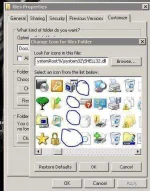
5. Costumize folder. Change icon, pick nio ung invisible icon.
Note:sa numpad nio itype ung 0160 or 255 di pwede yung nasa taas ng qwertyuiop. Magkaiba ang function nila.
So ayun, sana makatulong.
E bakit kelangan natin ng invisible folder??
Ewan ko sainyo, kung anong ilalagay nio, xmovies or ano. Bahala kayo. In my case gamit ko sia sa office, kasi 3 kami sa computer, shifting kasi kami ng sched. So files ko na private lagay ko sa invi folder ko. So ayun
2.rename folder
3. Press alt and type 0160 or 255
4. Enter
5. Costumize folder. Change icon, pick nio ung invisible icon.
Note:sa numpad nio itype ung 0160 or 255 di pwede yung nasa taas ng qwertyuiop. Magkaiba ang function nila.
So ayun, sana makatulong.
E bakit kelangan natin ng invisible folder??
Ewan ko sainyo, kung anong ilalagay nio, xmovies or ano. Bahala kayo. In my case gamit ko sia sa office, kasi 3 kami sa computer, shifting kasi kami ng sched. So files ko na private lagay ko sa invi folder ko. So ayun


 ..,for more security.,iapply narin encryption para di mabuksan pag nakita..BTW..,points sayo.Thanks!