PH
PHstep 1
Download You do not have permission to view the full content of this post. Log in or register now. (Size: 46 MB). Devices marked with ★ are locked. If your device is locked,try You do not have permission to view the full content of this post. Log in or register now.to unlock it first(see my previous threads for proper unlocking). Devices marked with ☆ are unlocked. If your device is unlocked, please just follow the following tutorial to complete the ROM flashing.
step 2
Select the right MIUI ROM version for your phone from miui sites and download the corresponding package file.(Please check if the ROM file suffix is '.tgz'. If it is '.gz', please rename it to '.tgz')
step 3
Turn off the device. Press the Volume– key and the Power button at the same time to enter Fastboot mode. Then connect the device to the Windows PC/laptop via a micro USB cable
step 4
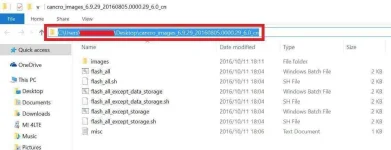
Double click on the downloaded ROM file to decompress it. Open the file folder for the decompressed ROM pack, and copy its path on the computer.
step 5
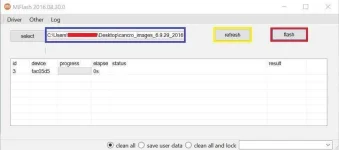
Decompress the MIUI ROM flashing tool downloaded in Step 1, and double click on it to install (if there is security warning, select 'Run'). After installation is completed, open MiFlash.exe and paste into the address bar the ROM file folder path copied in the last step.
Click on the first button (circled out in yellow) to Refresh, and MiFlash should automatically recognize the device. Then click the second button (circled out in red) to flash the ROM file to the device.
step 6
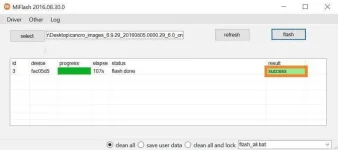
Wait until the progress bar inside MiFlash turns fully green, which means the ROM has been successfully installed. Then your device should automatically boot to the new version.
You do not have permission to view the full content of this post. Log in or register now.
(After Mi PC Suite is installed, make sure that your phone is in fastboot mode, connect your phone to a computer, and select the correct ROM file to flash)
source:xiaomi.com
~Professora Hakimi Kazumi
Asianism
Download You do not have permission to view the full content of this post. Log in or register now. (Size: 46 MB). Devices marked with ★ are locked. If your device is locked,try You do not have permission to view the full content of this post. Log in or register now.to unlock it first(see my previous threads for proper unlocking). Devices marked with ☆ are unlocked. If your device is unlocked, please just follow the following tutorial to complete the ROM flashing.
step 2
Select the right MIUI ROM version for your phone from miui sites and download the corresponding package file.(Please check if the ROM file suffix is '.tgz'. If it is '.gz', please rename it to '.tgz')
step 3
Turn off the device. Press the Volume– key and the Power button at the same time to enter Fastboot mode. Then connect the device to the Windows PC/laptop via a micro USB cable
step 4
Double click on the downloaded ROM file to decompress it. Open the file folder for the decompressed ROM pack, and copy its path on the computer.
step 5
Decompress the MIUI ROM flashing tool downloaded in Step 1, and double click on it to install (if there is security warning, select 'Run'). After installation is completed, open MiFlash.exe and paste into the address bar the ROM file folder path copied in the last step.
Click on the first button (circled out in yellow) to Refresh, and MiFlash should automatically recognize the device. Then click the second button (circled out in red) to flash the ROM file to the device.
step 6
Wait until the progress bar inside MiFlash turns fully green, which means the ROM has been successfully installed. Then your device should automatically boot to the new version.
You do not have permission to view the full content of this post. Log in or register now.
(After Mi PC Suite is installed, make sure that your phone is in fastboot mode, connect your phone to a computer, and select the correct ROM file to flash)
source:xiaomi.com
~Professora Hakimi Kazumi
Asianism