 PH
PHBelow are the simple steps to Install this software on your Windows PC. This application now supports both 32 Bit & 64 Bit Version Windows OS.
1. Download Mi Flash tool . Open the folder where you have placed or downloaded this tool. Now, Extract the Downloaded zip file in your Windows PC.Make sure that you have uninstalled any Previous version of Mi Flash
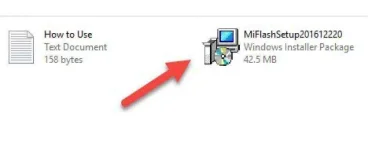
2. Run MiFlashSetup.msi file from extracted folder this will start installation on your window
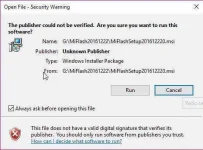
3. Maybe depends on your Windows Setting, You will get a Security Warning. Don’t worry about it! Just press Run button to Continue.
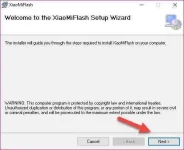
4. On the first screen Choose Next option.
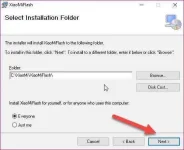
5. On the next screen, Installer will automatically choose Installation Folder. Just press Next button to continue the installation process.
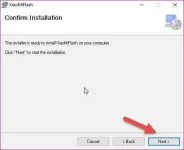
6. Choose Next to Confirm installation
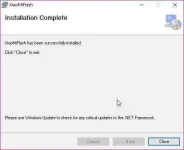
Please wait until it completes installation of this tool on your Windows OS. You will see the installation is completed successfully. Press Close button to exi
That’s it! We have successfully installed Xiaomi Mi Flash tool on your Windows PC. Now, you are ready to flash Xiaomi Stock Firmware/ROMs on your phones
1. Download Mi Flash tool . Open the folder where you have placed or downloaded this tool. Now, Extract the Downloaded zip file in your Windows PC.Make sure that you have uninstalled any Previous version of Mi Flash
2. Run MiFlashSetup.msi file from extracted folder this will start installation on your window
3. Maybe depends on your Windows Setting, You will get a Security Warning. Don’t worry about it! Just press Run button to Continue.
4. On the first screen Choose Next option.
5. On the next screen, Installer will automatically choose Installation Folder. Just press Next button to continue the installation process.
6. Choose Next to Confirm installation
Please wait until it completes installation of this tool on your Windows OS. You will see the installation is completed successfully. Press Close button to exi
That’s it! We have successfully installed Xiaomi Mi Flash tool on your Windows PC. Now, you are ready to flash Xiaomi Stock Firmware/ROMs on your phones
Attachments
-
 run-mi-flash-setup-exe-msi-980x400.webp18.8 KB · Views: 7
 -
 securiety-warning-from-windows-1.webp25.8 KB · Views: 2
 -
 mi-flash-tool-installtion-screenshot-1.webp23 KB · Views: 2
 -
 mi-flash-tool-installtion-screenshot-2.webp21.6 KB · Views: 1
 -
 mi-flash-tool-installtion-screenshot-3.webp11.5 KB · Views: 2
 -
 mi-flash-tool-installtion-screenshot-4.webp13.2 KB · Views: 1
