🔒 Closed Help

Status
Not open for further replies.
How to increase internet speed for PC/Laptop:

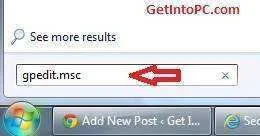
1. Hold or press Windows key + R to open command prompt and type 'gpedit.msc' w/o single quote.
increase-internet-speed.webp

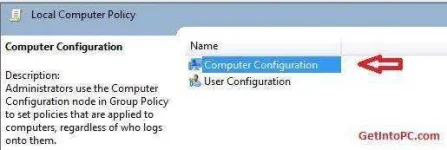
2. Now double click the Computer Configuration as per screenshot.
boost-internet-speed.webp

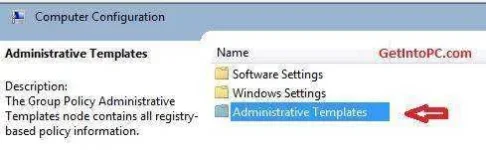
3. Now double click Administrative Templates.
boost-net-speed.webp

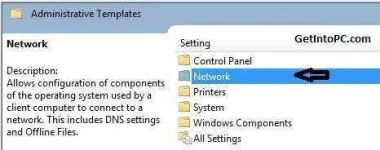
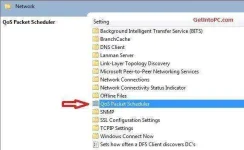
4. Double click Network.
increase-net-speed.webp

5. Double click QoS Packet Scheduler.
optimize-internet-speed.webp

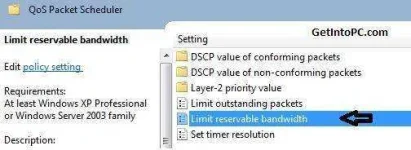
6. Double click Limit reservable bandwidth.
How-to-increase-internet-speed.webp

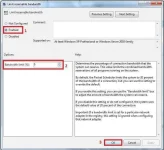
7. First click on Enabled.
Then change Bandwidth limit (%) to zero. As per screenshot.
Then click OK.
increase-and-boost-internet-speed.webp

After you click OK, you have now cut the part of windows bandwidth. There is no reserved bandwidth now. You will experience a difference that your internet speed is optimized now.

Yan lang alam ko paps. Sana makatulong.
 
Status
Not open for further replies.

Similar threads

About this Thread

  • 7
    Replies
  • 662
    Views
  • 5
    Participants
Last reply from:
Jmrie_

Trending Topics

Online now

Members online
1,043
Guests online
920
Total visitors
1,963

Forum statistics

Threads
2,274,929
Posts
28,959,406
Members
1,233,486
Latest member
Vlaaaaaad_
Back
Top