PH
PHJaycee200114
Fanatic
Hi guys..ito po own method ko kung pano mag root
ng galaxy tab 3v via odin
download this file..required pc po ito
testet on my device
heres a link below
You do not have permission to view the full content of this post. Log in or register now.
Extract this file
Open mo ang extracted file at run odin...
Click AP and select the autoroot..Md5 file
Yan yung kailangan para maroot ang device..
Boot mo ang device sa download mode
Press volume down+power+home sabay sabay..
Tas press volume up to continue.
Plug mo ang device sa computer or loptop
Make sure na installed ang drivers ng device mo..
And then click start na sa odin..
Done..wag mabahala sa pag blinm bljnk ng screen..
Tapos na ang root..
at para naman sa TWRP RECOVERY
HERES A LINK BELOW
You do not have permission to view the full content of this post. Log in or register now.
FLASH TWRP RECOVERY VIA RASHR APK OKAy?
Link ng RASHR
You do not have permission to view the full content of this post. Log in or register now.
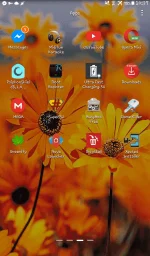
Install rashr apk..after installed..
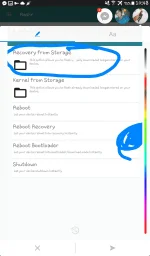
Open it...click recovery from storage.
Pag walang "recovery from storage na nakalagay..boot mo muna sa recovery..tapos reboot..at
Open rashr again..and now meron na yang recovery from storage..
Click nyo lang yan tas select mo yung na TWRP.img na na download mo
And flash..tapos rebooT to recovery.. done
Success
Note lang..wag pindutin ang kernel from storage..dapat recovery from storage or else mag bootloop Device mo kasi sa kernel mo na flash..
Pls pls pls
Pls follow my instructions okay?
GOOD LUCK..
feedback kung may questions or problems..
ng galaxy tab 3v via odin
download this file..required pc po ito
testet on my device
heres a link below
You do not have permission to view the full content of this post. Log in or register now.
Extract this file
Open mo ang extracted file at run odin...
Click AP and select the autoroot..Md5 file
Yan yung kailangan para maroot ang device..
Boot mo ang device sa download mode
Press volume down+power+home sabay sabay..
Tas press volume up to continue.
Plug mo ang device sa computer or loptop
Make sure na installed ang drivers ng device mo..
And then click start na sa odin..
Done..wag mabahala sa pag blinm bljnk ng screen..
Tapos na ang root..
at para naman sa TWRP RECOVERY
HERES A LINK BELOW
You do not have permission to view the full content of this post. Log in or register now.
FLASH TWRP RECOVERY VIA RASHR APK OKAy?
Link ng RASHR
You do not have permission to view the full content of this post. Log in or register now.
Install rashr apk..after installed..
Open it...click recovery from storage.
Pag walang "recovery from storage na nakalagay..boot mo muna sa recovery..tapos reboot..at
Open rashr again..and now meron na yang recovery from storage..
Click nyo lang yan tas select mo yung na TWRP.img na na download mo
And flash..tapos rebooT to recovery.. done
Success
Note lang..wag pindutin ang kernel from storage..dapat recovery from storage or else mag bootloop Device mo kasi sa kernel mo na flash..
Pls pls pls
Pls follow my instructions okay?
GOOD LUCK..
feedback kung may questions or problems..