๐Ÿ”’ Closed Forgot pw :(

Status
Not open for further replies.
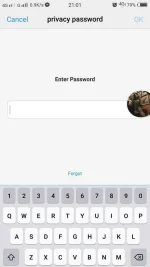
Eto po :(
 

Attachments

  • received_1445213958859139.webp
    received_1445213958859139.webp
    37.8 KB · Views: 26
Eto kung papaano mag hard reset ng vivo
BLU Vivo 5 Hard reset method. Hard reset Delete all your data like photos, contacts and applications (Apps) in your android mobile. You will not recover your files after reset your mobile. So try to recover your password first. If you can not recover your PIN or Password, then follow this method.

  1. Switch off or Turn off your phone.
  2. Then, Press and Hold
    1. Volume Up + Power button (or)
    2. Home button + Volume Up + Power button (or)
    3. Volume Down + Power button (or)
    4. Volume Up + Volume Down + Power button
  3. Please try above all steps one by one, Until you will see Android reboot menu.
  4. Then, To go to the Recovery Mode menu hold down the Power key for a short while.
  5. Next, select option : โ€œwipe data / factory resetโ€ using Volume Down, and Power button to confirm operation.
  6. After that, choose option โ€œyesโ€ with Volume Down, to select and Power button to accept.
  7. Finally, press Power button to enter option โ€œ reboot system now โ€.
  8. Finally, Hard reset done on your mobile.
 
Meron pa way para hindi mawal files mo

Ipagawa mo sa tech read passwor or read pattern lang yan using gsm box or smartcard

Ano location mo
Meron ako box and smartcard libre lang
 
tama pagawa munalng yan..ts kung malapit lang ako matutulungan kita kaso malayo eh ... hehe tama yung opinion sa taas..use gsm box.ts
 
Status
Not open for further replies.

About this Thread

  • 28
    Replies
  • 2K
    Views
  • 8
    Participants
Last reply from:
T R A D E

Trending Topics

Online now

Members online
1,028
Guests online
882
Total visitors
1,910

Forum statistics

Threads
2,274,901
Posts
28,959,245
Members
1,233,482
Latest member
MyNameIsElga
Back
Top