 PH
PHAsus Zenfone Flash Tool 2.0.1 (AFT)
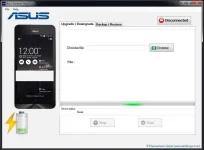
Asus Zenfone Flash Tool is a small application which allows you to flash Stock Firmware on Asus Zenfone Devices. Here, we have managed to share the latest version of Asus Zenfone Flash Tool along with the previous release.
Features of Asus Zenfone Flash Tool
● Flash Firmware
It allows you to flash the stock firmware on almost any Asus Smartphone and tablets. Simply Install the Application on your Computer and Launch it, then after connect the device to the computer and select the Firmware you want to flash and you are done.
● Backup Apps
It allows you to backup the user installed apps from the device and save it to the computer. But it doesnt allows you to backup the App data which is used to restore the app settings and points.
● Backup System Apps
It allows you to backup the pre-installed (system) apps from the Asus Smartphone and tablet to the computer. The backup will be saved in .ab format on your computer.
● Restore Backup
It also allows you to restore the backup you have made including the Custom Apps Backup and Pre-Installed (system) Apps from the computer.
How to use Asus Zenfone Flash Tool
Donload Asus Zenfone Flash Tool 2.0.1 You do not have permission to view the full content of this post. Log in or register now.
Donload Asus Firmware & Driver You do not have permission to view the full content of this post. Log in or register now.
Asus Zenfone Flash Tool is a small application which allows you to flash Stock Firmware on Asus Zenfone Devices. Here, we have managed to share the latest version of Asus Zenfone Flash Tool along with the previous release.
Features of Asus Zenfone Flash Tool
● Flash Firmware
It allows you to flash the stock firmware on almost any Asus Smartphone and tablets. Simply Install the Application on your Computer and Launch it, then after connect the device to the computer and select the Firmware you want to flash and you are done.
● Backup Apps
It allows you to backup the user installed apps from the device and save it to the computer. But it doesnt allows you to backup the App data which is used to restore the app settings and points.
● Backup System Apps
It allows you to backup the pre-installed (system) apps from the Asus Smartphone and tablet to the computer. The backup will be saved in .ab format on your computer.
● Restore Backup
It also allows you to restore the backup you have made including the Custom Apps Backup and Pre-Installed (system) Apps from the computer.
How to use Asus Zenfone Flash Tool
- First, Connect your phone to PC .
- Open Run window and type Asus.
- To connect your mobile to flash tool click on “Disconnected” button.
- If it gets connected then it will show Connected with Greenlight and your mobile phone will be displayed.
- Now choose the ROM by clicking on Browse Button.
- Wait until file loaded Successfully when file loaded successfully “Start” button will be enabled.
- Click on “Start” Button. Now message box will open follow instruction on “message box”.
- Don’t click on “Resume” button until you follow all steps on “message box”.
- Now click on resume button and wait to complete task. Now restart your mobile and done.
Donload Asus Zenfone Flash Tool 2.0.1 You do not have permission to view the full content of this post. Log in or register now.
Donload Asus Firmware & Driver You do not have permission to view the full content of this post. Log in or register now.
