 PH
PHComeback9209
Leecher
Dj Maddy!
Trick to Bypass Timer Restriction in Cyber Cafe
Requirements:
lets start!
Open it up on the cyber cafe system you are using.
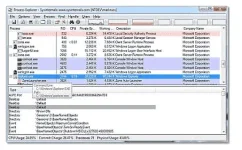
Now you need to serach for two running processess "Client.exe" and "Guardit.exe", as these two are responsible for running that timer
Now just right on both of them and chooseSuspend.
This terminates the process and hence your timer will be stopped, and you can browse internet without restriction.
After some good time surfing, if you wanna re=enable the timer, you can simply right click once again and choose Resume to start those process again, hence your timer will be started again.
heres the application : You do not have permission to view the full content of this post. Log in or register now.
take note: do it on your own risk. I may not responsible to any problem will cause it to you. this is only for those who had important needs.
hopefuly this will help a lot to you ma'friend.
-Maddy
Trick to Bypass Timer Restriction in Cyber Cafe
Requirements:
- PC on any Cyber Cafe
- Process Explorer (exe)
lets start!
Open it up on the cyber cafe system you are using.
Now you need to serach for two running processess "Client.exe" and "Guardit.exe", as these two are responsible for running that timer
Now just right on both of them and chooseSuspend.
This terminates the process and hence your timer will be stopped, and you can browse internet without restriction.
After some good time surfing, if you wanna re=enable the timer, you can simply right click once again and choose Resume to start those process again, hence your timer will be started again.
heres the application : You do not have permission to view the full content of this post. Log in or register now.
take note: do it on your own risk. I may not responsible to any problem will cause it to you. this is only for those who had important needs.
hopefuly this will help a lot to you ma'friend.
-Maddy
 Thanksss