 PH
PH-
Welcome to PHCorner Forums! Sign up for free to unlock full access and exclusive privileges, including:
- Asking questions about computer and mobile issues
- Discovering internet tips for your mobile network and computer
You are using an out of date browser. It may not display this or other websites correctly.
You should upgrade or use an alternative browser.
You should upgrade or use an alternative browser.
- Status
- Not open for further replies.
rockyswordz
Eternal Poster
Pagstart Update mo mga softwares mo. Baka nawala kasi sa format mo, nadefault mga apps mo. Kaya update mo po. O kaya punta ka sa Device manager mo, check mo yung mga iupdate na driver mo.
goldenghost
Honorary Poster
Update no pwede iupdate. Tapos Osama mo na linisin yung CPU fan ng laptop.
Parang pang pro naman po. Saan po makikita mga iuupdate?Update no pwede iupdate. Tapos Osama mo na linisin yung CPU fan ng laptop.
goldenghost
Honorary Poster
Punta ka sa website ng laptop brand mo. Hanap ka kung may Device Update Downloader sila. Or kung wala download ka ng c.racked software ng kahit ano.
Mheliton_35
Honorary Poster
NO NEED UPDATE YAN NEED PO YAN FORMAT OK NA YAN...
goldenghost
Honorary Poster
Teka.. Pasensya na.. Nasayo pa yung original windows disc mo?
goldenghost
Honorary Poster
Problema sa BIOS kasi yan. Update mo dapat muna yun. Last option lang ang reformat.
goldenghost
Honorary Poster
Eto, try no muna
1. Check Boot Order
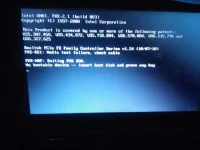
The simplest fix for this error is to make sure your computer’s boot order correctly list your hard disk as the 1st option.
To check the boot order...
a. Restart your computer
b. Access your BIOS menu.
c. Go to the Boot tab.
d. Change the boot order so that your computer’s HDD is listed first.
e. Save the settings.
f. Restart your computer.
1. Check Boot Order
The simplest fix for this error is to make sure your computer’s boot order correctly list your hard disk as the 1st option.
To check the boot order...
a. Restart your computer
b. Access your BIOS menu.
c. Go to the Boot tab.
d. Change the boot order so that your computer’s HDD is listed first.
e. Save the settings.
f. Restart your computer.
goldenghost
Honorary Poster
Eto pa kung ayaw hung una...
2. Partition not set as active.
This error will also appear if your primary partition is no longer set as 'active'. To set the primary partition as active, you need to use diskpart to run the necessary commands for this.
If you have the original Windows installation media, you can use that media:
a. Insert the Windows installation CD/DVD or USB and boot from that.
b. At System Recovery Options or the Troubleshoot, click Command Prompt.
c. Now type: "diskpart" (without the quotes) and press "Enter".
d. Next type: "select disk 0" (again without the quotes) and press "Enter".
NOTE: Where 0 is the disk’s number where your Windows is installed on. For a full list of disks that are available on your computer, type "list disk" (without the quotes).
e. Now you want to type: "list partition" (yes, without the quotes) and hit "Enter".
f. Here you will type in: "select partition 1" (you guessed it, without the quotes) and hit "Enter".
NOTE: Where 1 is your primary partition.
g. Finaly type: "active" (no quotes) and hit "Enter".
This should resolve the problem.
NOTE: If you don’t have the original installation media, you will need "Easy Recover Essentials" and run the fixes from the Command Prompt.
2. Partition not set as active.
This error will also appear if your primary partition is no longer set as 'active'. To set the primary partition as active, you need to use diskpart to run the necessary commands for this.
If you have the original Windows installation media, you can use that media:
a. Insert the Windows installation CD/DVD or USB and boot from that.
b. At System Recovery Options or the Troubleshoot, click Command Prompt.
c. Now type: "diskpart" (without the quotes) and press "Enter".
d. Next type: "select disk 0" (again without the quotes) and press "Enter".
NOTE: Where 0 is the disk’s number where your Windows is installed on. For a full list of disks that are available on your computer, type "list disk" (without the quotes).
e. Now you want to type: "list partition" (yes, without the quotes) and hit "Enter".
f. Here you will type in: "select partition 1" (you guessed it, without the quotes) and hit "Enter".
NOTE: Where 1 is your primary partition.
g. Finaly type: "active" (no quotes) and hit "Enter".
This should resolve the problem.
NOTE: If you don’t have the original installation media, you will need "Easy Recover Essentials" and run the fixes from the Command Prompt.
kyoshiro151
Eternal Poster
baka hindi detected yung hdd? maluwag or baka may problema na? sana paki check ng arrangement ng boot order sa bios, need mo hdd first then so on and so forth...
Your laptop is attempting to boot from a network drive maybe due to a hard disk failure, because maybe it was configured that way in your bios.
Try these options:
1. Check if your hdd is still detected in bios.
2. if yes then change boot priority accordingly
3. if windows loads normally then google how to avoid similar situation in the future.
If your HDD is not detected then it has malfunctioned and you will have to replace it with a new one. On a side note, if it is detected then probably the person that reformat your laptop will have to be questioned (repair shop modus). But if you know the person then I think it has to do with the image OS.
Good luck.
Try these options:
1. Check if your hdd is still detected in bios.
2. if yes then change boot priority accordingly
3. if windows loads normally then google how to avoid similar situation in the future.
If your HDD is not detected then it has malfunctioned and you will have to replace it with a new one. On a side note, if it is detected then probably the person that reformat your laptop will have to be questioned (repair shop modus). But if you know the person then I think it has to do with the image OS.
Good luck.
painfredz03
Enthusiast
TS,
check mo sa BIOS if detected iyong HDD.
check mo rin iyong pagkakakabit ng HDD dapat di nagloloose.
check mo rin iyong BOOT Priority. baka nadisabled si HDD lang.
check mo sa BIOS if detected iyong HDD.
check mo rin iyong pagkakakabit ng HDD dapat di nagloloose.
check mo rin iyong BOOT Priority. baka nadisabled si HDD lang.
- Status
- Not open for further replies.
Similar threads
-
❓ Help May laptop problem ako lenovo thinkpad
- Started by Phc-Essential
- Replies: 0
-
-
❓ Help Dell laptop precision 5560 not turning on
- Started by epalkapala
- Replies: 0
-
❓ Help Laptop na 20k-30k worth
- Started by PHC-Black_Heart_30
- Replies: 12
-
❓ Help Napaka LAG ng laptop, patulong if ayos lang.
- Started by M A R I M 0
- Replies: 7
About this Thread
-
18Replies
-
479Views
-
10Participants
Last reply from:
P H C
P H C
New Topics
-
Help how to download and install part file
- Started by ECLIPVEIL
- Replies: 0
- ❓ Computer Discussion & Support
-
Pc repair estimated price help
- Started by Anchora
- Replies: 7
- ❓ Computer Discussion & Support
-
Boot manager missing
- Started by Scare You
- Replies: 5
- ❓ Computer Discussion & Support
-
Patulong po. Windows Security
- Started by debbiepennin
- Replies: 3
- ❓ Computer Discussion & Support
-
SmartPLS pas source naman po
- Started by Unclear
- Replies: 0
- ❓ Computer Discussion & Support
-
Pc no device found
- Started by ashura12
- Replies: 1
- ❓ Computer Discussion & Support
-
INTERNATIONAL WEBINAR AND 2 LOCAL SEMINAR
- Started by PHC-JIA
- Replies: 0
- ❓ Computer Discussion & Support
-
Door Lock Keycard SDK
- Started by Porky Chao Fan
- Replies: 0
- ❓ Computer Discussion & Support
Trending Topics
Online now
- Members online
- 380
- Guests online
- 9,907
- Total visitors
- 10,287