 PH
PHAlert! Alert!
Kindly follow me, For more Tricks and Tutorial Stuffs.
https://phcorner.org/account/following - Hit the link and Kindly type my username then Save change,

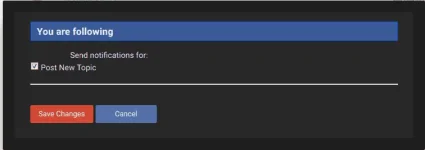 Check the Checkbox for automatically update for my new topic.
"Thank you Brad/Sis"
Step 1
Plug ur Sd Card or USB (Damaged or Corrupted/ hndi nafoformat pag iformat mo)
Step 2
open CMD (Command Prompt)
Step 4
Type this
diskpart
(and press enter)
(tapos may lalabas yan na mga nakasulat)
Step 5
type
list disk
(and press enter)
(tapos lalabas jan ung mga disk ng hard drive ng pc/laptop mo at ung disk ng Memo card o USB mo)
pero be sure na alam mo ung disk ng memo card mo kasi pag nagkamli ka . baka hard drive mo ang maformat mo...
Step 6
then type
select disk 1
(assuming na ang usb/memo card mo ay disk 1) (pero pag disk ibang disk number ang memocard/usb mo, palitan mo lang ang number na icocommand mo.)
pag na enter mo na, ganito ang nakasulat
"Disk 1 is now the selected disk"
(or kung ibang disk man ,, kung anong nicommand mo na number ,, un ang lalabas)
Step 7
type
clean (and press enter)
(lalabas jan ganito)
"DiskPart Succeded in cleaning the disk"
Step 8
type
create partition primary (and press enter)
(lalabas jan ganito)
"DiskPart succeded in creating the specified partition"
Step 9
type
active (and press enter)
(lalabas jan ganito)
"DiskPart marked the current partition as active"
Step 10
type
select partition 1 (and press enter)
(lalabas jan ganito)
"Partition 1 is now the selected partition"
Step 11
type
format fs=fat32 (and press enter)
(pag nag enter,, nagfoformat na yan at lalabas jan ang processing ng pag format kung ilang percent na . konting tyaga lang sa pag hintay kasi pag malaki ang memory ng memocard/ usb mo ,. medyo matagal to
(at pag nag 100percent yan ganito ang labas)
"DiskPart successfully formatted the volume."
Step 12
type
exit (and press enter)
And your done!!! grin emoticon
Eject and Plug again ur Memory card / Flashdrive sa Pc/Laptop mo.
-Keeera
Kindly follow me, For more Tricks and Tutorial Stuffs.
https://phcorner.org/account/following - Hit the link and Kindly type my username then Save change,
Check the Checkbox for automatically update for my new topic. "Thank you Brad/Sis"
Step 1
Plug ur Sd Card or USB (Damaged or Corrupted/ hndi nafoformat pag iformat mo)
Step 2
open CMD (Command Prompt)
Step 4
Type this
diskpart
(and press enter)
(tapos may lalabas yan na mga nakasulat)
Step 5
type
list disk
(and press enter)
(tapos lalabas jan ung mga disk ng hard drive ng pc/laptop mo at ung disk ng Memo card o USB mo)
pero be sure na alam mo ung disk ng memo card mo kasi pag nagkamli ka . baka hard drive mo ang maformat mo...
Step 6
then type
select disk 1
(assuming na ang usb/memo card mo ay disk 1) (pero pag disk ibang disk number ang memocard/usb mo, palitan mo lang ang number na icocommand mo.)
pag na enter mo na, ganito ang nakasulat
"Disk 1 is now the selected disk"
(or kung ibang disk man ,, kung anong nicommand mo na number ,, un ang lalabas)
Step 7
type
clean (and press enter)
(lalabas jan ganito)
"DiskPart Succeded in cleaning the disk"
Step 8
type
create partition primary (and press enter)
(lalabas jan ganito)
"DiskPart succeded in creating the specified partition"
Step 9
type
active (and press enter)
(lalabas jan ganito)
"DiskPart marked the current partition as active"
Step 10
type
select partition 1 (and press enter)
(lalabas jan ganito)
"Partition 1 is now the selected partition"
Step 11
type
format fs=fat32 (and press enter)
(pag nag enter,, nagfoformat na yan at lalabas jan ang processing ng pag format kung ilang percent na . konting tyaga lang sa pag hintay kasi pag malaki ang memory ng memocard/ usb mo ,. medyo matagal to
(at pag nag 100percent yan ganito ang labas)
"DiskPart successfully formatted the volume."
Step 12
type
exit (and press enter)
And your done!!! grin emoticon
Eject and Plug again ur Memory card / Flashdrive sa Pc/Laptop mo.
-Keeera
 thanks