 PH
PHHow To Hide/Unhide folder files in Windows 7?
first of all you need to listen to my heartbeat tracks
while listening did you know that my trick was known as "the tricks of white häçker students"?
well you all need to do, just open your ears and lend a hand to understand even you already know this trick.
so let's get started!
requirements: PC/mouse&keyboard ofcourse
1st method:
steps:
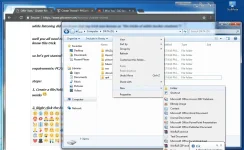
1. Create a file/folder then save any files you wanna save. even love letter of you made will works
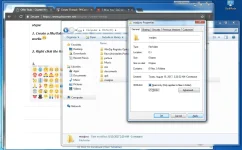
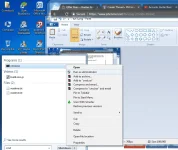
2. Right click the folder/files that you made earlier. then tap Properties>General>tap Hidden then apply.
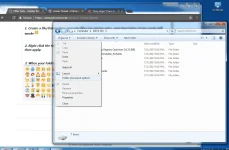
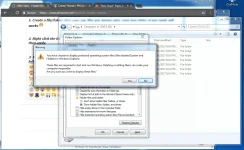
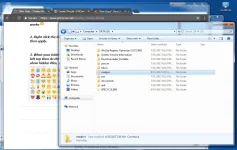
3. When your folder/files was gone like an blink of an eye click organize you can see it in left top then do this step Folder and search option>View>uncheck 3 HIDE options then check show hidden files, folders and drives>click yes and apply then ok.
boom it will shows the hidden files/folder that you've been hide earlier.
2nd method:
steps:
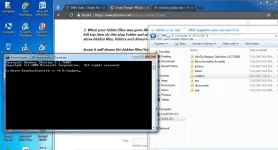
1. HIDE FILES - Open your CMD run as administrator or even not then type this command
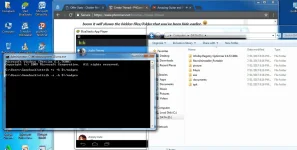
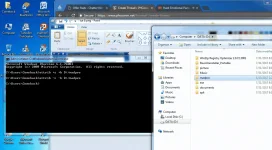
attrib +s +h D:/madpro then hit enter. i created files/folder on my drive "D" if you make it on dirve "C" then change the D:/madpro to C:/madpro.
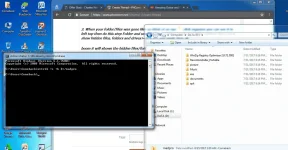
2. UNHIDE FILES - Open your CMD again then do the same command but change the possitve sign "+" to negative sign "-"
attrib -s -h D:/madpro then hit enter.
then thats it you can see your files/folder again
i hope this will helps you a lot PHC members. this is only educational purpose dont do for some bad things or else our world ends in poverty and lies of truth persons. get it?
here I am always. call me MADPRO - maddy for short and always telling to you my friend "learn from pro listener's because when they teaching you, it's 100% guarantee that they will teach you the good and better ways"
closing heartbeat track:
https://phc.onl/#forbidden#/58TT_4nEFX4
https://phc.onl/#forbidden#/rkoEWm4Bovs
hope you like it !
visit also my other thread hopefuly it will helps you a lot
https://phcorner.org/t/how-to-acces...id-tricks-phc-here-we-go.378593/#post-5562266
https://phcorner.org/t/how-to-activate-god-mode-in-windows-pc-phc-here-we-go.378620/#post-5560834
hanggang sa uulitin!
`MADPRO
first of all you need to listen to my heartbeat tracks
while listening did you know that my trick was known as "the tricks of white häçker students"?
well you all need to do, just open your ears and lend a hand to understand even you already know this trick.
so let's get started!
requirements: PC/mouse&keyboard ofcourse
1st method:
steps:
1. Create a file/folder then save any files you wanna save. even love letter of you made will works
2. Right click the folder/files that you made earlier. then tap Properties>General>tap Hidden then apply.
3. When your folder/files was gone like an blink of an eye
click organize you can see it in left top then do this step Folder and search option>View>uncheck 3 HIDE options then check show hidden files, folders and drives>click yes and apply then ok.boom it will shows the hidden files/folder that you've been hide earlier.
2nd method:
steps:
1. HIDE FILES - Open your CMD run as administrator or even not
then type this command attrib +s +h D:/madpro then hit enter. i created files/folder on my drive "D" if you make it on dirve "C" then change the D:/madpro to C:/madpro.
2. UNHIDE FILES - Open your CMD again then do the same command but change the possitve sign "+" to negative sign "-"
attrib -s -h D:/madpro then hit enter.
then thats it you can see your files/folder again
i hope this will helps you a lot PHC members. this is only educational purpose dont do for some bad things or else our world ends in poverty and lies of truth persons. get it?
here I am always. call me MADPRO - maddy for short and always telling to you my friend "learn from pro listener's because when they teaching you, it's 100% guarantee that they will teach you the good and better ways"
closing heartbeat track:
https://phc.onl/#forbidden#/58TT_4nEFX4
https://phc.onl/#forbidden#/rkoEWm4Bovs
hope you like it !
visit also my other thread hopefuly it will helps you a lot
https://phcorner.org/t/how-to-acces...id-tricks-phc-here-we-go.378593/#post-5562266
https://phcorner.org/t/how-to-activate-god-mode-in-windows-pc-phc-here-we-go.378620/#post-5560834
hanggang sa uulitin!
`MADPRO
Attachments
-
 tut 1.webp119.4 KB · Views: 9
 -
 tut 2.webp90.7 KB · Views: 6
 -
 tut 3.webp88.1 KB · Views: 7
 -
 tut 4.webp106.7 KB · Views: 7
 -
 tut 5.webp97.5 KB · Views: 7
 -
 tut 6.webp91 KB · Views: 6
 -
 tut 7.webp105.8 KB · Views: 7
 -
 tut 8.webp98.4 KB · Views: 6
 -
 tut 9.webp98.8 KB · Views: 5
 -
 tut 10.webp109.8 KB · Views: 6