PH
PHDora The Explorer
Forum Guru
IP Hunter tutorial for pocket wifi and modem b315s-936 with version 3.1.2. Below are the basic steps and tutorial for pocket wifi:
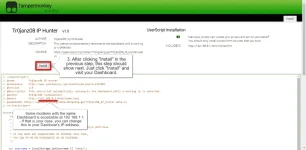
Installtion of tr0janz08 IP Hunter
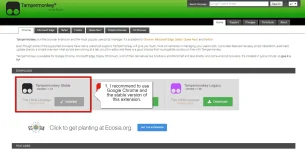
1. Download and Install You do not have permission to view the full content of this post. Log in or register now. by Jon Biniok
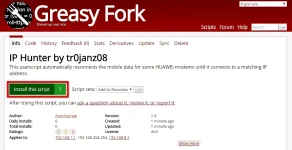
2. Install the IP hunter script here by You do not have permission to view the full content of this post. Log in or register now.
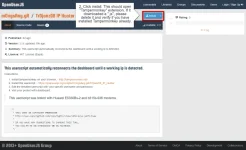
3. Install with Tempermonkey
How to use tr0janz08 IP Hunter
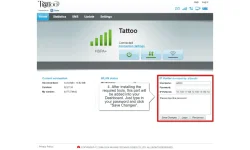
1. Open the modem dashboard
2. Initially you will need to type your username and password then save changes. Note this tool will automatically function every time you access the dashboard.
How to Update tr0janz08 IP Hunter
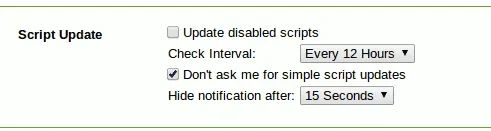
1. By default the tool upates periodically you can change the time interval though on the scrip update section
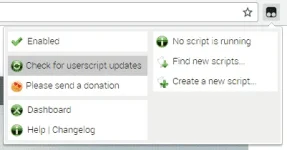
2. To get the latest updates you can click the "Tampermonkey icon" then click "Check for userscript updates".
This tutorial was tested on the following models
Disclaimer: This tool is for educational purposes only.
Installtion of tr0janz08 IP Hunter
1. Download and Install You do not have permission to view the full content of this post. Log in or register now. by Jon Biniok
2. Install the IP hunter script here by You do not have permission to view the full content of this post. Log in or register now.
3. Install with Tempermonkey
How to use tr0janz08 IP Hunter
1. Open the modem dashboard
2. Initially you will need to type your username and password then save changes. Note this tool will automatically function every time you access the dashboard.
How to Update tr0janz08 IP Hunter
1. By default the tool upates periodically you can change the time interval though on the scrip update section
2. To get the latest updates you can click the "Tampermonkey icon" then click "Check for userscript updates".
This tutorial was tested on the following models
- E5330Bs-2
- B315s-936
- E3531
- E5330cs-82
- 15.100.09.00.15
- 17.100.09.00.03
- 17.100.12.01.158
- 17.100.14.00.158
Disclaimer: This tool is for educational purposes only.