 PH
PHJMharzky014
Honorary Poster
------------------------------------------------------------------------------------------------------------------
Internet Download Manager 6.28 Build 15 Free Download Latest Version for Windows PC. It’s full offline installer standalone setup of Internet Download Manager (IDM) for Windows 32 bit 64 bit PC.
Internet Download Manager Full Overview
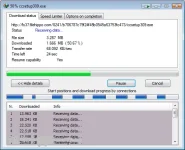
Internet Download Manager is a reliabe and very useful tool with safe multipart downloading technology to accelerate from internet your downloads such a video, music, games, documents and other important stuff for you files. IDM software download free full version has a smart download logic accelerator and increases download speeds by up to 5 times, resumes and schedules downloads. Comprehensive error recovery and resume capability will restart broken or interrupted downloads due to lost connections, network problems, computer shutdowns, or unexpected power outages. Simple graphic user interface makes Internet Download Manager user friendly and easy to use. Unlike other download managers and accelerators, IDM segments downloaded files dynamically during download process and reuses available connections without additional connect and login stages to achieve best acceleration performance


What’s New in Internet Download Manager
* Fixed bugs
Instruction po nsa loob na po ng files pag kaopen mo gamit ng winrar po..
Ito po ung links.. Paki Download Na lang po.. Palike na rin po Thanks.
IDM.6.28.Build.15.Full
You do not have permission to view the full content of this post. Log in or register now.
IDM.6.28.Build.15.Fix
You do not have permission to view the full content of this post. Log in or register now.
How to Disable Internet Download Manager Automatic Update Check
----------------------------------------------------------------
You do not have permission to view the full content of this post. Log in or register now., shortly known as IDM is probably the most popular among ρáíd download manager tools available today for Windows. Along with accelerated downloader, You do not have permission to view the full content of this post. Log in or register now. which lets you directly download videos from web besides normal files. IDM works much more conveniently than other download manager programs.
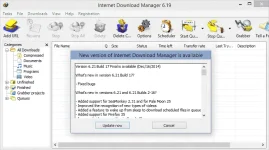
IDM also frequently checks for new version and notifies you with a dialog promptly. The dialog has the title “New version of Internet Download Manager is available” with latest version information in the field. This is really A cool feature which lets you know that an update of this tool is available. Thus you don’t have to tension about not having the latest version.
----------------------------------------------------------------
However, in case you want to stop IDM from checking for update, download
Disable-IDM-Auto-Update-Check zip
You do not have permission to view the full content of this post. Log in or register now.
-----------------------------------------------------------------------------------------
You do not have permission to view the full content of this post. Log in or register now.
and run the REG file, or proceed to the following guide.
How to Turn off IDM Automatic Update Check
2.In Registry Editor, proceed as following: HKEY_CURRENT_USER > Software > DownloadManager.
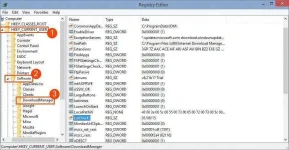
3.Double click on the name LstCheck (it can be LastCheck for older IDM versions).
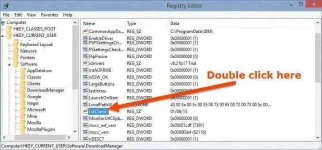
4.Change the value to a much future date as I did:
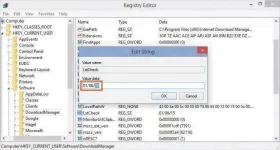 5.Hit OK and close Registry editor.
6.Restart your PC.
This will prevent IDM from showing update availability notification.
Bonus: How to Manually Update IDM
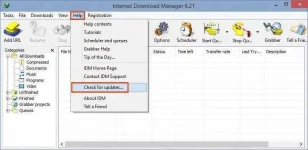
It will check for latest version and notify you if there’s an update or not.
It’s recommended to keep Internet Download Manager always updated as latest versions come with bug fixes, optimization and new features.
Internet Download Manager 6.28 Build 15 Free Download Latest Version for Windows PC. It’s full offline installer standalone setup of Internet Download Manager (IDM) for Windows 32 bit 64 bit PC.
Internet Download Manager Full Overview
Internet Download Manager is a reliabe and very useful tool with safe multipart downloading technology to accelerate from internet your downloads such a video, music, games, documents and other important stuff for you files. IDM software download free full version has a smart download logic accelerator and increases download speeds by up to 5 times, resumes and schedules downloads. Comprehensive error recovery and resume capability will restart broken or interrupted downloads due to lost connections, network problems, computer shutdowns, or unexpected power outages. Simple graphic user interface makes Internet Download Manager user friendly and easy to use. Unlike other download managers and accelerators, IDM segments downloaded files dynamically during download process and reuses available connections without additional connect and login stages to achieve best acceleration performance
What’s New in Internet Download Manager
* Fixed bugs
Instruction po nsa loob na po ng files pag kaopen mo gamit ng winrar po..
Ito po ung links.. Paki Download Na lang po..
Palike na rin po Thanks.IDM.6.28.Build.15.Full
You do not have permission to view the full content of this post. Log in or register now.
IDM.6.28.Build.15.Fix
You do not have permission to view the full content of this post. Log in or register now.
How to Disable Internet Download Manager Automatic Update Check
----------------------------------------------------------------
You do not have permission to view the full content of this post. Log in or register now., shortly known as IDM is probably the most popular among ρáíd download manager tools available today for Windows. Along with accelerated downloader, You do not have permission to view the full content of this post. Log in or register now. which lets you directly download videos from web besides normal files. IDM works much more conveniently than other download manager programs.
IDM also frequently checks for new version and notifies you with a dialog promptly. The dialog has the title “New version of Internet Download Manager is available” with latest version information in the field. This is really A cool feature which lets you know that an update of this tool is available. Thus you don’t have to tension about not having the latest version.
----------------------------------------------------------------
However, in case you want to stop IDM from checking for update, download
Disable-IDM-Auto-Update-Check zip
You do not have permission to view the full content of this post. Log in or register now.
-----------------------------------------------------------------------------------------
You do not have permission to view the full content of this post. Log in or register now.
and run the REG file, or proceed to the following guide.
How to Turn off IDM Automatic Update Check
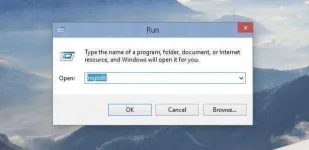
- Press Win+R on you keyboard to launch Run. Type regedit and hit OK. It will run Registry Editor.
2.In Registry Editor, proceed as following: HKEY_CURRENT_USER > Software > DownloadManager.
3.Double click on the name LstCheck (it can be LastCheck for older IDM versions).
4.Change the value to a much future date as I did:
5.Hit OK and close Registry editor.6.Restart your PC.
This will prevent IDM from showing update availability notification.
Bonus: How to Manually Update IDM
- Select Help > Check for updates from toolbar.
It will check for latest version and notify you if there’s an update or not.
It’s recommended to keep Internet Download Manager always updated as latest versions come with bug fixes, optimization and new features.