 PH
PHThe Real One
Forum Expert

Description:
USB Flash Drive Format Tool Pro 1.0.0.320 Retail,USB Drive Format Tool is a tiny freeware utility designed for formatting any USB storage devices (USB Flash drive, USB stick, USB pen drive, USB portable drive, and SDCard) in FAT, FAT32, exFAT, and NTFS file systems.
Features:
- USB Drive Format Tool is a tiny freeware utility designed for formatting any USB storage devices (USB Flash drive, USB stick, USB pen drive, USB portable drive, and SDCard) in FAT, FAT32, exFAT, and NTFS file systems.
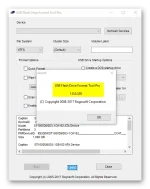
- To get started, you will need to connect the USB device that you intend to work with to the computer, so the utility can detect it and display it in its main screen. Users simply need to specify the USB device they wish to format, select the file system and assign the volume a label, then optionally choose quick format or enable compression.
- One of the differences between USB Drive Format Tool and the regular formatting tool found in Windows is the fact that this freeware allows users to securely erase data on USB drives with 12 algorithms of industrial strength, while the Windows version does not provide this option to wipe any disk drive.
- Moreover, the free tool can be used to format USB storage devices that cannot be formatted by Windows; anyone who encounters this problem «windows was unable to complete the format» might use this tool to repair the USB drives that are behaving badly. Users can easily recover any USB Flash drive to its full capacity by removing any tracks of malicious software, preloaded software, pop-up ads, or hidden disk partitions that cannot be removed in the traditional way.
- Furthermore, one also has the possibility of creating a DOS start-up USB drive, or making a bootable USB stick to setup Windows, by either using a Microsoft Windows Setup CD/DVD, or an ISO image file located at a specific path. The conversion from ISO to USB is straightforward; the software helps you write the ISO image file to USB disk. You only need to select the ISO file you want to burn, and select the USB flash drive, then the software can quickly burn the entire ISO file. Meanwhile, you can create bootable USB disk with a USB flash drive.
- The software application has been tested on many storage device units for safety and stability. Some of the USB sticks that were used in the tests are: Compact Flash, SDCard, CF Card II, Memory Stick Duo Pro, SDHC, SDXC, Flash Drive, Thumb Drive, Pen Drive) of the following brands, SanDisk, Kingston, HP, PNY, Silicon Power, Transcend, Samsung, Verbatim, Lexar, Corsair, Toshiba, Sony, LaCie, Teclast, ADATA, Eaget, Patriot.

You do not have permission to view the full content of this post. Log in or register now.


