 PH
PHAlmost everyone is aware about ‘Internet Download Manager’ (IDM). You might have been using this application since it helps you to download files from web at high speed. I would say, this is from one of the best tool to be used to download files from internet. But you may have been facing the pop up that ‘IDM has been registered with the Fake serial number ’.
This pop up is really very irritating since it appears every time when you are about to download some file or when you start your system. This error leads you to search for cracked file from torrent and other alternative.
Here in this article I am going to reveal 2 simple and easy steps to get rid of this pop up without using any torrent file or without using any fake serial key.
Before proceeding use You do not have permission to view the full content of this post. Log in or register now. to remove previously installed IDM completely.
Fix IDM has been registered with a fake serial number
Method 1: Tweaking with IDM files.
#1. Open window explorer and navigate to ‘Internet Download Manager’ folder in program files.
Open ‘Internet Download Manager’ folder to see the list of files as shown below:
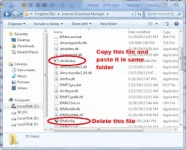
#2. In open window, search and delete ‘IDMGrHlp.exe’ file. And copy ‘idmBroker.exe’ from same folder and paste it in same folder.
How to remove ‘IDM has been registered with the fake serial number ’ error?
May 28, 2017 By Anshul Leave a Comment
Almost everyone is aware about ‘Internet Download Manager’ (IDM). You might have been using this application since it helps you to download files from web at high speed. I would say, this is from one of the best tool to be used to download files from internet. But you may have been facing the pop up that ‘IDM has been registered with the Fake serial number ’.
This pop up is really very irritating since it appears every time when you are about to download some file or when you start your system. This error leads you to search for cracked file from torrent and other alternative.
Here in this article I am going to reveal 2 simple and easy steps to get rid of this pop up without using any torrent file or without using any fake serial key.
Before proceeding use You do not have permission to view the full content of this post. Log in or register now. to remove previously installed IDM completely.
Fix IDM has been registered with a fake serial number
Method 1: Tweaking with IDM files.
#1. Open window explorer and navigate to ‘Internet Download Manager’ folder in program files.
Open ‘Internet Download Manager’ folder to see the list of files as shown below:
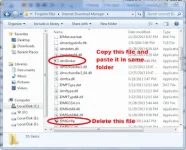
#2. In open window, search and delete ‘IDMGrHlp.exe’ file. And copy ‘idmBroker.exe’ from same folder and paste it in same folder.
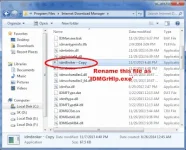
#3. Once you done with Step #2. Now rename the copied file of ‘idmBroker.exe’ to ‘IDMGrHlp.exe’ as shown below:
#4. Now last step is to restart your system to apply this effect and enjoy the downloading without any interruption.
Method 2: Play with Hosts File
#1. Open window explorer and navigate to folder > ‘C:WindowsSystem32driversetc’.
This folder contains 5 files out of which one is ‘hosts’ file.
#2. Right click on that file follow by Open With >> Notepad.
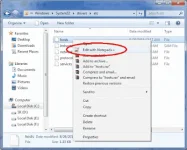
#3. Once you have opened this file in Notepad. In my case I am using ‘Notepadd++’ it doesn’t make any difference.
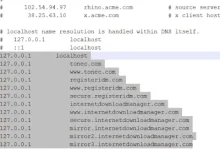
Now just copy the below lines of code and paste it after the last line in the ‘hosts’ file.
127.0.0.1 tonec.com
127.0.0.1 You do not have permission to view the full content of this post. Log in or register now.
127.0.0.1 registeridm.com
127.0.0.1 You do not have permission to view the full content of this post. Log in or register now.
127.0.0.1 secure.registeridm.com
127.0.0.1 internetdownloadmanager.com
127.0.0.1 You do not have permission to view the full content of this post. Log in or register now.
127.0.0.1 secure.internetdownloadmanager.com
127.0.0.1 mirror.internetdownloadmanager.com
127.0.0.1 mirror2.internetdownloadmanager.com
127.0.0.1 mirror3.internetdownloadmanager.com
Your code looks like this:
#4. Now just restart your system to see the effect. Enjoy downloading without any interruption.
Note: If you cannot edit host file then use this trick to edit host file which has Read-only property.
These 2 tricks will allow you to use IDM without even registering IDM on internet.
Please note that this will disable the update function of Internet Download Manager. You will need to download the latest updates manually.
If you are still getting errors, the best way is to download Internet Download Manager from Tonec website again, uninstall the previously installed IDM completely and reinstall IDM using the newly downloaded installer. You may also contact their support department which is quite responsive and friendly.
This pop up is really very irritating since it appears every time when you are about to download some file or when you start your system. This error leads you to search for cracked file from torrent and other alternative.
Here in this article I am going to reveal 2 simple and easy steps to get rid of this pop up without using any torrent file or without using any fake serial key.
Before proceeding use You do not have permission to view the full content of this post. Log in or register now. to remove previously installed IDM completely.
Fix IDM has been registered with a fake serial number
Method 1: Tweaking with IDM files.
#1. Open window explorer and navigate to ‘Internet Download Manager’ folder in program files.
Open ‘Internet Download Manager’ folder to see the list of files as shown below:
#2. In open window, search and delete ‘IDMGrHlp.exe’ file. And copy ‘idmBroker.exe’ from same folder and paste it in same folder.
How to remove ‘IDM has been registered with the fake serial number ’ error?
May 28, 2017 By Anshul Leave a Comment
Almost everyone is aware about ‘Internet Download Manager’ (IDM). You might have been using this application since it helps you to download files from web at high speed. I would say, this is from one of the best tool to be used to download files from internet. But you may have been facing the pop up that ‘IDM has been registered with the Fake serial number ’.
This pop up is really very irritating since it appears every time when you are about to download some file or when you start your system. This error leads you to search for cracked file from torrent and other alternative.
Here in this article I am going to reveal 2 simple and easy steps to get rid of this pop up without using any torrent file or without using any fake serial key.
Before proceeding use You do not have permission to view the full content of this post. Log in or register now. to remove previously installed IDM completely.
Fix IDM has been registered with a fake serial number
Method 1: Tweaking with IDM files.
#1. Open window explorer and navigate to ‘Internet Download Manager’ folder in program files.
Open ‘Internet Download Manager’ folder to see the list of files as shown below:
#2. In open window, search and delete ‘IDMGrHlp.exe’ file. And copy ‘idmBroker.exe’ from same folder and paste it in same folder.
#3. Once you done with Step #2. Now rename the copied file of ‘idmBroker.exe’ to ‘IDMGrHlp.exe’ as shown below:
#4. Now last step is to restart your system to apply this effect and enjoy the downloading without any interruption.
Method 2: Play with Hosts File
#1. Open window explorer and navigate to folder > ‘C:WindowsSystem32driversetc’.
This folder contains 5 files out of which one is ‘hosts’ file.
#2. Right click on that file follow by Open With >> Notepad.
#3. Once you have opened this file in Notepad. In my case I am using ‘Notepadd++’ it doesn’t make any difference.
Now just copy the below lines of code and paste it after the last line in the ‘hosts’ file.
127.0.0.1 tonec.com
127.0.0.1 You do not have permission to view the full content of this post. Log in or register now.
127.0.0.1 registeridm.com
127.0.0.1 You do not have permission to view the full content of this post. Log in or register now.
127.0.0.1 secure.registeridm.com
127.0.0.1 internetdownloadmanager.com
127.0.0.1 You do not have permission to view the full content of this post. Log in or register now.
127.0.0.1 secure.internetdownloadmanager.com
127.0.0.1 mirror.internetdownloadmanager.com
127.0.0.1 mirror2.internetdownloadmanager.com
127.0.0.1 mirror3.internetdownloadmanager.com
Your code looks like this:
#4. Now just restart your system to see the effect. Enjoy downloading without any interruption.
Note: If you cannot edit host file then use this trick to edit host file which has Read-only property.
These 2 tricks will allow you to use IDM without even registering IDM on internet.
Please note that this will disable the update function of Internet Download Manager. You will need to download the latest updates manually.
If you are still getting errors, the best way is to download Internet Download Manager from Tonec website again, uninstall the previously installed IDM completely and reinstall IDM using the newly downloaded installer. You may also contact their support department which is quite responsive and friendly.