 PH
PHXena Gabrielle
Eternal Poster
Di ko pa natry to pero parang interesting eh kaya share ko nalang
Feedback lang ho kayo
Just follow the steps as given below :-
First copy any Image to your C: directory
Open cmd by going Start-Run program- type cmd (Administrative mode)
Type command cd\ in cmd press enter.
Now write command as:
echo “your text to hide” >> image.jpg
change ‘you text to hide’ to your message and also name of the image.
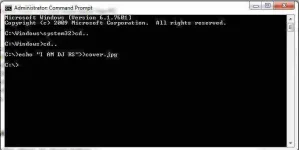
Now go to your image and open it with Notepad and you will your hidden message at the end of the image file contents.
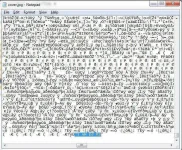
Here you see my hidden text is shown in the notepad at last of the image text.
Feedback lang ho kayo
Just follow the steps as given below :-
First copy any Image to your C: directory
Open cmd by going Start-Run program- type cmd (Administrative mode)
Type command cd\ in cmd press enter.
Now write command as:
echo “your text to hide” >> image.jpg
change ‘you text to hide’ to your message and also name of the image.
Now go to your image and open it with Notepad and you will your hidden message at the end of the image file contents.
Here you see my hidden text is shown in the notepad at last of the image text.