 PH
PHXena Gabrielle
Eternal Poster
To change drive letters.
Just follow the steps as given below :
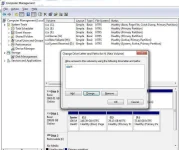
1.Go to Start >Control Panel >Administrative Tools >Computer Management >Disk Management >
Second Method:
You can go directly by typing the command in run: diskmgmt.msc
Then right-click the partition whose name you want to change (click in the white area just below the word “Volume”) and select “change drive letter and paths.”
From here you can add, remove or change drive letters and paths to the partition.

Just follow the steps as given below :
1.Go to Start >Control Panel >Administrative Tools >Computer Management >Disk Management >
Second Method:
You can go directly by typing the command in run: diskmgmt.msc
Then right-click the partition whose name you want to change (click in the white area just below the word “Volume”) and select “change drive letter and paths.”
From here you can add, remove or change drive letters and paths to the partition.