PH
PHHello guys this tutorial, tuturuan ko kayo kung paano niyo maaactivate or mareregister yung filmora without using crack.
Disadvantage kasi ng paggamit ng crack is never nyo na macoconnect sa internet si filmora, but keep in mind na some effects and filters sa filmora kailangan pa din natin idownload. Which is obviously kelangan ng internet.
So eto na ang step by step tutorial.
1. Kelangan muna natin idownload and iinstall ang Wondershare Filmora, just go to this link: You do not have permission to view the full content of this post. Log in or register now. then click niyo yung "Free Download"
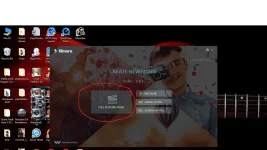
2. After you download it and installed, open Filmora application and choose "Full Feature Mode"

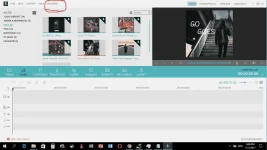
3. Then kapag nasa loob na kayo ng application, click niyo yung register sa taas.

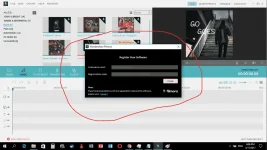
4. Tapos itype niyo to sa register box.
Licensed e-mail: c2943297@drdrb.com
Registration code: FB9694298253B51545E70D22B3033808
Licensed e-mail: c2941647@drdrb.com
Registration code: 10403029CF3644154841651AF141E800
Mamili kayo kung ano lang sa dalawa ang gagamitin niyo.
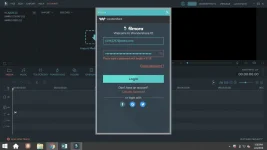
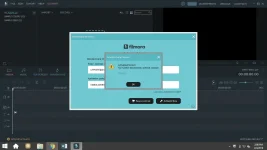
5. Magkakaroon kayo ng error na "the email has been banned" Okay lang yan. Ang gawin niyo ngayon is punta kayo sa task manager if you are windows 10 user please click Details and hanapin ninyo yung "WShelper.exe" right click niyo yon then choose "Open file location"
6. Next is close Filmora, then right-click on WShelper.exe sa task manager then click end process, pagka end process niyo punta kayo sa folder then delete "WShelper.exe"
note: please do it in this order
(Sorry walang SS kasi nagawa ko na to so hindi niyo na makikita yung actual na nagawa ko kapag nag SS ako)
7. Then, open filmora again, and click register tapos ilagay niyo ulit yung Licensed Email and Registration code niyo. After niyo siya malagay magkakaroon kayo ng confirmation na registered na yung filmora niyo
Ganito yung itsura niya kapag registered na

And there you go! Sana nakatulong ako sa inyo po! If you have questions feel free to comment and rereplyan ko kayo ASAP. Thank you and enjoy video editing!!!!
Credits to: youtube, nakalimutan ko kung kaninong channel hahaha I will edit this kapag naalala ko kung saang channel.
Disadvantage kasi ng paggamit ng crack is never nyo na macoconnect sa internet si filmora, but keep in mind na some effects and filters sa filmora kailangan pa din natin idownload. Which is obviously kelangan ng internet.
So eto na ang step by step tutorial.
1. Kelangan muna natin idownload and iinstall ang Wondershare Filmora, just go to this link: You do not have permission to view the full content of this post. Log in or register now. then click niyo yung "Free Download"
2. After you download it and installed, open Filmora application and choose "Full Feature Mode"
3. Then kapag nasa loob na kayo ng application, click niyo yung register sa taas.
4. Tapos itype niyo to sa register box.
Licensed e-mail: c2943297@drdrb.com
Registration code: FB9694298253B51545E70D22B3033808
Licensed e-mail: c2941647@drdrb.com
Registration code: 10403029CF3644154841651AF141E800
Mamili kayo kung ano lang sa dalawa ang gagamitin niyo.
5. Magkakaroon kayo ng error na "the email has been banned" Okay lang yan. Ang gawin niyo ngayon is punta kayo sa task manager if you are windows 10 user please click Details and hanapin ninyo yung "WShelper.exe" right click niyo yon then choose "Open file location"
6. Next is close Filmora, then right-click on WShelper.exe sa task manager then click end process, pagka end process niyo punta kayo sa folder then delete "WShelper.exe"
note: please do it in this order
(Sorry walang SS kasi nagawa ko na to so hindi niyo na makikita yung actual na nagawa ko kapag nag SS ako)
7. Then, open filmora again, and click register tapos ilagay niyo ulit yung Licensed Email and Registration code niyo. After niyo siya malagay magkakaroon kayo ng confirmation na registered na yung filmora niyo
Ganito yung itsura niya kapag registered na
And there you go! Sana nakatulong ako sa inyo po! If you have questions feel free to comment and rereplyan ko kayo ASAP. Thank you and enjoy video editing!!!!
Credits to: youtube, nakalimutan ko kung kaninong channel hahaha I will edit this kapag naalala ko kung saang channel.
 thanks a lot!