 PH
PHXena Gabrielle
Eternal Poster
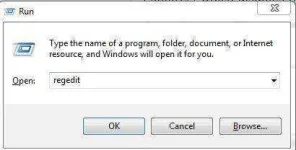
Go to Start > Run > type ” regedit “.
Once in regedit go to
[HKEY_CURRENT_USER\Software\Microsoft\Windows\CurrentVersion\Policies\ Explorer] which disables right click for only the current user or
[HKEY_LOCAL_MACHINE\Software\Microsoft\Windows\CurrentVersion\Policies\ Explorer] which disables the right click for all users.
Now either modify or create a new DWORD value named NoViewContextMenu and set the value data to 1.
Now, exit the registry, and restart your computer for the change to take effect.
SECOND METHOD:
Steps to resolve:
1. Go to Start >Run >Type “gpedit.msc” click OK.
2. Get to this location: User Configuration –> Administrative templates –> Windows Components –> Windows Explorer
3. In the right pane double click on : Remove Windows Explorer’s default context menu.
4. Select Disable and click OK.
...you're responsible ok? I'm just giving the tips and whatnot
Once in regedit go to
[HKEY_CURRENT_USER\Software\Microsoft\Windows\CurrentVersion\Policies\ Explorer] which disables right click for only the current user or
[HKEY_LOCAL_MACHINE\Software\Microsoft\Windows\CurrentVersion\Policies\ Explorer] which disables the right click for all users.
Now either modify or create a new DWORD value named NoViewContextMenu and set the value data to 1.
Now, exit the registry, and restart your computer for the change to take effect.
SECOND METHOD:
Steps to resolve:
1. Go to Start >Run >Type “gpedit.msc” click OK.
2. Get to this location: User Configuration –> Administrative templates –> Windows Components –> Windows Explorer
3. In the right pane double click on : Remove Windows Explorer’s default context menu.
4. Select Disable and click OK.
...you're responsible ok? I'm just giving the tips and whatnot